CONTENTS
The carton should contain:
1 x Personal CD player
1 x Headphones
1 x Operating manual
If any items are missing or damaged, contact your
nearest Argos store for a replacement. Have your
receipt ready when you call. Retain the packaging.
If you dispose of it, do so having regards to any
recycling regulations in your area.
BAT TERY INSTALLATION
1. Slide off the battery cover as shown by the 2
arrows in the diagram (it is hinged so it will not
remove completely).
2. Insert 2 x AA batteries as shown. Take care to
match the + & - polarity markings.
3. Replace the battery cover.
DISPLAY & CONTROLS
1. Volume control
2. LCD display
3. Headphone socket
4. Open door lock
5. FF
button
6. REW
button
7. STOP button
8. PLAY/PAUSE
button
IMPORTANT SAFETY INFORMATION
Read these instructions. Do not use this apparatus near water.
Keep these instructions. Clean only with a slightly damp cloth.
Heed all warnings Do no block and ventilation openings.
Follow all instructions.
Install in accordance with the manufacturer’s instructions.
Do not install or operate near any heat sources such as radiators, stoves or other apparatus that
produce heat.
Unplug this apparatus during lightning storms or when unused for long periods of time.
Refer all servicing to qualied service personnel. Servicing is required when the apparatus has been
damaged in any way, such as the power supply cord or plug is damaged, liquid has been spilled or
objects have fallen into the apparatus, the apparatus has been exposed to rain or moisture, does not
operate normally or has been dropped.
WARNING: To reduce the risk of re or electric shock, do not expose this product to rain or moisture.
The product must not be exposed to dripping and splashing and no object lled with liquids such as a
vase of owers should be placed on the product.
No naked ame sources such as candles should be placed on the product.
CAUTION: Changes or modications not expressly approved by the manufacturers could void the
user’s authority to operate this device.
CAUTION: Usage of controls or adjustments or per for mance of procedures other than those specied
herein may result in hazardous exposure.
CAUTION: DO NOT RE MOVE COV ER (OR BACK)
This symbol indicate s that there are
important operating and maintenance
instructions in the literature accompanying
this unit.
SAFETY INFORMATION CONTINUED
IMPORTANT: This equipment generates, uses and can radiate radio frequency energy and, if
not installed and used in acc ordance with the instructions, may c ause harmful inter ference to
radio c ommunication. However, this is no guarantee that interference will not occur in a particular
installation. If this equipment does cause harmful inter ference to radio or television reception, which
can be determined by turning the equipment off and on, the user is encouraged to try to correct the
inter ference by one of the following measures:
• Reorient or relocate the receiving antenna
• Increase the separation between the equipment and receiver
• Consult the dealer or an experienced radio/ TV technician for help.
CAUTION CLASS 1 LASER PRODUCT
Use of contents or adjustments of performance of procedures other than those specied Herein
may result in hazardous radiat ion exposure.
LASER SAFET Y
This unit employs a laser, only qualied service personnel should attempt repair.
DANGER: Invisible laser radiation when open and interlock failed or defeated avoid direct exposure to beam.
CAUTION: hazardous laser radiation when open and intelock defeated.
1
3
4
5
6
7
8
2
CD OPERATION
Getting Started
1. Press the Open Door Lock (4) to open the lid.
2. Insert a CD, ensure the label is facing upwards. Close the lid.
3. Press the PLAY/ PAUSE button to power up the unit.
4. The display will show “ “ briey while the unit reads the disc.
5. If a disc is not detected the display will show “dISC”.
NOTE: If a disc is not readable then “Er” will be shown instead.
6. After a shor t period the display will show the last track number and the total play time
length of the entire CD.
7. The unit will then proceed to play the CD, starting from track 01.
THIS CD PLAYER
DOES NOT HAVE A JOG PROOF
FUNCTION - SO THE MUSIC MAY SKIP IF
THE PLAYER IS KNOCKED OR MOVED
: THIS IS NOT A FAULT
Personal CD player
Instruction manual
CCD431

 Need help?
 General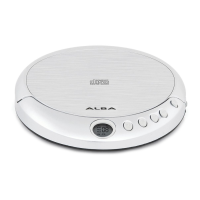

 To Next Page