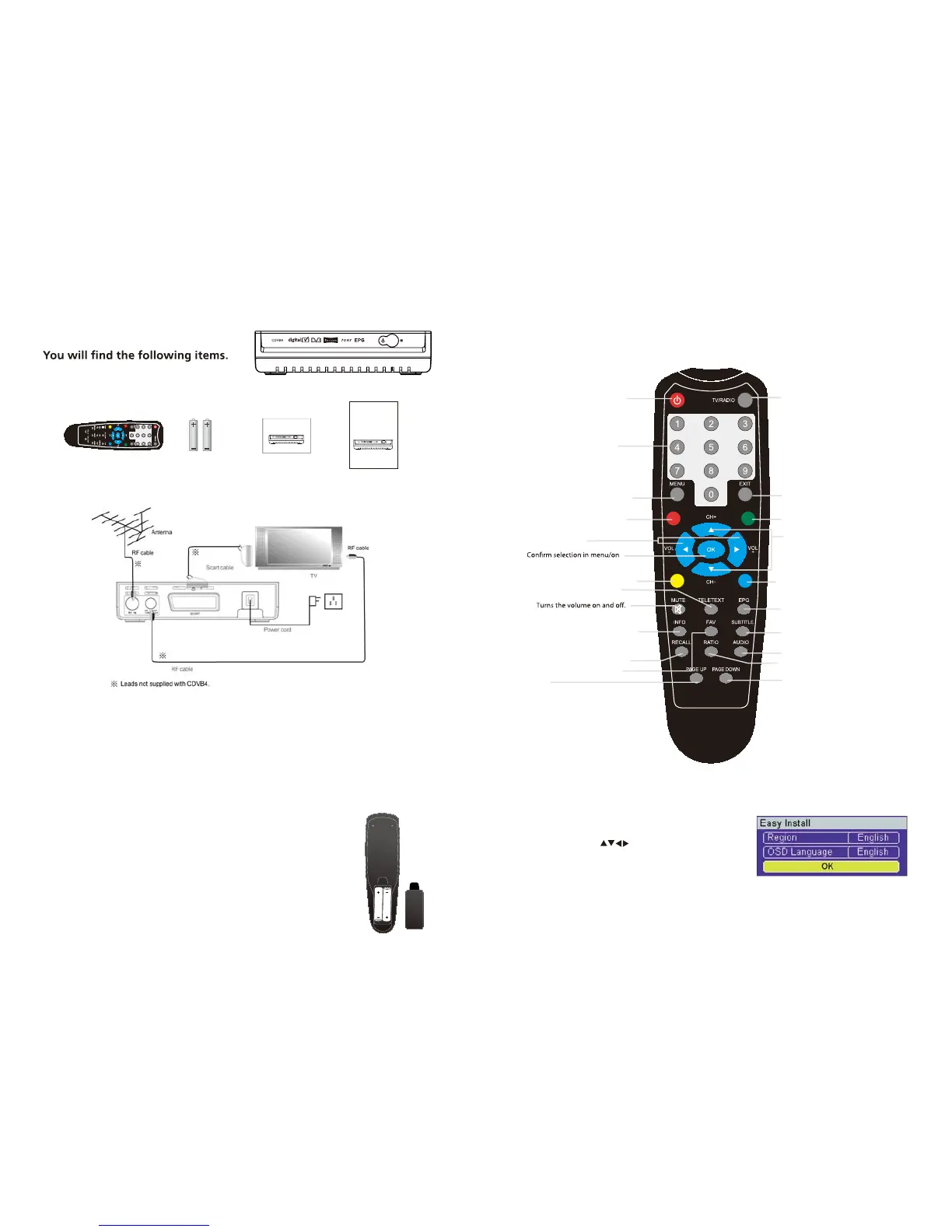
1. In the box
1 x CDVB4 1 x Remote Control
1 x User Guide 1 x Quick Start Guide
2 x AAA Batteries
2. Connecting to a TV with a Scart socket
1. Make sure your TV and any other equipment you are connecting is switched o .
2. Take the aerial out of your TV and connect it to the ‘ANT’ socket on the back panel of
the CDVB4 digital receiver
3. Connect a SCART cable (not supplied) between the TV SCART socket on the back
panel of the CDVB4 receiver and the SCART socket on your TV.
5. Switch on the CDVB4 receiver at the wall socket. The green lig
ht on the front panel
will come light.
6. Switch on your TV.
3. Putting batteries in the remote control
1. Open the remote-control battery cover on the back of the
remote control.
2. Put the batteries in (included with your receiver’s remote control)
as shown on the diagram to the right.
3. Put the battery cover back on.
CDVB4 Main Unit
PSTANDBY ower On/Standby.
MENU Opens the menu so that
you can change the settings of your
Digital Box.
NUMBER PAD Enter values and
select the channel directly by
entering its number.
VOLUME UP/DOWN
TV/RADIO To go in Radio
mode or in TV mode.
SUBT To enable or disable the
subtitles (DVB).
EPG Display the EPG
Electronic Program Guide.
EXIT Allows you to go back one step in
the menus.
MUTE
OK
screen displays.
CHANNEL UP/DOWN
FAV To access to the favorite list.
INFO Press once to display information
about the current programme. Press
twice to display technical information
about the current programme and
signal.
4. Using the remote control
5. First-time installation
User Guide Quick Start Guide
Remote Control AAA Batteries
1. When the Set Top Box is switched on for the rst time,
a "Welcome Page" will be displayed.
2. Use the arrow keys to select the "Region" and
"OSD Language".
3. Move highlight to "Search" button and press "OK" to
begin the channel scan.
GREEN BUTTON
PAGE UP
PAGE DOWN
RATIO
RED BUTTON
For teletext funtion
For teletext funtion
YELLOW BUTTON For teletext funtion
BLUE BUTTON For teletext funtion
TELETEXT Open teletext funtion
RECALL Switch to previous channel
AUDIO Select audio:left/right/stereo/mono
Aspect ratio
Quick Start Guide
Digital Set Top Box
CDVB4
Scart set-top box
CDVB4
Instruction Manual
4. Connect a RF cable (not supplied) between the RF LOOP socket on the back
panel of the CDVB4 receiver and the RF IN socket on your TV.



 To Next Page
 Loading...
