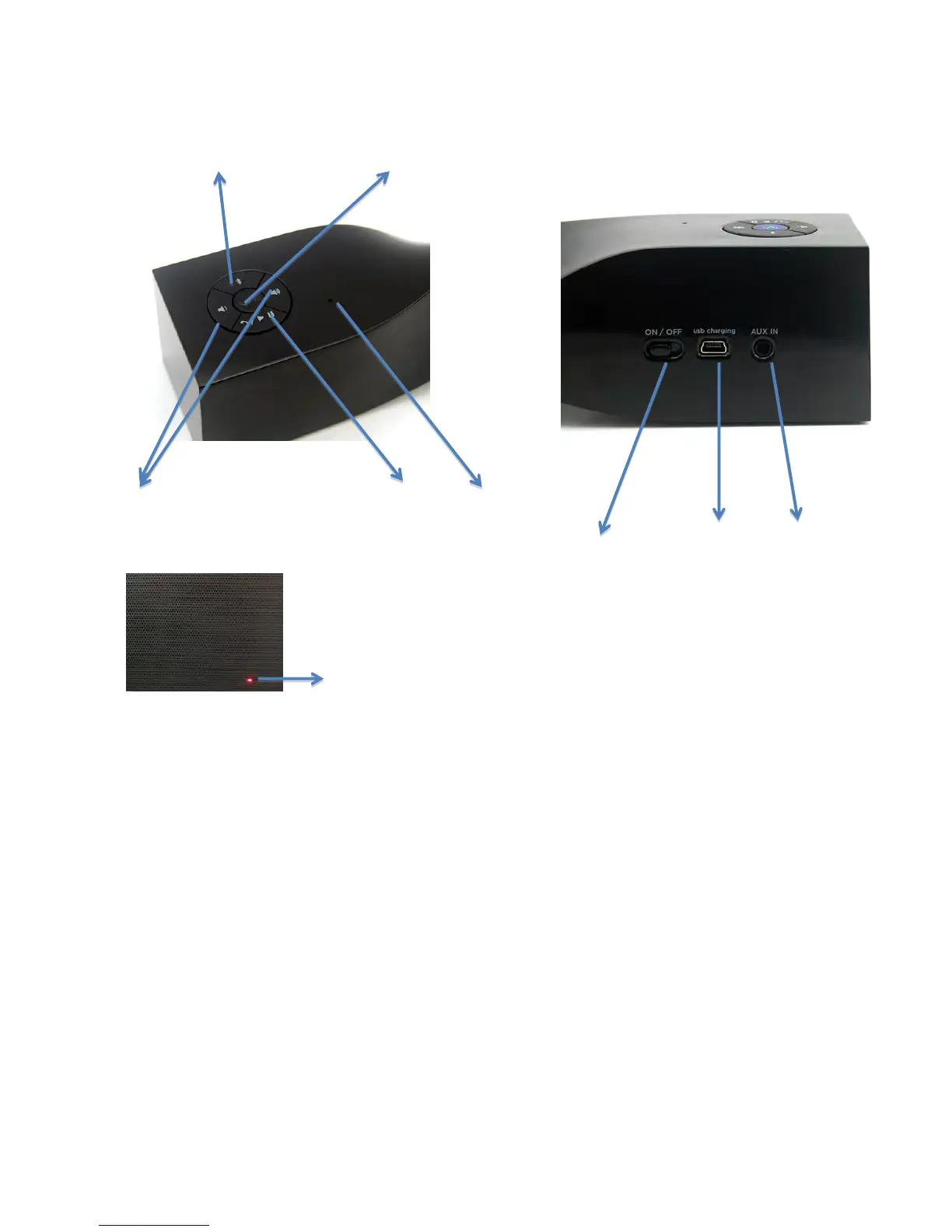
Layout of operating buttons/connectors
Bluetooth Connecting button | Power/Mode – with Pairing LED indicator built-in
Volume +/- | Answer-phone-call/Play/Pause | Microphone
ON/OFF sliding switch | mini USB charging port | AUX-
in
LED charging indicator
OFF – fully charged
RED – charging
Blink – lower battery power
Charging the MAX-twist (3.7V rechargeable battery built-in)
1- Turn off MAX-twist before charging
2- Connect MAX-twist using the supplied USB cable to a power source such as PC or USB
charging devices (not included)
3- Red indicator light is ON during charging, turns OFF after fully charged.
4- Red indicator blinks to remind low battery power, it is time for charging.
Switch ON/OFF the MAX-twist
1- After fully charged, turn ON/OFF sliding switch (on back side of the unit) to “ON”
2- Switch-on: Long press Power/Mode button until Red LED appears, then release it, red &
blue LED blinks quickly, MAX-twist is in standby-mode for pairing.
3- Switch-off: again Long press Power/Mode button until RED LED appears, then release it,
red LED disappears after switch-off.
How Pairing LED indicator (below Power/Mode button) works
1- OFF: Power off
2- Blue/Red blinks quickly: in pairing mode
3- Solid Blue: power on with Bluetooth Mode (successfully paired via Bluetooth)
4- Solid Green: power on with AUX-in mode



 To Next Page