
 Need help?
Do you have a question about the Alcate GO FLIP 3 and is the answer not in the manual?
Using a mobile phone while driving is a risk. Always obey traffic laws and regulations.
Switch off phone periodically, before aircraft, in health facilities, near flammable liquids, and maintain distance from medical devices.
Website, Facebook, Twitter, Instagram links, hotline, and address for support and information.
Path to access regulatory information, FCC ID, and other labeling details on the device.
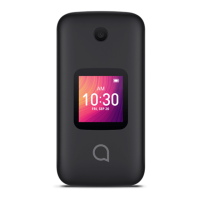
The Alcatel GO FLIP 3 (model 40520) is a mobile phone designed for general communication and basic internet access, prioritizing safety, ease of use, and durability. It functions as a radio transmitter and receiver, operating on GSM, UMTS, and LTE networks, and is equipped with Bluetooth and Wi-Fi capabilities. The device is designed to meet national SAR limits and includes features to ensure user safety and environmental responsibility.
The Alcatel GO FLIP 3 serves as a primary communication tool, allowing users to make and receive calls, send and receive messages (including MMS), and access the internet. Its flip design offers a compact form factor when closed and a traditional phone experience when open. The device supports various wireless technologies, including Bluetooth for connecting to accessories and Wi-Fi for internet access, and can function as a hotspot where available. It also includes a built-in antenna for optimal operation. The phone is designed to be hearing aid compatible (HAC rating M4/T4), assisting users with hearing devices. For emergency situations, the device can be used to dial emergency call numbers, though users are advised not to rely solely on the phone for such calls due to potential network limitations. The phone's software can be updated over the air (FOTA) to ensure optimal performance and security.
The phone is designed with user safety and convenience in mind. When making calls, users are advised to pick up the call before holding the phone to their ear and to move the handset away from their ear when using hands-free mode to prevent hearing impairment from amplified volume. For traffic safety, drivers are requested to refrain from using the mobile phone while driving, even with a hands-free kit, and to check local laws and regulations regarding mobile phone use in vehicles. The device emits electromagnetic waves that can interfere with vehicle electronic systems like ABS or airbags, so it should not be placed on the dashboard or within an airbag deployment area. Users should also check with their car dealer or manufacturer to ensure the car's electronic devices are shielded from mobile phone RF energy.
For general use, it is recommended to switch off the phone periodically to optimize performance. The phone should be switched off before boarding an aircraft and when in health care facilities, except in designated areas, to avoid interference with medical equipment. Users should also switch off the phone near gas or flammable liquids and strictly obey all signs and instructions in potentially explosive atmospheres. When the phone is switched on, it should be kept at least 15 cm from medical devices such as pacemakers, hearing aids, or insulin pumps. When using the phone, it should be held against the ear on the opposite side to any medical device.
The operating temperature range for the phone is 0°C (32°F) to 50°C (122°F). At temperatures above 50°C (122°F), the display legibility may be temporarily impaired. The phone may become warm during prolonged calls, gaming, internet surfing, or running complex applications; this is a normal consequence of the CPU handling excessive data, and the phone will return to normal temperatures after these actions cease.
The device also incorporates privacy considerations. Users are responsible for protecting their personal data and should not share it with unauthorized devices or third parties. When using Wi-Fi, only trusted networks should be connected, and network security should be employed when using the product as a hotspot. The phone can store personal information on a SIM card, memory card, and built-in memory, and users should remove or clear all personal information before recycling, returning, or giving away the product. Apps should be chosen and updated carefully, and only installed from trusted sources, as some apps can impact performance or access private information.
Proper maintenance and care are essential for the longevity and optimal performance of the Alcatel GO FLIP 3. Users are advised to handle the phone with care, keeping it in a clean and dust-free place. The device should not be exposed to adverse weather or environmental conditions such as moisture, humidity, rain, liquid infiltration, dust, or sea air. The phone should not be dismantled or repaired by the user. Dropping, throwing, or bending the mobile phone should be avoided. If the screen is damaged, cracked, or broken, the phone should not be used to prevent injury. Painting the phone is also not recommended.
Only batteries, battery chargers, and accessories recommended by TCL Communication Ltd. and its affiliates, and compatible with the phone model, should be used. Using other chargers or batteries may cause damage, for which the manufacturer disclaims liability. The battery should not be opened, punctured, disassembled, short-circuited, burned, or disposed of in household garbage, or stored at temperatures above 60°C. Batteries must be disposed of according to locally applicable environmental regulations.
For optimal battery life, users should ensure the battery is fully charged (minimum 3.2 hours). After a partial charge, the battery level indicator may not be exact, so waiting at least 20 minutes after removing the charger is recommended for an accurate indication. To conserve battery, users should switch off the backlight when not needed, extend the email auto-check interval, exit background-running applications when not in use, and deactivate Bluetooth, Wi-Fi, or GPS when not in use.
Regular backups of important information stored on the phone are recommended. If the phone has a removable cover, users should be aware that it may contain substances that could cause an allergic reaction.
In case of issues, troubleshooting steps include restarting the phone, checking battery charge, ensuring proper charging conditions (0°C to 45°C), verifying network coverage, checking SIM card validity and insertion, and confirming subscription status with the service provider. For internet connectivity issues, checking the IMEI number, internet access service availability, and network coverage is advised. For call issues, checking dialed numbers, country and area codes, network connection, subscription status, and airplane mode settings are important. For MMS issues, checking phone memory and MMS parameters with the service provider is recommended. If the SIM card PIN is locked, the PUK code should be obtained from the service provider. For Bluetooth detection, ensuring Bluetooth is turned on and the phone is visible to other users is necessary.
 General
| Operating System | KaiOS |
|---|---|
| RAM | 512 MB |
| Storage | 4 GB |
| Display Size | 2.8 inches |
| Resolution | 240 x 320 pixels |
| Main Camera | 2 MP |
| Front Camera | No |
| Battery | 1350 mAh |
| CPU | Quad-core 1.1 GHz Cortex-A7 |
| SIM | Nano-SIM |
| External Display | 1.44 inches |
| Wi-Fi | 802.11 b/g/n |
| GPS | Yes |
| Audio Jack | 3.5mm |
| Colors | Black |
| Connectivity | 4G LTE |
| Talk Time | Up to 8 hours |
| Bluetooth | 4.2 |
| Chipset | Qualcomm Snapdragon 210 (MSM8909) |

 To Next Page