67 68
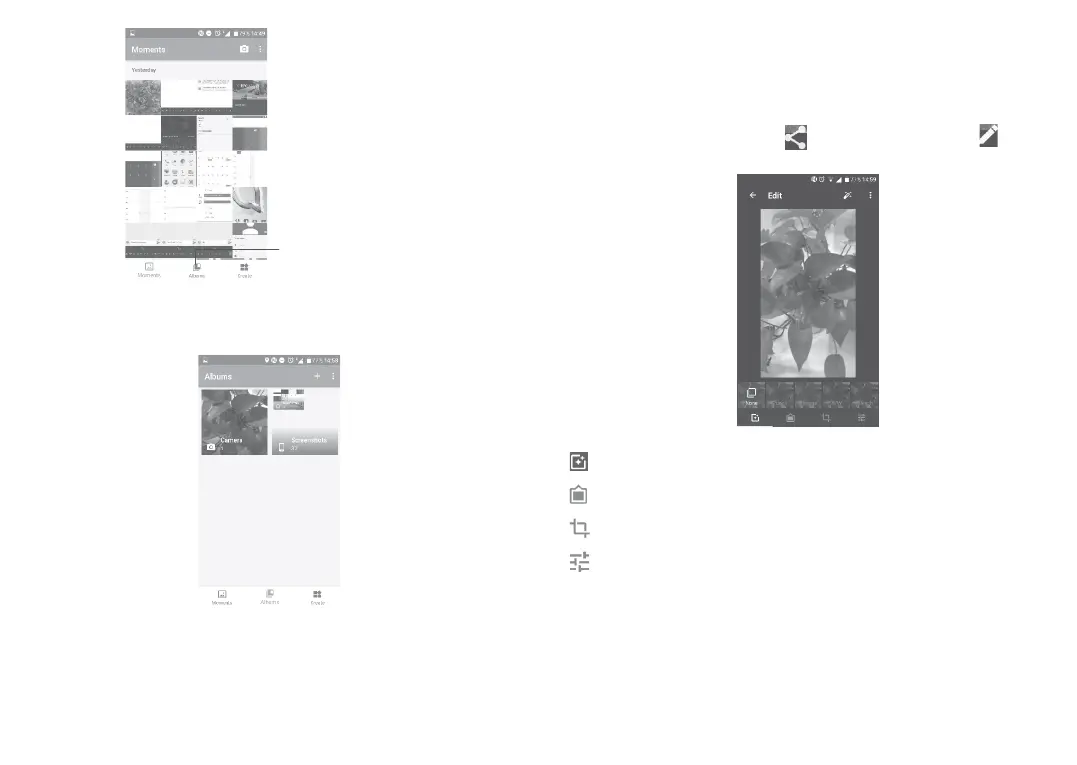
Access your
albums.
To view a picture/play a video
Pictures and videos are displayed by albums in the Gallery.
•Touch an album. All pictures or videos will spread across the screen.
•Touch the picture/video to view or play.
•Slide upwards/downwards to view previous or next pictures/videos.
Working with pictures
You can work with pictures by rotating or cropping them, sharing them
with friends, setting them as a contact photo or wallpaper, etc.
Locate the picture you want to work on, and touch the picture in the
full-screen picture view. Touch to share the picture, or to edit
the picture.
Set effects such as Punch, Vintage, B/W, Bleach, etc.
Add a border.
Crop, Straighten, Rotate, Mirror or Draw the picture.
Adjust the picture colour.
Batch operation
The Gallery provides a multi-select function, so that you can work with
pictures/videos in batches.



 To Next Page