EasyManua.ls Logo

Alcatel A7 XL - User Manual

Alcatel A7 XL
97 pages
Print Icon
To Next Page IconTo Next Page
Loading...
z
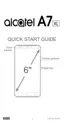
For more information about how to use the phone, please go to www.alcatel-mobile.com and
download the complete user manual. Moreover, on the website, you can also find answers
to frequently asked questions, upgrade the software via Mobile Upgrade, and so much more.

Other manuals for Alcatel A7 XL

Questions and Answers

  • C
    crystal64Sep 23, 2025
    What to do if the phone doesn't ring when a call or message arrives on Alcatel Cell Phone?
    • C
      christine93Sep 23, 2025
      If your Alcatel Cell Phone doesn't ring for calls or messages, make sure that Do Not Disturb mode (Settings > Sound & notification > Do Not Disturb) is not activated. Adjust the volume using the Volume up/down key.
  • H
    Holly SmithAug 25, 2025
    Why does my Alcatel A7 XL Cell Phone battery drain so fast?
    • B
      Brian MortonAug 25, 2025
      Several factors can cause your Alcatel Cell Phone battery to drain quickly. To optimize battery life: * Ensure the phone charges for at least 135 minutes. * After a partial charge, wait 20 minutes after removing the charger for an accurate battery level. * Adjust screen brightness. * Increase the email auto-check interval. * Manually update news/weather or increase their check interval. * Close unused background apps. * Turn off Bluetooth, Wi-Fi, or GPS when not in use.
  • C
    Cynthia Klein DDSAug 25, 2025
    What to do if my Alcatel Cell Phone can't charge properly?
    • S
      stephaniekingAug 26, 2025
      If your Alcatel Cell Phone isn't charging correctly, ensure you're using the charger that came with the phone. If your phone has a removable battery, check that it's properly inserted and making good contact. If the battery is completely discharged, it may take about 20 minutes for the charging indicator to appear. Charging should be carried out under normal conditions (0°C (32°F) to 40°C (104°F)). When abroad, verify voltage input compatibility. Also, inspect the charging port for damage.
  • H
    Helen ThompsonAug 27, 2025
    Why is there an invalid SIM card error on my Alcatel A7 XL Cell Phone?
    • J
      Jennifer BakerAug 27, 2025
      If your Alcatel Cell Phone displays an invalid SIM card error, ensure that the SIM card has been correctly inserted. Also, check that the chip on your SIM card is not damaged and that the service of your SIM card matches the network you’re on.
  • E
    Eric DyerAug 27, 2025
    What to do if my Alcatel Cell Phone can't connect to the internet?
    • C
      Casey GomezAug 27, 2025
      If your Alcatel Cell Phone can't connect to the internet, first ensure that your wireless service plan includes Cellular Data. Check your phone's settings to verify that Cellular Data is enabled or that you're connected to Wi-Fi. Also, make sure you're in an area with network coverage for cellular data or Wi-Fi. If problems persist, try connecting at a later time or from a different location.
  • J
    Jared BraunSep 13, 2025
    What to do if SIM card PIN locked on Alcatel Cell Phone?
    • C
      Carrie PerezSep 14, 2025
      If your SIM card is PIN locked on your Alcatel Cell Phone, contact your network carrier to obtain the PUK (Personal Unblocking Key) code.
  • D
    Derek BerrySep 12, 2025
    What to do if I can't add a contact on my Alcatel A7 XL?
    • M
      Maurice Wilson Jr.Sep 12, 2025
      If you can't add a contact to your Alcatel Cell Phone, ensure that your SIM card contact list is not full. If it is, delete some files or save the files to the phone.
  • L
    Larry SchultzSep 12, 2025
    What to do if the phone becomes warm following prolonged calls, game playing, internet surfing or running other complex applications on Alcatel A7 XL Cell Phone?
    • A
      Anthony SmithSep 12, 2025
      The heating you experience on your Alcatel Cell Phone during prolonged use with calls, games, or internet is a normal consequence of the CPU handling excessive data. Ending these activities will allow your phone to return to its normal temperature.
  • J
    Juan BrownSep 4, 2025
    What to do if I forget some passwords/codes/keys on my Alcatel Cell Phone?
    • K
      Kevin BrownSep 4, 2025
      If you forget passwords, codes, or keys on your Alcatel Cell Phone, perform a Factory data reset.
  • S
    Shane KimSep 2, 2025
    What to do if I can't send and receive MMS on my Alcatel A7 XL?
    • J
      johnsonsamuelSep 2, 2025
      If you're having trouble sending and receiving MMS messages on your Alcatel Cell Phone, first check if your phone memory is full. Contact your network carrier to verify service availability and MMS parameters. Also, confirm the server center number or your MMS profile with your carrier. If the server center is busy, try again later. Starting a new messaging string may also help, as your current string may have reached its limit.

Summary

Safety, Use, and Specifications

Safety and Use Guidelines

Covers essential safety information, traffic rules, privacy, and proper usage.

Radio Waves and Health Precautions

Explains RF exposure, SAR limits, and hearing protection advice.

Device Specifications

Details processor, memory, display, network, and camera specifications.

Getting Started and Navigation

Initial Setup and Phone Operation

Guide for setting up the phone, powering on/off, and inserting SIM/microSD.

Home Screen and Touchscreen Interaction

Explains the home screen layout, icons, and basic touchscreen gestures.

Text Input Methods

Details how to use the onscreen keyboard for typing and text editing.

Core Phone Functionality

Calls, Contacts, and Voicemail Management

Instructions for making, receiving calls, managing contacts, and voicemail.

Messaging and Email Usage

How to send/receive SMS, MMS, and manage Gmail accounts.

Connecting to the Internet

Steps for connecting via mobile data, Wi-Fi, and managing network settings.

Device Settings and Troubleshooting

System Settings and Customization

Explains how to configure wireless networks, display, sound, and other device settings.

Troubleshooting Common Problems

Solutions for issues like phone not switching on, connectivity, and charging problems.

Alcatel A7 XL Specifications

General IconGeneral
Display6.0 inches
Resolution1080 x 1920 pixels
ProcessorOcta-core 1.5 GHz Cortex-A53
ChipsetMediaTek MT6750S
CPUOcta-core 1.5 GHz Cortex-A53
GPUMali-T860MP2
RAM3GB
Internal Storage32 GB
Expandable StoragemicroSD, up to 128 GB
Secondary Camera2 MP
Front Camera5 MP
Battery4000 mAh
Operating SystemAndroid 7.0 (Nougat)
Weight175 g

Related product manuals