Home
Alcatel
Projector
ONE TOUCH V101
Page 5
Alcatel ONE TOUCH V101 - Page 5
95 pages
Manual
Save Page as PDF
To Next Page
To Next Page
To Previous Page
To Previous Page
Loading...
5
d)
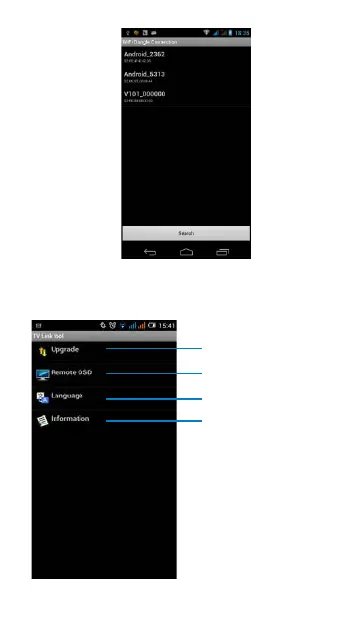
Click “search” icon, seconds later choose
“V101_******” item
to connect with V101, you can
see
the menu UI a
s below
, then
set wireless
network, upgrade, setting V101 and
so on.
T
ouch to upgrade
T
ouch to adjus
t
display scal
e
T
ouch t
o change
language
T
ouch to see
V101’s in
fo
4
6
Table of Contents
Main Page
English
2
Default Chapter
2
Table of Contents
2
1 Your Devide
3
What's in the Box
3
Appearance Illustration
3
Installation
4
2 Quick Start to Mirror
6
3 Upgrade
7
4 Safety and Use
9
Français
19
1 Votre Appareil
20
Contenu
20
Illustration de la Présentation
20
Installation
21
2 Démarrage Rapide du Miroir
23
3 Mise À Niveau
25
4 Précautions D'emploi
27
Deutsch
38
1 Gerät
39
Lieferumfang
39
Tasten und Anschlüsse
39
Installation
40
2 Kurzanleitung zur
43
Display-Übertragung
43
3 Aktualisierung
44
4 Sicherheit und Gebrauch
47
Italiano
57
1 Il Dispositivo
58
Contenuto Della Confezione
58
Figura del Dispositivo
58
Installazione
59
2 Guida Rapida Alla Funzione Mirror
62
3 Aggiornamento
63
4 Precauzioni D'impiego
65
Русский
79
1 Ваше Устройство
80
Комплектация
80
Иллюстрации
80
Установка
81
Отражения
84
3 Обновления
85
4 Меры Безопасности
88
Other manuals for Alcatel ONE TOUCH V101
User Manual
16 pages



 To Next Page