2
Geng started
About the Virtual Reality (VR) Goggles
With your Alcatel VR Goggles, experience virtual reality and
enjoy 2D and 3D content such as games, videos and other VR
applicaons with your Idol 4 smartphone.
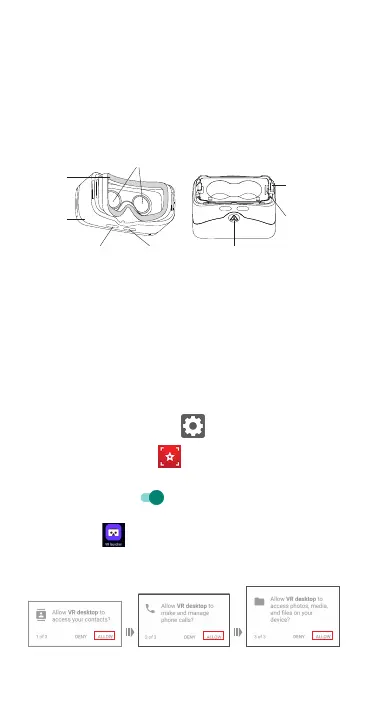
Top cover
“SELECT” buon“BACK” buon
Cushion
Lenses
Phone clip
release
buon
Tension clip
Boom cover release
buon
Note: Buons are touch-sensive and do not need to be pressed.
Using the VR goggles for the rst me
VR set-up
During inial set-up, you must accept permissions prior to placing
the Idol 4 into the VR goggles.
1. Enable Lilstar permissions following the steps below:
• On your device, tap Sengs > Apps.
• Tap Lilstar VR Cinema > permissions.
• Turn on storage permission by moving the switch to the right
unl it turns green.
2. From the Idol 4 Apps menu, select the “VR Launcher”
applicaon.
3. Accept all the necessary permissions by tapping “Allow” for
each the rst me.



 To Next Page