4
2. Make sure your device is powered on and the screen unlocked.
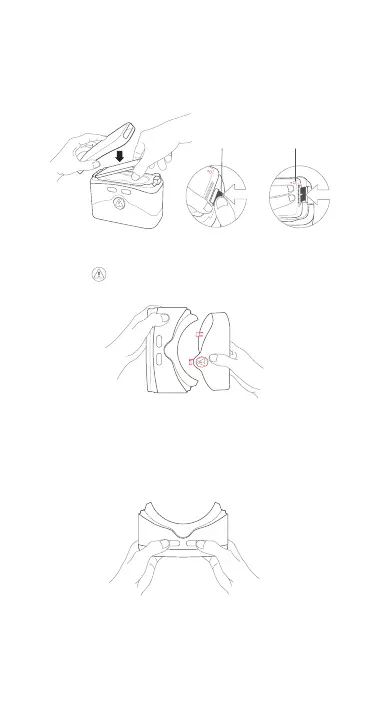
Firmly press down on the clip release buon to pull tension
clip back. Carefully insert the device (Screen facing down with
the camera to the right ) at an angle into the center of the VR
goggles and push down unl tension clip clicks. Place the top
cover back on.
3. Press the buon to remove the boom cover.
4. Hold the VR goggles with two hands. Find the BACK (<) (le)
and SELECT (o) (right) buons on the boom. The buons are
touch-sensive and do not need to be pressed with force. Use
these buons to navigate while in the VR launcher.
Notes:
• Make sure device clicks into place or it may fall out and be
damaged.
• Use a lens cleansing cloth to keep the lenses clean.



 To Next Page