611242 - Digital Multifunction Control
User guide
611242 user guide, R03 2
Operation and use
This multifunction controller with dehumidistat offers multiple modes enabling a
personalized control of your air quality.
Note: your choice of operation mode becomes active 6 seconds after its selection.
1. Manual mode: exchange
If you occasionally want to refresh the air in your house or a room for a certain period, you must select the manual air exchange
mode. This air exchange is continuous. To select this mode, you must proceed as follows:
1. Press the MODE key until the “exchange” symbol appears;
2. Select manual operation by pressing the AUTO/MAN key. The MAN indicator will be displayed;
3. Select the desired speed, “low” or “high”, using the UP-DOWN arrow keys.
2. Manual mode: recirculation
You can select the “manual air recirculation” mode if the air quality in your space is adequate, or if the outdoor humidity too high.
This activates a continuous air recirculation without exchange. To select this mode, you must proceed as follows:
1. Press the MODE key until the “recirculation” symbol appears;
2. Select manual operation by pressing the AUTO/MAN key. The MAN indicator will be displayed;
3. Select the desired speed, “low” or “high”, using the UP-DOWN arrow keys.
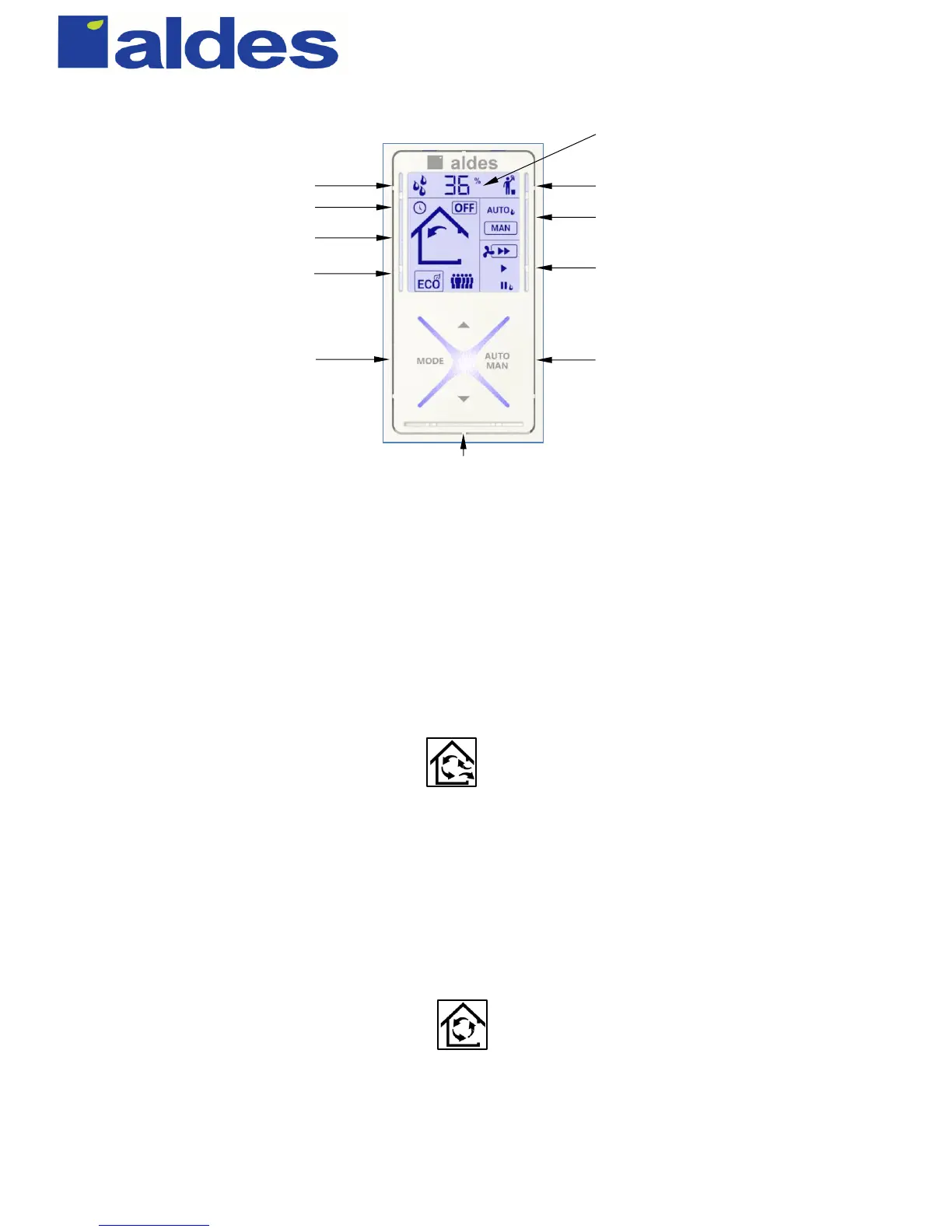
Air exchange system maintenance indicator
Excess humidity indicator
Current value of ambient relative humidity
Humidity setpoint during its adjustment
Timer countdown during timed modes
ECO1 and ECO2 modes indication
ECO and high occupancy modes
The text box shows the mode selected
Display of current ventilation mode:
exchange or recirculation
Automatic/manual operation indicator
The text box shows the operation selected
Fan speed
The text box shows the speed selected
Adjustment of the relative humidity setpoint
Adjustment of the fan speed or duration
Selection of the operating mode
Selection between automatic and manual operation
Unit controlled by an Aldes timer


 To Next Page
 Loading...