Mini food chopper
AFTER SALES SUPPORT
888 775 0202
13
cshelp@cnaii.com
MODEL: KLMC15W PRODUCT CODE: 7307-15 01/2015
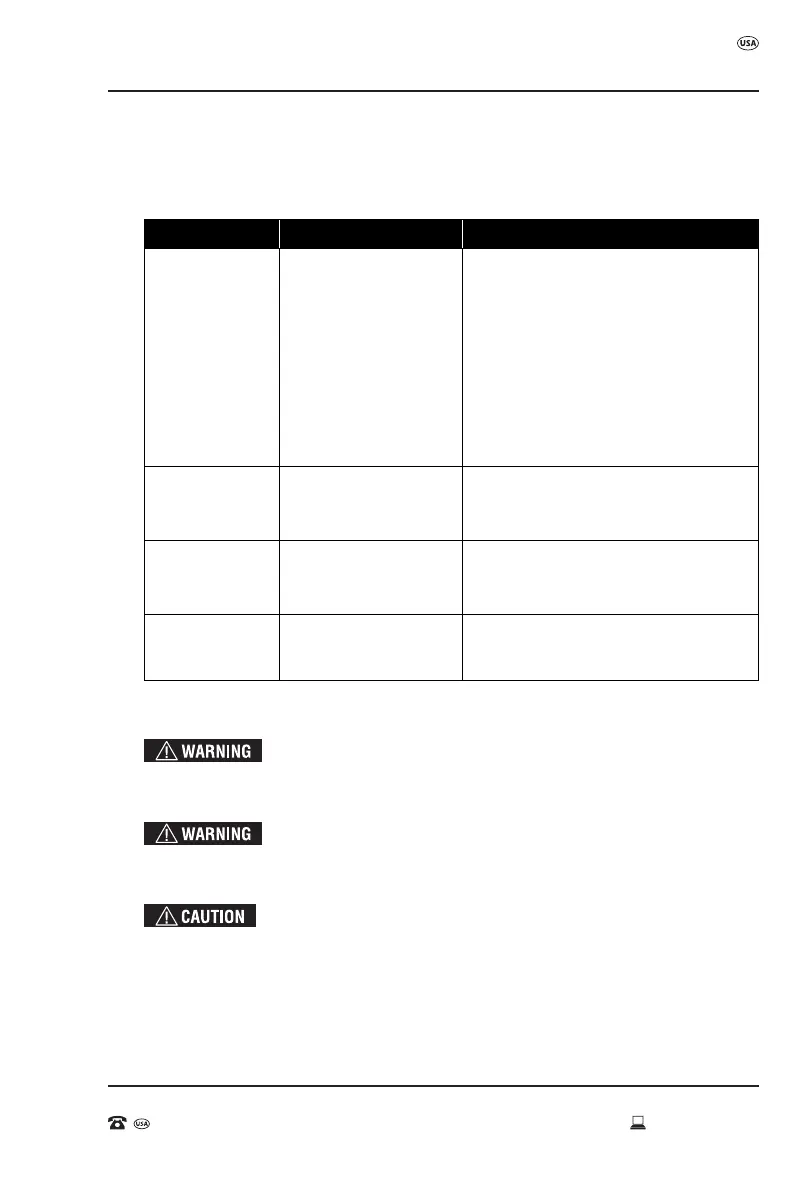
Chapter 5 - FAQ
Problem Possible Causes Solutions
Will not operate
or turn on
- No power
- Bowl and cover are not
properly aligned
- Damages due to
shipping damage or
improper installation
- Check if food chopper is plugged in
- The food chopper will not start if the bowl
and the cover are not properly aligned
and locked into the base unit
- See “Warranty Conditions” on p.15 of
this user manual
* If none of the above work, check the
fuse/circuit breaker in your home
Stops during
operation
- Overloaded
- Cover unlocked
- Remove some food and restart
- Check to see if cover is aligned and locked
Works slowly - Overloaded
- Pieces of food too large
- Remove some food and restart
- Cut food into smaller pieces and restart
Poor performance
of tools
- Blade worn down - See “Warranty Conditions” on p.15 of
this user manual
Troubleshooting
FAQ
Cleaning
To avoid the risk of electric shock, ALWAYS ensure the product is unplugged from the
electrical outlet before assembling, disassembling, relocating, servicing or cleaning.
Allow the chopping blades to completely stop. Handle the blades with care as they are extremely
sharp. Use caution when attaching, detaching, cleaning or storing the blade assembly.
• Make sure the unit is unplugged before cleaning. Allow parts to completely stop before
cleaning the product.
Use caution when attaching or detaching the parts to the Mini Food Chopper. The chopping
blades are extremely sharp. DO NOT use abrasive cleaners or scouring pads to clean any
part of the product. Store the unit in a cool, dry place.



 To Next Page