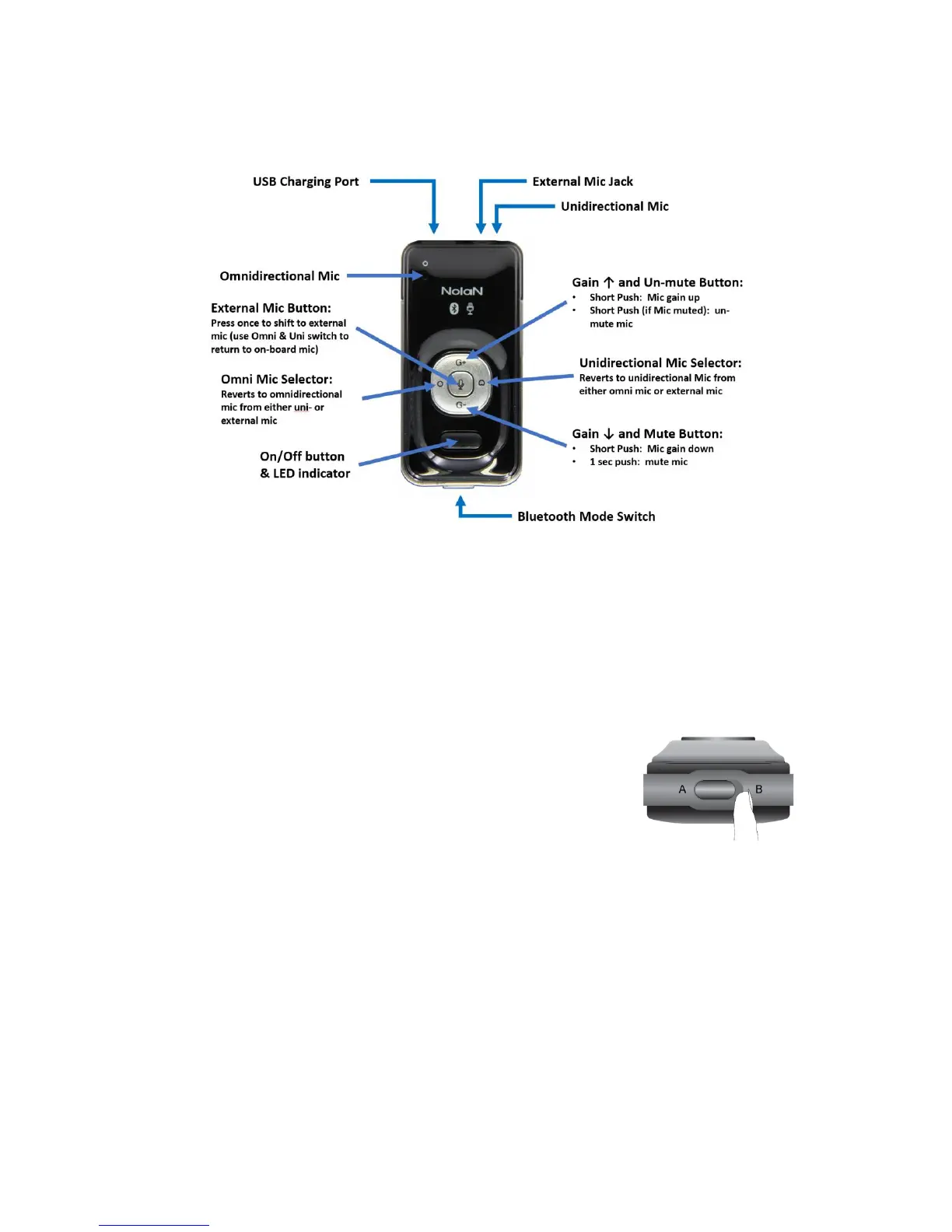
Overview of functions
Use of the on/off button: The power to the mic is controlled as follows:
a. 3 second hold: mic turns on
b. 3 second hold: mic turns off
Pairing with your preferred device
First, you must consider the type of device you plan to connect with and set the sliding switch on the
lower edge of the LiveMIC2 to the appropriate setting:
• Position A: Select this for use with Bluetooth equipped audio
receivers, speakers, PA systems and headsets.
• Position B: Select this for use with iPhones, iPads, Android
devices and other small mobile devices.
Pairing with a Type A Device (Speaker or Audio Receiver)
1. Set the sliding switch on the bottom edge of the LiveMIC2 to position “A”
2. With the LiveMIC2 turned off, press and hold the power button until it begins rapidly flashing
blue. It is now in the Type A device pairing mode.
3. Initiate the pairing functionality on your remote audio receiver or other device
4. When the two devices are paired, the blue LED will change to flash slowly
5. Note: If your device requires that you enter a pin code, you can use any of the following: 0000,
1111, 1234, and 8888.
Pairing with a Type-B Device (Smartphone, personal computer, etc.)


 To Next Page