GB
12
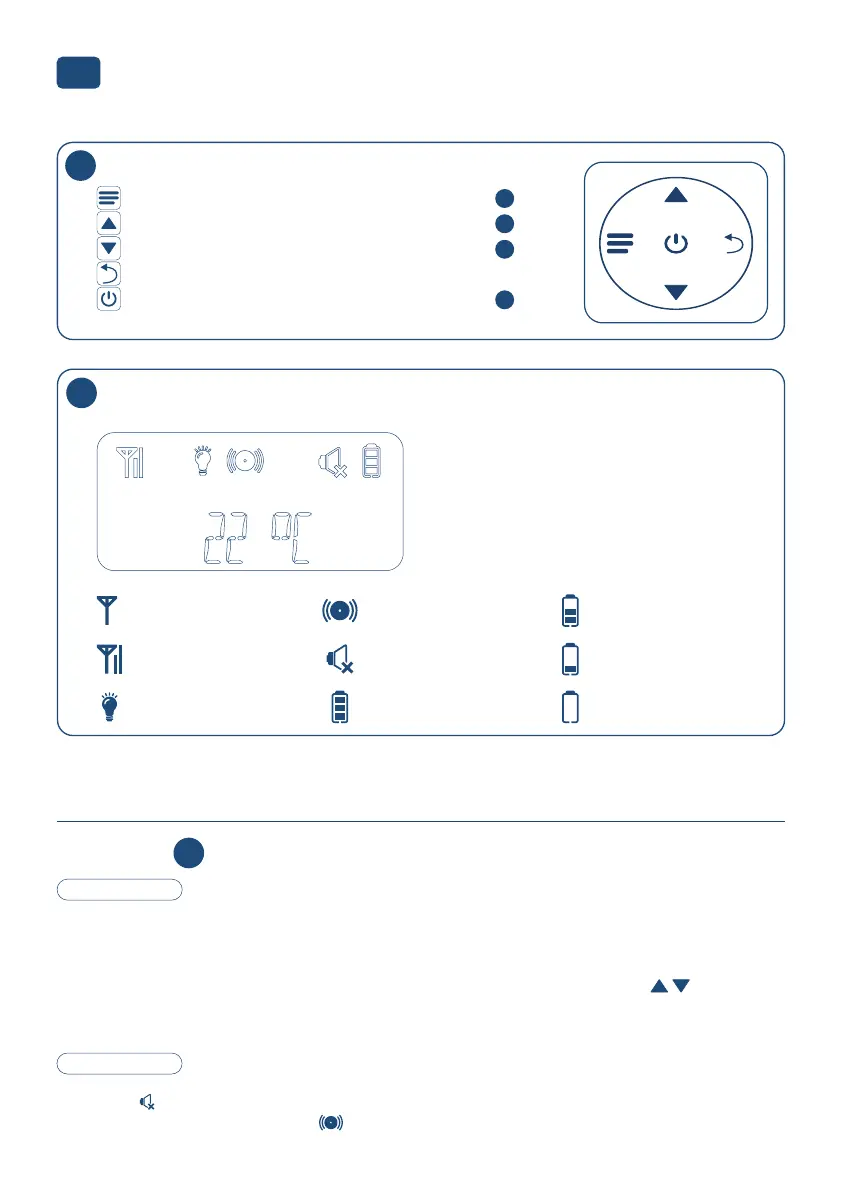
Good connection with
baby unit
No connection with
baby unit
Night light is enabled
on the baby unit
Sound alert is ena-
bled
Sound on the parent
unit is o
Battery fully charged
Battery 2/3 full
Battery 1/3 full
Battery nearly empty
Sensitivity
The Full Eco mode is active when the baby is sleeping and making no sounds.
The baby unit will then switch to standby and the transmitter is turned o, to ensure that there’s no more
transfer between the baby unit and parent unit.
When the baby starts making sounds, the transmitter is enabled again and you’ll be able to hear the baby
through the parent unit. The sensitivity of this function may be set in 4 steps using the buttons:
Step 1 (lowest sensitivity) to step 4 (highest sensitivity).
At step 4 the Full Eco mode is switched o to allow for a continuous connection.
Sound alert
If the baby is making a lot of noise for at least 3 consecutive seconds, and the sound of the parent unit is
set to silent , the light of the display illuminates.
At the same time the sound alert icon starts ashing and the parent unit will emit a tone.
Explanation at
Buttons operation
Parent unit start-up screen
13
14
Menu button / Conrm button (see also )
Up in menu / Volume + (see also )
Down in menu / Volume - (see also )
Return to the previous step in the menu
Parent unit on and o (see also )
Back to the display’s start-up screen
8
15
8
4
15
HI TEMP = Baby unit temperature alert > 30 °C
LO TEMP = Baby unit temperature alert < 10 °C


 To Next Page