29
3
1
2
4
5
6
7
9
8
10
11
12
13
14
15
16
17
18
22
21
20
19
18
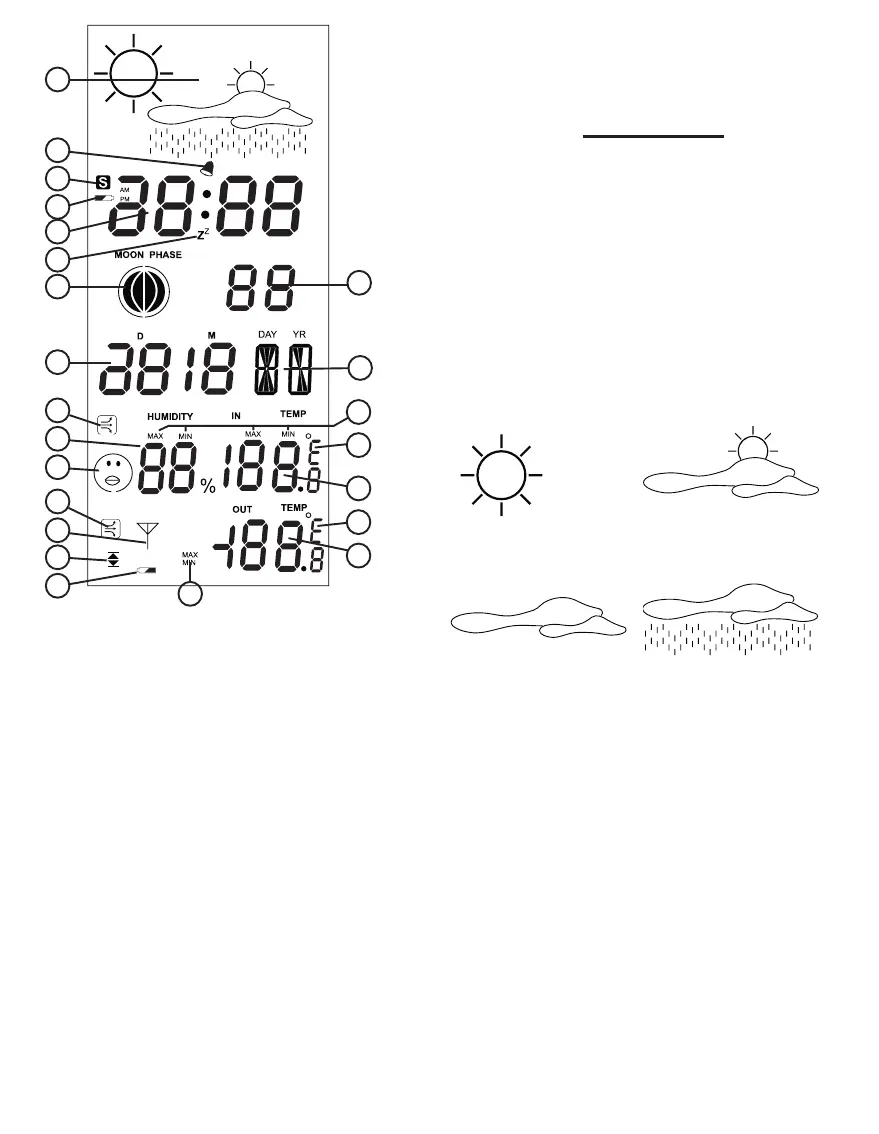
Display overview:
1. weather forecast using dierent icons.
2. alarm clock function on/o.
3. no function
4. indoor unit low battery indication
5. time display
6. snooze function activated
7. moon status indication
8. seconds display
9. date display
10. name of the day display
11. temperature curve icon indoors
12. humidity indoors
13. comfort icon
14. temperature curve outdoors
15. reception icon
16. high and low temperature alert
17. outdoor unit low battery indication
18. minimum or maximum display history
19. outdoor unit temperature
20. display in ºC or ºF
21. temperature indoors
22. display in ºC or ºF
OPERATION
Weather forecast:
The weather forecast is displayed using dif-
ferent icons. This weather forecast is calculat-
ed based on changes in air pressure and this
allows for a forecast reliability of 70 to 75%.
The use of air conditionings or adjustments
of the indoor climate can aect the weather
forecast.
The weather forecast is indicated using 4 icon
combinations:
Sunny Partly cloudy
Cloudy Rainy
Alarm (wake-up):
See Installation for setting up the alarm clock.
Press the “ALARM” button to activate the
alarm. As soon as the alarm sounds, you
can turn it o by pressing a random button.
The alarm function remains activated and will
sound again after 24 hours.



 To Next Page