53
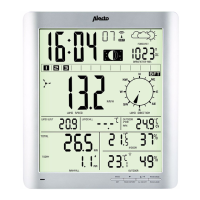
PRESSURE / -
touch repeatedly to see the following in order:
• AVERAGE
12Hr: average air pressure over the
last 12 hours
• AVERAGE
24Hr: average air pressure over the
last 24 hours
• AVERAGE
48Hr: average air pressure over the
last 48 hours
• AVERAGE
72Hr:average air pressure over the
last 72 hours
When no extra specication is shown, the actual
temperature will be displayed.
press and hold the PRESSURE button for 2 sec-
onds to switch between the absolute air pressure
(ABS) and the relative air pressure (REL)
during setup (see paragraph 7.2), this button is also
used for selecting choices and decreasing values
ALARM
when touching this for the rst time, the set values
for the MAX alarm are displayed
when touching this for the second time, the set
values for the MIN alarm are displayed
see paragraph 7.5 for setting the MIN and MAX limits
and for determining how this function must operate
MAX/MIN
touch repeatedly to see the following in order:
• MAX: the highest values measured are displayed
• MIN: the lowest values measured are displayed
while the MAX or MIN value is displayed, press the
TEMP, RAIN or WIND button to see all possible
variations
while the MAX or MIN value is displayed, press and
hold the
PRESSURE
button for 2 seconds to switch
between the absolute air pressure and relative air
pressure
press and hold the MAX/MIN button to reset the dis-
played data of that moment (i.e. all MIN or all MAX
measurements)
see paragraph ‘Basic setup’ (7.2) to automatically
reset the MAX/MIN measurements each day at
midnight
LIGHT/SNOOZE
repeatedly and briey touch this button to set the
display lighting to low, medium or high
to save battery power, the display lighting will auto-
matically return to the ‘low’ setting after 15 seconds
when the unit is being used on battery power only
this button is also used to return to the standard
display from any setting or choice



 To Next Page