Need help?
Do you have a question about the Alemite 3580 Series and is the answer not in the manual?
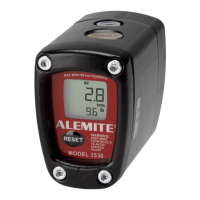
The Alemite 3580 Electronic Preset Meter is a device designed for precise fluid dispensing and measurement, primarily used in professional settings. It offers advanced features for managing fluid systems, including RF communication capabilities for integration with FMS networks.
The 3580 Electronic Preset Meter functions as a fluid dispensing and measurement tool. It can be operated in two primary modes: RF Mode and EPM Mode (Electronic Preset Meter Mode).
In RF Mode, the meter communicates wirelessly with a keypad to receive work orders and transmit dispense results. This allows for automated management of fluid dispensing tasks, including batch quantity, and ensures accurate record-keeping. The meter will automatically attempt to communicate with the RF system if the initial communication fails, resending dispense results multiple times. If communication is unsuccessful, a "History" icon will illuminate, indicating uncommunicated dispense information.
In EPM Mode, the meter operates as a standalone unit for manual fluid dispensing. Users can set a desired batch quantity, and the meter will automatically stop dispensing once that quantity is reached. This mode is useful for situations where RF communication is not required or available. The meter also supports resettable and accumulated totals, allowing users to track both individual dispense quantities and overall fluid usage.
The device incorporates several safety features and warnings to prevent injury and equipment damage. These include warnings about explosion and fire hazards related to improper grounding, poor ventilation, and dispensing flammable fluids. It also provides warnings about meter hazards, emphasizing the importance of proper use, daily equipment checks, and adherence to maximum working pressure levels.
The meter's display provides real-time information, including the dispensed quantity, unit of measure (quarts, pints, gallons, liters), and various icons indicating status such as low battery, communication status, and historical data.
The meter is available in two models:
Meter Installation: The installation process involves relieving system pressure, grounding all system components (pump, air and fluid hoses, air compressor, fluid supply container), and flushing the system to remove contaminants. The meter can be attached to a hose (Model 3580-B) or a nozzle (Model 3580-A) using thread sealant (Loctite® 243™ recommended) to ensure secure and leak-free connections. After installation, the system should be pressurized, and air purged from the fluid lines for accurate dispensing.
Meter Operation (RF Mode): To operate in RF Mode, the meter must be installed and connected to an FMS network. The user presses and holds the "10" key to release the "RESET" button, which then allows the meter to communicate with the keypad. The display will show the batch quantity, and the user can pull the trigger to begin fluid flow. The solenoid valve automatically locks when the batch quantity is reached or if the trigger is released. The meter will then send the dispense result to the keypad.
Meter Operation (EPM Mode): In EPM Mode, the meter can be set for startup purposes by entering a specific key sequence. The "AUTO" button is used to toggle between Manual Mode and Batch Mode. In Manual Mode, the user presses the "AUTO" button to begin flow, and the display shows the amount dispensed. In Batch Mode, the user can change the batch size using the "10," "1," and "0.1" buttons to set the desired quantity. The meter will automatically stop dispensing once the batch size is reached.
Operating Mode Functions: The meter offers resettable and accumulated totals. Pressing and holding the "TOTAL" button displays the accumulated total. Holding the "TOTAL" button for three seconds resets the resettable total. The "RESET" button is used to return to the operating display.
Changing Factory Settings: Users can verify the firmware version by holding the "TOTAL" and "1" buttons. The programming feature allows changes to the unit of measure (pint, quart, gallon, liter) and the scale factor. A PIN is required to access these settings. The scale factor, which adjusts the meter's accuracy, can be changed by entering a specific value. The meter also allows for enabling or disabling EPM (Manual) Mode and configuring network program settings.
Error Codes: The meter displays various error codes (e.g., F01, F02, F03, F08, F09, SF0) to indicate communication issues, configuration problems, or other malfunctions. Most errors can be cleared by pressing the "RESET" button.
Low Battery Indicators: The meter provides visual warnings for low battery status. A low battery icon appears in the lower left corner of the display. If the battery power is too low, the meter functions are disabled, and the battery icon flashes.
Changing the Batteries: To change the batteries, the unit face is removed by unscrewing two screws. The battery door is then exposed, allowing replacement of the old batteries with four new AA alkaline batteries. It is crucial to observe battery polarity markings and dispose of used batteries properly according to local regulations. The manual explicitly states that changing the batteries does not affect any of the programmed values or totals.
Troubleshooting: The manual includes a troubleshooting section that lists common symptoms, possible causes, and remedies. For example, if the battery icon is displayed or the display is blank, the possible causes are low batteries, a sleeping meter, or a loose battery connection. Remedies include replacing batteries, pressing the "RESET" button, or checking the battery pack connection. Other issues addressed include the meter not latching for batching, slow or no fluid flow, and inaccurate meter readings, with corresponding solutions such as checking filters, pump pressure, and scale factor settings.
Cleaning and Servicing: The manual emphasizes the importance of checking equipment daily and repairing or replacing worn or damaged parts immediately. It also advises cleaning or installing nozzles as part of maintenance procedures.
The Alemite 3580 Electronic Preset Meter is a robust and versatile tool designed for accurate and efficient fluid dispensing in various professional applications, with a strong emphasis on safety and user-friendly operation and maintenance.
 General
| Brand | Alemite |
|---|---|
| Model | 3580 Series |
| Category | Measuring Instruments |
| Language | English |


 To Next Page