8
Helping People Live Better
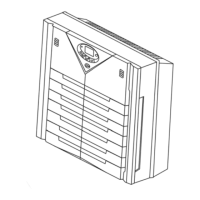
PROGRAMMING THE PARALDA
e Paralda can be programmed to run at certain fan speeds at three pre-set times through-
out the day. is is done in the program mode. When in the Program Mode, one of the
three settings directly below the clock will be illuminated (1, 2, or 3). When in Manual
Mode, the settings are not illuminated and the air purier will operate continuously at the
current fan speed. is is your visual indication for which mode you are using. When rst
turned on the air purier will be in manual mode. To change back to Manual Mode from
Program Mode simply press the unit o and turn back on.
To Program Your Paralda
1. Press and hold PGM key for two seconds to enter the setup mode. e unit will beep
and the clock with then blink. e current time will turn on.
2. Press +/- to change the time.
3. Press the PGM key to accept the current time. e current time turns o and the set-
ting 1 icon turns on. e clock will start blinking.
4. Press +/- to change the time for setting 1.
5. Press the PGM key to accept the time for setting 1.
6. Press the SPEED button to select the fan speed for setting 1. is is the speed you
want the fan to run for the rst preset time of the day.
7. Press the PGM key to accept the fan speed for setting 1.
8. Press +/- to change the time for setting 2.
9. Press the PGM key to accept the time for setting 2.
10. Press the SPEED button to select the fan speed for setting 2. is is the speed you
want the fan to run for the second preset time of the day.
11. Press the PGM key to accept the fan speed for setting 2.
12. Press +/- to change the time for setting 3.
13. Press the PGM key to accept the time for setting 3.


 To Next Page