8
Troubleshooting
The following conditions or problems may occur when using the NycoCard
™
READER II. If your problem still
exists after corrective action is taken, please contact your local distributor.
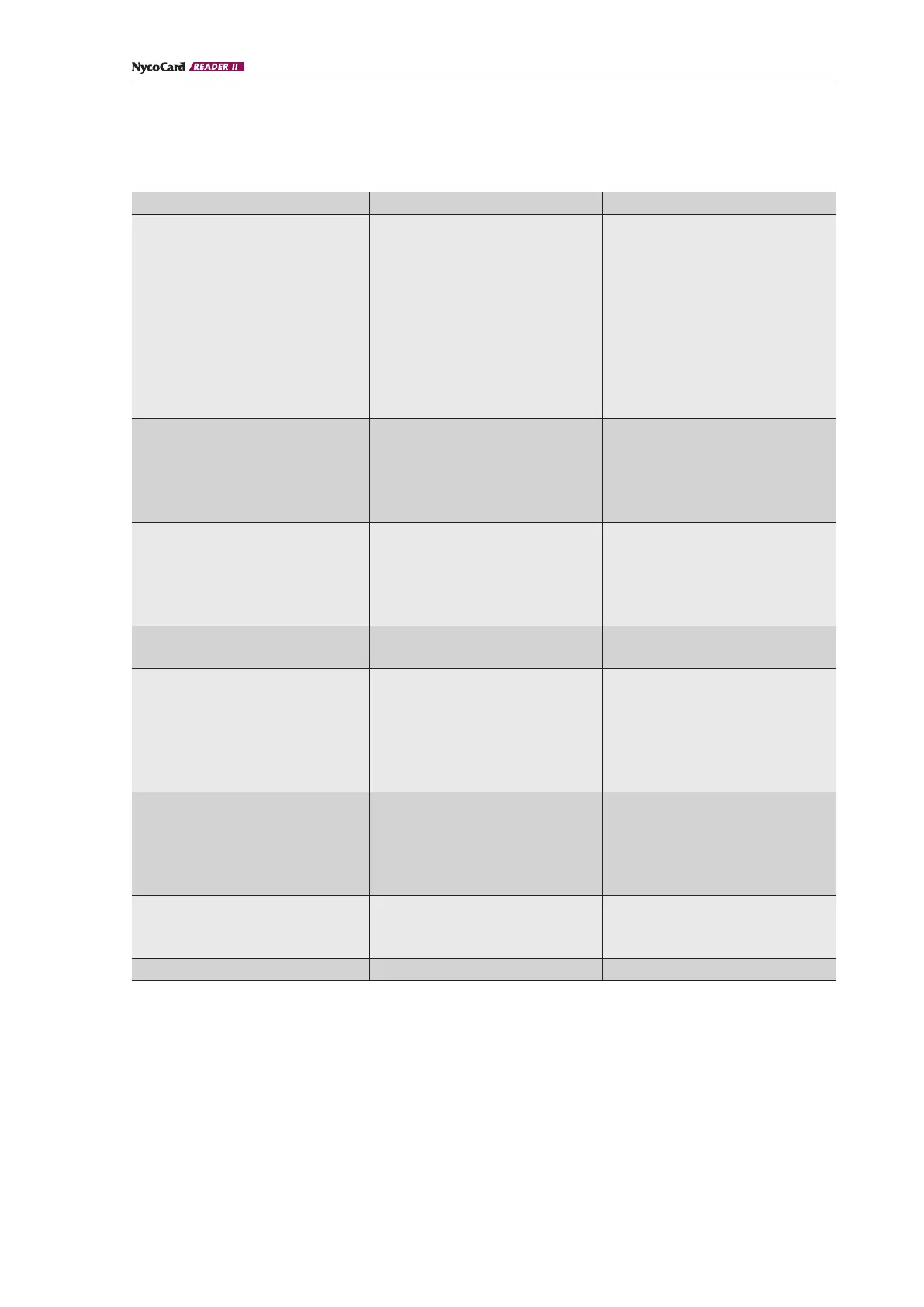
Problem Possible cause Corrective action
“Adjust ERROR”. 1.
Pen tip is dirty or damaged.
2.
Intermittent temperature
changes or condensing
conditions.
1. Replace Pen tip, re-start the
instrument, perform Adjusting
and White calibration.
2. Perform New White in Main
menu Option, re-start the instru-
ment, perform Adjusting and
White calibration.
If “Adjust Error” still appears,
please contact your local
distributor.
“Battery low” appears on the
display.
1. Batteries discharged.
2.
Batteries improperly inserted
into the battery holders.
3.
One of the batteries has short-
circuited and is not recharging.
1.
Recharge the batteries.
2.
Reinsert batteries.
3.
Replace all batteries.
Display screen is blank
or unreadable.
1.
Batteries discharged. (see other
causes under “Battery low”).
2.
Sub-optimal viewing conditions
Light too dim.
1.
Recharge the batteries. Check
polarity and that the batteries
are of the correct type.
2.
Increase light level or change
light position.
Display fades out during
“Adjusting”.
1.
Batteries discharged. 1. Recharge batteries.
“Calibrate white/ ERROR! Recalibr.”
appears on the display.
1.
Calibration device used is dirty,
cratched or not totally white
2.
Ageing of the instrument has
changed the internal white
value.
3.
Pen tip is dirty or damaged.
1.
Replace calibration device and
recalibrate.
2.
Measurement of new white
value.
3.
Replace the pen tip.
Recalibrate.
“Calibrate white Active Wait...”
persists on the display screen.
1.
Pen cable not properly inserted. 1. Check that the pen cable
connector plug is properly
inserted into the receptacle
of the instrument.
Recalibrate.
Program will not proceed from
“Place pen” to “Active. Wait…”.
1.
Room light too strong or unit in
direct sunlight.
1. Reduce light/avoid sunlight on
device. Perform adjusting and
white calibration.
“RAM ERROR” / “Test data error” 1.
Contact your local distributor.


 To Next Page
 Loading...