6
Features
Top Panel
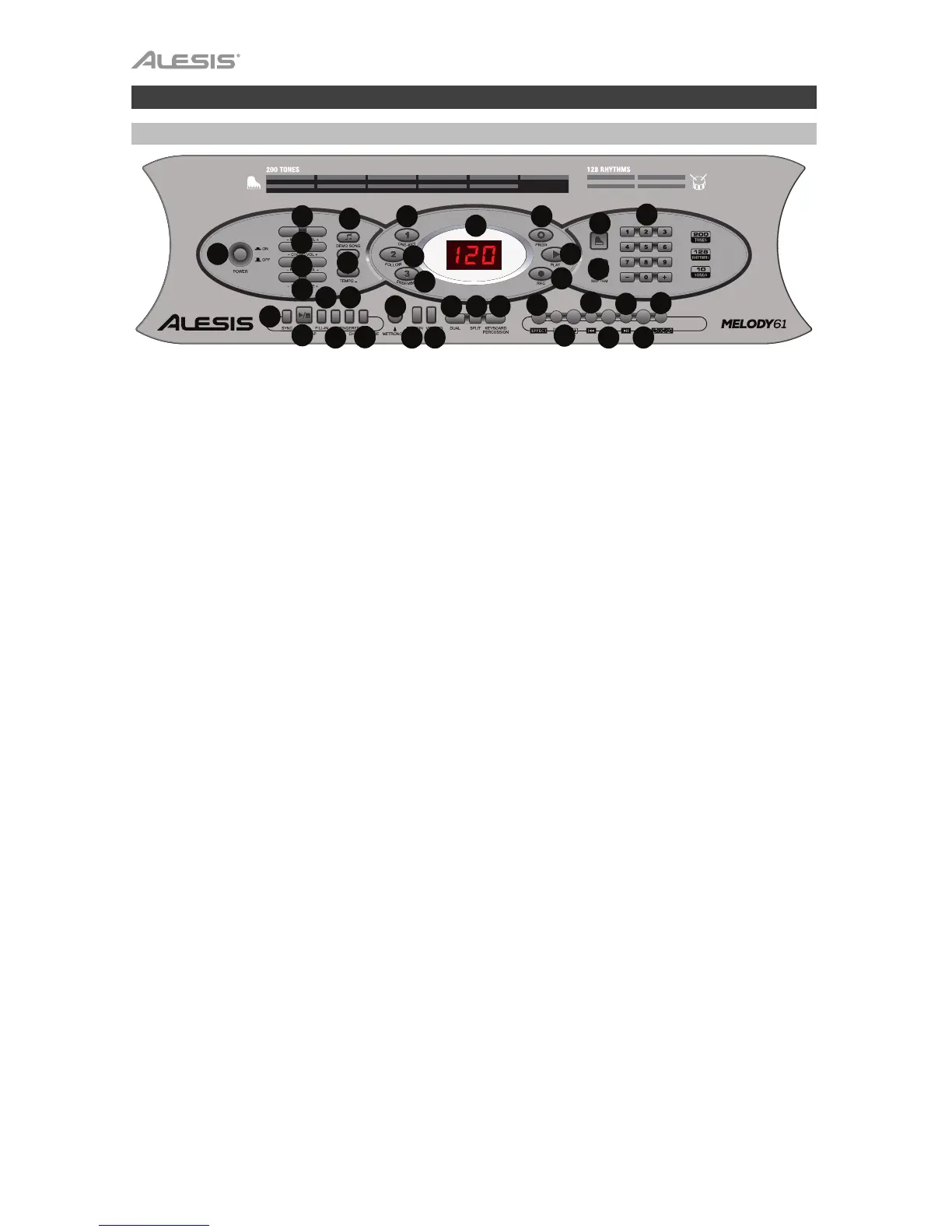
1. Power On/Off: Press this button to turn the keyboard on or off.
2. Transpose: Press the Transpose + or Transpose – button to increase or decrease the
key by a half-step. Press the Transpose + and Transpose – buttons simultaneously to
reset to the default value.
3. Rhythm Volume: Press the Rhythm Vol + or Rhythm Vol – button to increase or
decrease the rhythm volume. Press the Rhythm Vol + and Rhythm Vol – simultaneously
to reset to the default value.
4. Chord Volume: Press the Chord Vol + or Chord Vol – button to increase or decrease the
chord volume. Press the Chord Vol + and Chord Vol – buttons simultaneously to reset to
the default value.
5. Master Volume: Press the Master Vol + or Master Vol – button to increase or decrease
the overall volume for the sounds and rhythms. Press the Master Vol + and Master Vol –
buttons simultaneously to reset to the default value.
6. Te mp o: Press the Te m po + or Tempo – button to increase or decrease the rhythm
speed. Press the Te mpo + and Tem po – buttons simultaneously to reset to the default
value.
7. Demo Songs: Press this to hear the 10 demonstration songs. Use the number buttons or
+ or – buttons during playback to select another demonstration song.
8. One-Key: Press this button to start the Intelligent Teaching Function lesson 1.
9.
Follow: Press this button to start the Intelligent Teaching Function lesson 2.
10. Ensemble: Press this button to start the Intelligent Teaching Function lesson 3.
11. LED Display: Shows the various keyboard functions and numerical values.
12. Program: Press this button to program a custom rhythm.
13. Play: Press this button to playback a custom rhythm.
14. Record: Press this button to record a custom rhythm.
15. Tone : Select from the 200 sounds using the number buttons or pressing + or –.
16. Rhythm: Press this button to activate the corresponding accompaniment rhythm. Select
another rhythm using the number buttons or pressing + or –.
17. Numbers: Use these buttons to select an instrument, rhythm, song, or tempo.
18. Sync: Press the Sync button, and then play the keys in the lowest two octaves
(corresponding to the chords/notes). The play-along feature starts immediately when
playing a key, instead of having to press the Start/Stop button to start it.
19. Start/Stop: Press to start or stop an accompaniment rhythm.
20. Fill-In: Press this button to have a temporary rhythm play during the accompaniment
rhythm.
21. Single: Press this button after starting a rhythm to use the automatic chord
accompaniment and play a single chord on the keys in the AUTO BASS CHORD area of
the keyboard, which is F# and below. You can play any major chord by pressing a key in
this area. Press this button again to disable the chord function.
TONE
USB Music
Player
000-007 PIANO
008-015 MALLET
016-023 ORGAN
024-031 GUITAR
032-039 BASS
040-047 STRINGS
048-055 STRING ENSEMBLE
056-063 BRASS
064-071 REEDS
072-079 FLUTE
080-087 LEAD
088-095 PADS
096-103 FX
104-111 ETHNIC
112-119 PERCUSSION
120-128 SOUND EFFECTS
129-133 SYNTH PERCUSSION
134-143 SYNTH ORGAN
144-159 SYNTH GUITAR
160-172 SYNTH STRINGS
173-187 SYNTH REEDS
188-199 SYNTH BRASS
000-042 8 BEAT/16 BEAT
043-046 BALLAD
047-062 JAZZ/EUROPEAN
063-100 LATIN
101-106 MARCH/POLKA
107-113 COUNTRY/WESTERN
114-118 ASIAN
119-127 WALTZ
25



 To Next Page