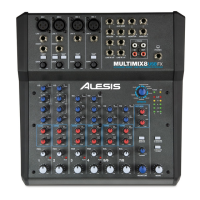
CHANNEL FEATURES
1. EQ: Boosts or cuts the respective frequencies for
each channel.
2. AUX A: Routes channel signal to an external device
like an effects processor.
3. AUX B: Controls level routed to internal effects
processor or – if a device is patched into the Aux B
returns – routes channel signal to an external device
like an effects processor.
4. PAN/BALANCE: Assigns the channel signal to
any spot in the mono or stereo spectrum.
5. CHANNEL FADER: Controls the signal level of
the MIC or LINE inputs.
MASTER FEATURES
Note: It is recommended that the MULTIMIX
be turned off before connecting and
disconnecting any sources to the inputs of
the unit.
1. AUX RETURN A: Controls the signal level that
returns from AUX A.
2. EFFECTS/AUX RET B: Controls the signal level
of the internal effects or the level returning from
AUX B if in use.
3. +48V LED: Indicates that the PHANTOM
POWER is enabled for the MIC inputs.
4. LED METERS: Monitors the audio signal level.
5. 2TK TO MIX: Routes the 2TK input to the MAIN
faders.
6. 2TK TO CTRL: Routes the 2TK input signal to the
HDPH /CTRL RM output.
7. MAIN MIX: Controls the level of the MAIN
OUTPUTS.
8. HDPH/CTRL RM: Controls the level that is sent to
the PHONES or CTRL RM outputs.
MANUAL DE INICIO RÁPIDO PARA EL MULTIMIX
(ESPAÑOL)
1. Asegúrese de que todos los artículos incluidos al inicio de este manual están incluidos en la caja.
2. LEA EL FOLLETO DE INSTRUCCIONES DE SEGURIDAD ANTES DE UTILIZAR
EL PRODUCTO.
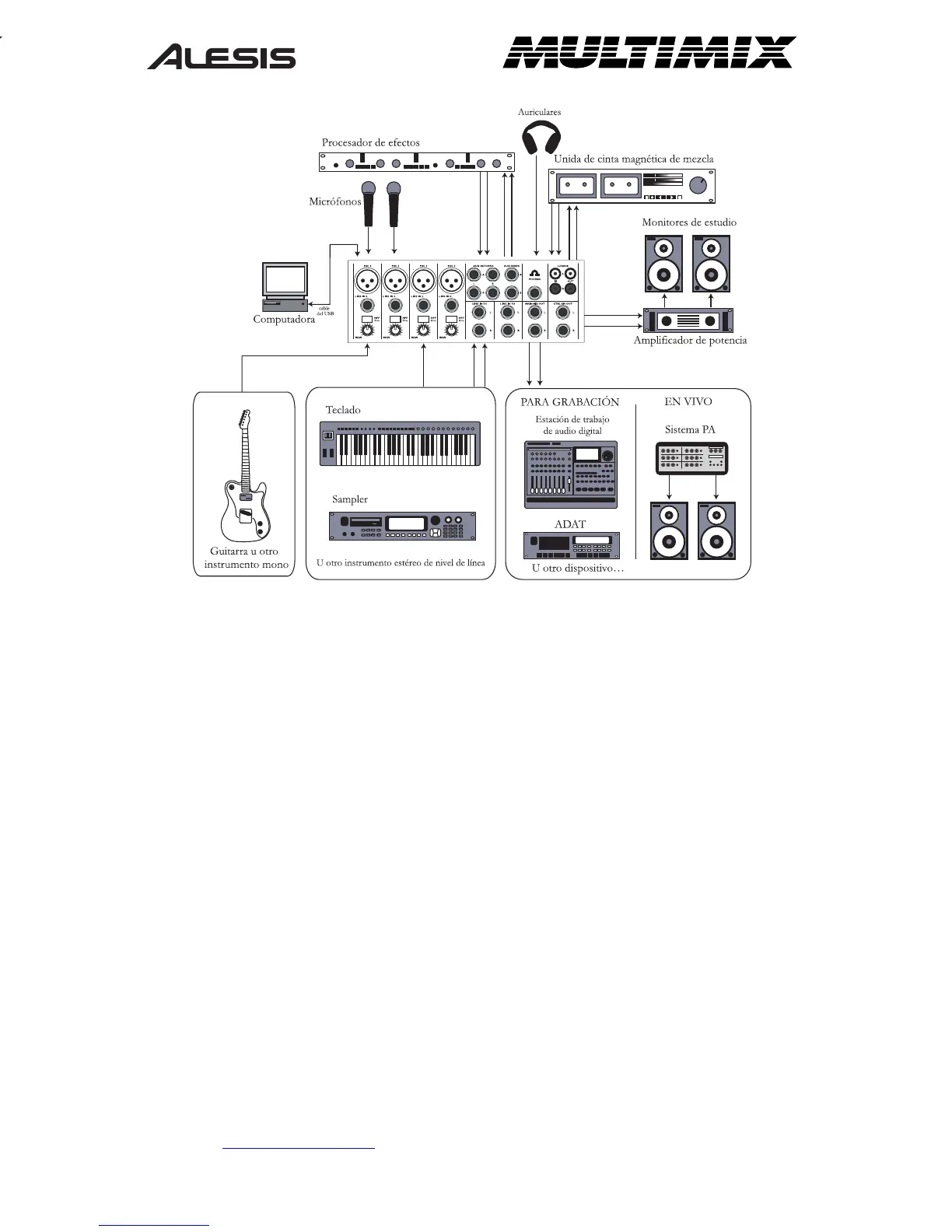
3. Estudie este diagrama de instalación.
4. Coloque el Multimix en una posición adecuada para su funcionamiento.
5. Asegúrese de que todos los dispositivos estén apagados y de que todos los volúmenes estén a
«cero».
6. Conecte todas las fuentes de entrada como se indica en el diagrama.
7. Conecte las salidas a los amplificadores de alimentación, unidades de cinta magnética, y/o fuentes
de audio.
8. Enchufe su Multimix y otros dispositivos a la potencia de corriente alterna.
9. Prenda todo en el siguiente orden:
• Fuentes de entrada de audio
• Efectos externos, dispositivos de grabación o ecualizadores
• El Multimix
• Por último, cualquier amplificador
10. Al apagar, realice siempre esta operación al contrario:
• Apague los amplificadores
• El Multimix
• Efectos externos, dispositivos de grabación o ecualizadores
• Finalmente, cualquier dispositivo de entrada
11. Visite http://www.alesis.com/
para registrar el producto.




 To Next Page