7
14.
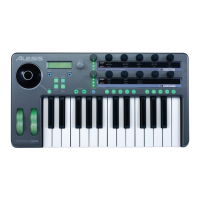
Layer Button
– Press the LAYER button repeatedly to cycle through the
Photon X 25’s three independent knob layers. The lights above the LAYER
button indicate which one of the three available layers is currently active.
Knob assignments can be made on each layer for a total of 30 knob assignments
per preset.
Plug-and-Play Connection to a Computer
Both Windows XP and Mac OS X see the Photon as a plug-and play MIDI and
Audio controller. Simply plug the Photon into your computer using a USB cable
and allow the operating system to install it automatically.
Depending on your operating system, the Photon X 25 may be identified by your
MIDI and Audio software applications as either a “Photon” controller or a “USB
Audio Device.” No need to worry: the Photon will work regardless of its
designation.
The Photon is not compatible with earlier versions of Windows or Mac OS.
Check http://www.Alesis.com for driver updates and up-to-date information on
operating system compatibility.


 To Next Page
 Loading...