6
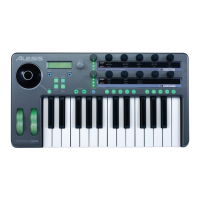
Top Panel Controls
1.
Keyboard
– A full-size, 25-note, velocity-sensitive keyboard.
2.
Octave Up/Down Buttons
– Transpose the keyboard in octaves using these
buttons. Press them both at the same time to reset the keyboard range.
3.
Pitch Wheel
– Control pitch bend with this backlit wheel.
4.
Modulation Wheel
– While you can control any parameter using this backlit
wheel, its most common use is for modulation control.
5.
AXYZ Dome
– The AXYZ dome responds to your hand position to provide
three-way MIDI control. Side-to-side, top-to-bottom, and distance-from dome
movements are all tracked.
6.
AXYZ Dome activation button
– Press this button to enable or disable
AXYZ Dome operation.
7.
Display
– The LCD display shows current status information.
8.
Configuration buttons
– Call up and save presets, set global parameters and
more using the configuration buttons. See below for additional detail.
9.
VALUE/ENTER Encoder
– Twirl the VALUE/ENTER encoder to select
various parameters and values. Press VALUE/ENTER to toggle between
parameter and value assignments and to accept your entries.
10.
Audio Input Level
– Adjust the gain of incoming audio here.
11.
Audio Output Level
– Adjust the level sent to the headphones and main
audio outputs.
12.
MIDI Control Knobs
– Ten high-resolution, endless knobs. These knobs
are suitable for transmitting standard 7-bit (0-127) MIDI commands.
13.
MIDI Control Buttons
– Ten buttons can operate in either toggle (on/off)
mode or momentary (trigger) mode.


 To Next Page
 Loading...