EasyManua.ls Logo

Alfa Network MINI - User Manual

Alfa Network MINI
2 pages
Print Icon
To Next Page IconTo Next Page
Loading...
Press
0,2 A
0,2 A
1,6
6,3
6,3
1.5 Hours
PLDC04361 Rev.00 (03-2020) www.alfatennant.com.br
1
2
3
4
6
5
7
8
910
11
Quick guide
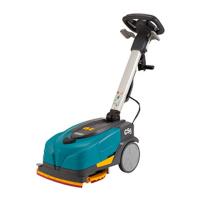
ALFA MINI Floor Scrubber
Guía rápida para el uso
Guia rápido de utilização
This guide is intended for quick consultation only and does not replace the user and maintenance manual.
Before using the machine, read the user and maintenance manual contained in the machine’s packaging thoroughly and strictly follow all the instructions.
La siguiente documentación no reemplaza el manual de uso y mantenimiento, sino que es un documento de consulta rápida.
Antes de utilizar la máquina, lea detenidamente el manual de uso y mantenimiento que se encuentra en el embalaje de la máquina y respete rigurosamente todas las indicaciones allí dadas.
A documentação seguinte não visa substituir o manual de uso e manutenção, mas sim constituir um guia rápido para a utilização da máquina. Antes de utilizar a máquina, leia atentamente o
manual de uso e manutenção contido na embalagem e cumpra rigorosamente todas as recomendações nele contidas.
Question and Answer IconNeed help?

Do you have a question about the Alfa Network MINI and is the answer not in the manual?

Summary

ALFA MINI Floor Scrubber Quick Guide

Unpack and Prepare Main Unit

Unpack the main floor scrubber unit and identify the handle assembly for attachment.

Position for Operation

Step onto the machine to ensure proper positioning and stability before operation.

Attach Handle Assembly

Connect and secure the handle assembly to the main floor scrubber unit.

Open Solution Tank Cover

Open the designated cover to access the solution tank for filling.

Insert Cleaning Component

Insert the brush or squeegee component into the machine's cleaning mechanism.

Activate Component Lock

Press the indicated button to lock the inserted cleaning component securely in place.

Attach Rollers;Wheels

Securely attach the rollers or wheels to the designated points on the machine.

Remove Shipping Restraints

Cut and remove any shipping restraints or securing tape from the machine.

Fill Solution Tanks

Fill the clean water tank with water and the chemical tank with the appropriate cleaning solution.

Confirm Component Installation

Verify that the cleaning component is correctly installed, indicated by a checkmark.

Check Battery Charge Indicator

Observe the battery indicator, showing an approximate runtime of 1.5 hours.

Prepare for Operation

Ensure the solution tanks are filled and the machine is ready for use.

Add Water and Chemical

Add the specified amount of water and chemical solution to the respective tanks.

Power On Machine

Turn the power switch to the 'ON' position to activate the floor scrubber.

Adjust Brush Speed;Settings

Rotate the control dial to adjust the brush speed or other operational settings.

Adjust Handle and Begin Scrubbing

Adjust the handle position and begin operating the floor scrubber.

Select Cleaning Mode

Choose the desired cleaning mode, such as ECO or AUTO, from the control panel.

Operate Machine

Operate the machine by pushing it forward to clean the floor.

Recharge Battery

Recharge the battery when depleted, indicated by the battery level icon.

Clean Machine Components

Clean the brush, squeegee, and tanks after use for maintenance.

Empty and Rinse Tanks

Empty and rinse the clean water and recovery tanks after each use.

Store Machine

Store the machine in a suitable location after cleaning and drying.

Maintenance and Safety Checks

Perform regular maintenance checks and follow safety guidelines for machine longevity.

Summary

ALFA MINI Floor Scrubber Quick Guide

Unpack and Prepare Main Unit

Unpack the main floor scrubber unit and identify the handle assembly for attachment.

Position for Operation

Step onto the machine to ensure proper positioning and stability before operation.

Attach Handle Assembly

Connect and secure the handle assembly to the main floor scrubber unit.

Open Solution Tank Cover

Open the designated cover to access the solution tank for filling.

Insert Cleaning Component

Insert the brush or squeegee component into the machine's cleaning mechanism.

Activate Component Lock

Press the indicated button to lock the inserted cleaning component securely in place.

Attach Rollers;Wheels

Securely attach the rollers or wheels to the designated points on the machine.

Remove Shipping Restraints

Cut and remove any shipping restraints or securing tape from the machine.

Fill Solution Tanks

Fill the clean water tank with water and the chemical tank with the appropriate cleaning solution.

Confirm Component Installation

Verify that the cleaning component is correctly installed, indicated by a checkmark.

Check Battery Charge Indicator

Observe the battery indicator, showing an approximate runtime of 1.5 hours.

Prepare for Operation

Ensure the solution tanks are filled and the machine is ready for use.

Add Water and Chemical

Add the specified amount of water and chemical solution to the respective tanks.

Power On Machine

Turn the power switch to the 'ON' position to activate the floor scrubber.

Adjust Brush Speed;Settings

Rotate the control dial to adjust the brush speed or other operational settings.

Adjust Handle and Begin Scrubbing

Adjust the handle position and begin operating the floor scrubber.

Select Cleaning Mode

Choose the desired cleaning mode, such as ECO or AUTO, from the control panel.

Operate Machine

Operate the machine by pushing it forward to clean the floor.

Recharge Battery

Recharge the battery when depleted, indicated by the battery level icon.

Clean Machine Components

Clean the brush, squeegee, and tanks after use for maintenance.

Empty and Rinse Tanks

Empty and rinse the clean water and recovery tanks after each use.

Store Machine

Store the machine in a suitable location after cleaning and drying.

Maintenance and Safety Checks

Perform regular maintenance checks and follow safety guidelines for machine longevity.

Alfa Network MINI Specifications

General IconGeneral
BrandAlfa Network
ModelMINI
CategoryScrubber
LanguageEnglish