EasyManua.ls Logo

ALFAtron ALF-UC1 - User Manual

ALFAtron ALF-UC1
103 pages
Print Icon
To Next Page IconTo Next Page
Loading...
www.alfatronelectronics.com
ALFATRON ELECTRONICS GmbH GERMANY
ALF-UC1 User Manual

Table of Contents

Question and Answer IconNeed help?

Do you have a question about the ALFAtron ALF-UC1 and is the answer not in the manual?

Overview

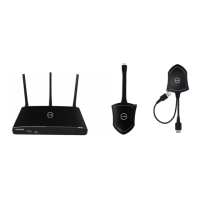
The ALF-UC1 is a wireless media presentation system designed to simplify meeting connections and enhance productivity. It includes a base unit and supports optional dongles (ALF-USBC-D, ALF-HDMI-D) for PC/Mac sharing, as well as "ALF-WirelessMedia" APK for Android and Airplay for iOS devices. The system allows for up to four simultaneous viewers on a single display and supports VESA PC resolution input with auto-detection. It can mirror a PC's extended desktop or MacBook's desktop, and smart devices' photos, videos, and music. The ALF-UC1 features a "show-me" button for wireless media teleporters and supports USB/HDMI/USB Type-C plug-in auto-configuration/pairing for this button.

Technical Specifications:

  • HDMI Output: 1x HDMI 19-pin female connector.
  • Video Output Resolution: Supports 3840x2160@60Hz, 3840x2160@30Hz, and 1920x1080@60Hz.
  • Format Compliance: HDMI1.4/HDMI2.0.
  • Video Capacity: 1080P @ <60Hz for Airplay (iOS devices) and "ALF-WirelessMedia" app (all show-me buttons).
  • HDCP: HDCP1.4 / HDCP2.2.
  • Analog Audio Output: 1x 3.5mm PC audio female connector.
  • LAN Port: 2x RJ45 (1x 1Gbps, 1x 100Mbps).
  • USB Interface: 1x USB3.0, 1x USB 2.0, 1x Type-C.
  • Audio Input: AirPlay, Windows / MAC.
  • Control Connectors: 3.5mm Phoenix terminal / RS232 interface.
  • Simultaneous Windows on Screen: ≥4 main windows + 14 thumbnail windows.
  • Simultaneous Connections: ≥16.
  • Wireless Data Rate: Up to 1200Mbps.
  • Video Playback Frame Rate: 20 - 60 FPS.
  • Latency: <100ms, Min 20ms.
  • Wireless Transmission Protocol: WIFI IEEE 802.11 a/g/n/ac.
  • Frequency Band: 2.4 GHz and 5 GHz.
  • WIFI Antenna: MIMO 2x2.
  • Dimensions (W x D x H): 165mm x 95mm x 24.5mm (including antenna: 165mm x 125mm x 24.5 mm).
  • Weight: 0.4lbs (200g).
  • Temperature: -4° ~ +140° F (-20° ~ +60° C).
  • Humidity (Storage / Operating): 20% - 90% (non-condensing).
  • DC Power: 12V / POE (LAN Port 2).
  • POE Standard: IEEE802.3af.
  • Power Consumption: 10W (MAX).

Usage Features:

  • Front Panel: Includes a front USB connector for dongle pairing, mouse control, and USB touch screen, a Type-C connector for dongle pairing, a power button, and a back-lit LED indicator for status (RED for initializing, flashing GREEN for power on, static GREEN for "Ready to share", static CYAN for "Sharing").
  • Rear Panel: Features a line audio output, RS-232 port, rear USBC and USB 3.0 connectors for dongle pairing and control, HDMI output, two LAN Ethernet ports (one 1Gbps, one 100Mbps with POE support), a DC power socket, and antenna fixture points.
  • Home Screen: Displays Wi-Fi status, SSID (Guest/Staff), password, password timer, Wi-Fi/LAN IP addresses, security level, and quick start instructions for Windows/MacOS, Android/iOS. It also provides a "Download Button" for the "AlfaShare.exe" launcher and "ALF-WirelessMedia2" App.
  • Mobile Device Connection: Supports "Wireless Direct Mode" (internal access point) or LAN connection. Users can download the "ALF-WirelessMedia" app for Android or use Airplay for iOS.
  • Dongle Pairing: Dongles are paired by plugging them into the base unit's USB or Type-C ports.
  • Mirroring: Supports PC/Laptop mirroring via driver-based transmitters (ALF-USB-L) or non-driver-based transmitters (ALF-HDMI-D / ALF-USBC-D). The system can mirror up to 4 sources simultaneously in a quad view.
  • Preview Window: Allows presenters to view live images of all connected transmitters and Android devices on a sidebar, with options to play, stop, fullscreen, adjust volume, and indicate device location on the main screen.
  • Whiteboard & Annotation: Requires an HID compatible device (interactive whiteboard or touchscreen). Users can write, draw, and annotate on documents or presentations, with options to select pen colors, shapes, and backgrounds. Drawings can be saved and shared.
  • Web Setting Management: Accessible via Wi-Fi IP browser page, allowing configuration of network settings, display & audio, moderator control, system settings, security settings, firmware upgrade, and other settings.

Maintenance Features:

  • Factory Reset: A reset button on the rear panel allows restoring default configurations. This will erase all previous settings.
  • Firmware Upgrade: The base unit firmware can be updated via a USB drive (copy "update.img" to root directory) or through the web server console. Dongle firmware and Launcher programs can also be updated.
  • Launcher Program Management: Users can download the "ALF-WirelessMedia" launcher for Windows or MAC from the base unit via USB or Wi-Fi. It is recommended to clear older versions of the launcher program from laptops to ensure optimal performance.
  • Auto Change Password: Configurable to automatically change Wi-Fi password at specified intervals (5 minutes, 30 minutes, 1 hour, 2 hours, 4 hours, 24 hours, or never).
  • Auto Standby: The ALF-UC1 can automatically switch to power-saving mode after a selectable time of inactivity, turning off HDMI output.
  • Configuration File: A packaged file containing all configuration parameters can be downloaded and copied to multiple devices for consistent setup.
  • Troubleshooting: The manual provides solutions for common issues such as bad wireless connection, low signal strength, inability to run "WirelessMedia" launcher, no display, USB not responding, low video performance, and no audio.
  • Security Settings: Offers three security levels (Normal safety, Higher security, Strict security) with predefined settings for dynamic password changes, encryption, AirPlay password, and blocking of mobile apps and web browser access.
  • Clear History After Meeting: Configurable to erase pictures, videos, and music stored in the base unit's memory after a meeting, either by user decision, automatically when memory is 90% full, or always.

ALFAtron ALF-UC1 Specifications

General IconGeneral
BrandALFAtron
ModelALF-UC1
CategoryConference System
LanguageEnglish