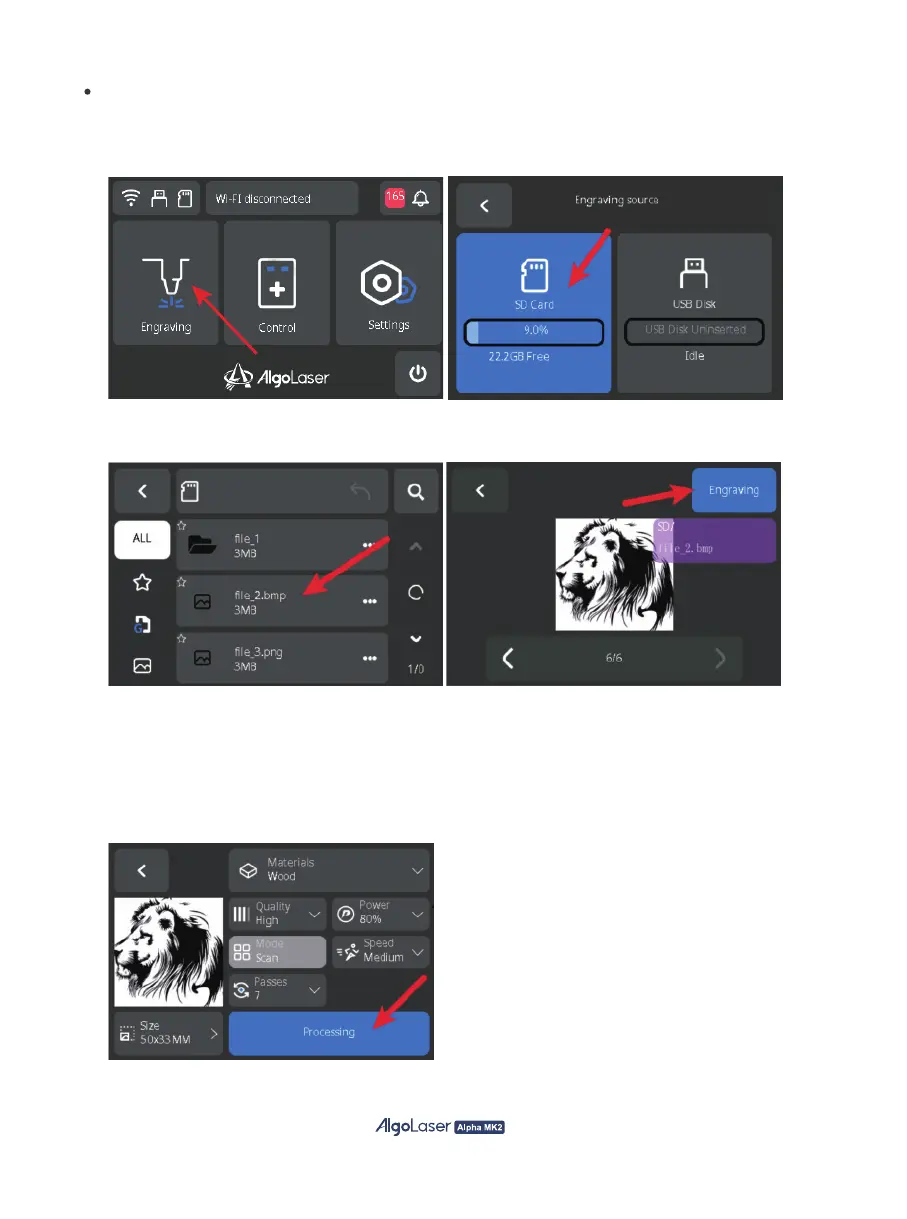
B. Select the file from the USB or SD card (ipg, png, bmp, or Gcode format), preview it,
and click "Engrave" to start engraving.
Engraving via Screen:
A. After powering on the machine, click on "Engrave" on the home page to
enter the "Engraving Source" page.Select the desired engraving file source, which can be either from
the SD card or USB. lf using USB, make sure to insert the USB drive to access the data.
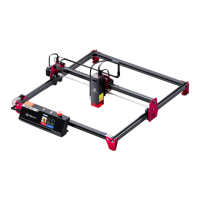
C. On the parameter page, you can choose the size, quality, power, mode, speed, number of passes,
and other parameters, and when you confirm that the parameters are correct (If an ALM-20BD is
used for engraving wood, the recommended speed is 20000 mm/min, and the recommended
power is 80%. For cutting wood, the recommended speed is 200 mm/min, and the recommended
power is 100% and ensure that the cutting is thorough in case of cutting multiple passes.
For details about other parameters, see the published cutting data.), click "Processing" to enter
the engraving preparation page.
24


 To Next Page