EasyManua.ls Logo

ALI GSWM001 - User Manual

ALI GSWM001
8 pages
Print Icon
To Next Page IconTo Next Page
Loading...
INSTALLATION MANUAL
support@walielectric.com
75x75/100x100
MAX
2~9kg
(4.4~19.8lbs)
RATED
32”
GSWM001
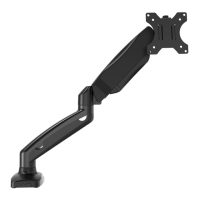
Single Monitor Wall Mount
Question and Answer IconNeed help?

Do you have a question about the ALI GSWM001 and is the answer not in the manual?

Summary

Step 1: Wall Mounting

Option A: Wood Stud Installation

Mounting instructions for wood stud walls, detailing hole drilling and securing the mount.

Option B: Concrete Wall Installation

Mounting instructions for concrete walls, including drilling and using anchors.

Step 2: Mount Assembly

Attach Mounting Cover

Secure the cover B onto the front of the main mount part.

Step 3: VESA Plate Attachment

Select TV Screws

Determine the correct screw size for attaching the VESA plate to the monitor.

Detach VESA Plate

Separate the VESA plate from the arm by removing the top screw.

Attach VESA Plate to Monitor

Mount the VESA plate to the monitor using provided bolts and washers.

Step 4: Monitor Mounting

Mount Monitor to Arm

Attach the assembled monitor to the arm and secure the VESA plate.

Step 5: Tension Adjustment

Adjust Gas Spring and Tilt Tension

Fine-tune the arm's gas spring and tilt tension for optimal monitor positioning.

Step 6: Cable Management

Disassemble Cable Cases

Remove cable management covers by unscrewing the bolts.

Manage Cables

Route cables through the arm and reattach the cable management covers.

Step 7: Final Positioning

Adjust Viewing Angle

Position the monitor by swiveling, tilting, and rotating for optimal viewing.

Overview

This document provides an installation manual for the WALI Single Monitor Wall Mount, model GSWM001. It outlines the steps for securely attaching a single monitor to a wall, offering guidance for both wood stud and concrete wall installations. The manual emphasizes safety warnings, proper assembly techniques, and adjustment features to ensure optimal monitor positioning and stability.

The primary function of this device is to provide a secure and adjustable mounting solution for a single monitor on a wall. It allows users to free up desk space and position their monitor ergonomically for improved viewing comfort and productivity. The wall mount is designed to accommodate various monitor sizes and weights within specified limits, offering flexibility for different setups.

Usage Features:

The WALI Single Monitor Wall Mount offers a range of features designed to enhance usability and adaptability. The installation process is detailed with clear, step-by-step instructions, ensuring that users can mount their monitor safely and effectively.

For installation, the manual provides two distinct options:

  • Wood Stud Installation: This method involves marking the position on the wall using a bubble level and pencil, locating wood studs with a stud finder, drilling pilot holes, and then securing the mount to the wood studs using ST6.3x55 screws (W-A) and D5 washers (W-C). A socket wrench or screwdriver is required for tightening.
  • Concrete Wall Installation: Similar to wood stud installation, this method requires marking the position, drilling larger diameter holes, inserting $10x45$ anchors (W-B) into the holes, and then attaching the mount to the concrete wall using ST6.3x55 screws (W-A) and D5 washers (W-C). Again, a socket wrench or screwdriver is needed for tightening.

Once the wall mount is securely installed, the monitor attachment process is straightforward. Users first need to select the appropriate M4x12 (M-A) or M5x12 (M-B) bolts and D5 washers (M-C) that fit their TV/monitor's VESA mounting holes. The VESA plate, which is initially attached to the arm, needs to be detached by threading the top screw counterclockwise. After attaching the VESA plate to the monitor using the selected bolts and washers, the assembled monitor and VESA plate are then placed onto the arm, and the top screw is tightened to ensure stability.

A key feature of this wall mount is its adjustability, which allows users to customize the monitor's position to their preference. The manual highlights several adjustment capabilities:

  • Gas Spring Tension Adjustment: The arm incorporates a gas spring mechanism that allows for smooth and effortless height adjustment. Users can adjust the gas spring tension using a 5mm Allen key (C). Turning the Allen key clockwise (-) reduces the tension, making it suitable for lighter screens, while turning it counter-clockwise (+) increases the tension, accommodating heavier screens. The manual notes that this adjustment may require numerous turns to achieve the desired tension. This feature ensures that the monitor stays at the desired height without drifting.
  • Tilt Tension Adjustment: The monitor's tilt can also be adjusted using the 5mm Allen key (C). This allows users to set the monitor's vertical angle for optimal viewing, reducing glare and improving ergonomic comfort.
  • Swivel, Tilt, and Rotation: After installation, the monitor can be manually swiveled, tilted, and rotated to achieve the best viewing angle. The manual illustrates a wide range of motion, including ±90° rotation, ±180° swivel, and a tilt range of +75° to -45°. This extensive adjustability ensures that users can easily share their screen, switch between landscape and portrait orientations, and find the most comfortable viewing position for various tasks.
  • Cable Management: The wall mount includes cable cases that help organize and conceal cables, contributing to a cleaner and more professional-looking workspace. Users can screw out bolts with the 5mm Allen key to open the cable cases, guide the cables through, and then put the cable cases back.

Maintenance Features:

While the manual does not explicitly detail ongoing maintenance procedures, it implicitly suggests practices that contribute to the longevity and safe operation of the device.

  • Regular Inspection: The "WARNING!" section at the beginning of the manual advises users to "Check carefully to make sure there are no missing or defective parts." This implies that periodic checks of the mount's components, screws, and connections are crucial to ensure continued safety and stability. Any signs of wear, loosening, or damage should prompt immediate attention.
  • Weight Capacity Adherence: The manual explicitly states, "Do not exceed weight capacity." Adhering to the specified weight limits for the monitor is a critical maintenance aspect, as overloading the mount can lead to structural failure and potential injury.
  • Proper Installation: The emphasis on correct installation for different wall types (wood stud, solid concrete, or brick walls) is a foundational maintenance practice. Improper installation can compromise the mount's integrity over time. The warning against mounting on drywall alone highlights the importance of using appropriate anchors and securing methods for the wall material.
  • Gas Spring Adjustment: The gas spring mechanism, while a usage feature, also has a maintenance aspect. Ensuring the gas spring tension is correctly adjusted for the monitor's weight helps prevent premature wear on the mechanism and ensures the monitor remains stable at the desired height. If the monitor starts to drift or is difficult to move, re-adjusting the gas spring tension would be a necessary maintenance step.
  • Cleanliness: Although not mentioned, keeping the mount and surrounding area clean can prevent dust and debris from accumulating in moving parts, which could potentially affect smooth operation over time.

The manual also includes a "TIPOVER WARNING" which, while primarily a safety warning, can be considered a maintenance-related instruction. It states, "USE TIPOVER RESTRAINT OR ANCHOR STAND TO WALL." This emphasizes the importance of securing the entire setup to prevent accidental tipping, especially in environments with children. This proactive measure helps maintain the stability of the entire system.

In summary, the WALI Single Monitor Wall Mount is designed for ease of installation and extensive adjustability, allowing users to optimize their monitor setup for ergonomics and space efficiency. While explicit maintenance instructions are minimal, the emphasis on correct installation, adherence to weight limits, and periodic inspection of components are key to ensuring the device's long-term safety and performance.

ALI GSWM001 Specifications

General IconGeneral
ModelGSWM001
CategoryRacks & Stands
MaterialSteel
ColorBlack
Adjustable ShelvesYes
WheelsYes