EasyManua.ls Logo

Align 3GX Compact - Page 6

Align 3GX Compact
24 pages
Print Icon
To Next Page IconTo Next Page
To Previous Page IconTo Previous Page
Loading...
METHOD
3:
JR/SPEKTRUM
SATELLITE
CONNECTIVITY
METHOD
53¢=:JR/SPEKTRUMA)R
EIR
|
Poe
í
CAUTION
{
í
=
Do
not
exchange
AIL.
-|
|
coocdodada
and
PIT
connections
Battery
ALRPITRIHHA
©
1.
Do
not
mix
satellite
receivers
of
different
makes.
2.
Even
under
correct
startup
sequence,
if
transmitter
is
powered
off
first,
LED1~LED5
will
also
flash.
Thus
the
3.
3GX
supports
satellite
receiver
models
currently
available
on
the
market.
Should
new
receiver
version
comes
out
with,
compatibility
issues,
firmware
will
be
updated
to
resolve
any
incompatibility
that
may
arise.
1.
PORRO
18
BAAR
IDEA»
2.
TEM
RAGDIBE
FR
ORAR
wp
o
T
A
Ue’
PAEARU
>
FSRA
SA
3.
ROMS
RE
IRAE
ME
SHOT
:
HUMMENINER
A
setting,
all
channels
will
hold
atthe
last
command
position,
except
throttle
channel
which
goes
to
a
preset
position.
1.
Push
throttle
Stick
tothe
desired
fail
safe
position.
2.Plug
the
binding
plug
into
3GX's
BIND
port,
and
perform
radio
binding
steps.
The
last
position
hold
function
will
be
active
after
the
3GX
initializes.
4.Test
Method:
Power
off
transmitter.
The
throttle
channel
should
move
to
preset
position,
while
all
other
channels
should
hold
in
their
last
position.
setting,
all
channels
will
move
to
the
pre-set
position.
3GX.
After
the
rapid
flash
of
satellite's
LEDs,
pull
the
binding
plug
off.
the
rapid
flash,
following
by
slower
flash.
while
the
LED
is
flashing
in
slower
mode.
be
set
after
the
3GX
initializes.
————
|
THR
RUD
PIT
ELE
AIL
receiver
should
always
be
powered
off
before
the
transmitter.
3.After
successful
binding,
do
not
power
off
the
3GX,
unplug
the
binding
plug
and
allow
3GX
to
enter
initializing
process.
When
helicopter
lost
connectivity
with
your
radio
under
this
1.
Plug
the
binding
plug
into
3GX's
BIND
port,
and
power
up
the
2.
Power
up
radio
transmitter,
and
perform
radio
binding
steps.
After
radio
is
bound,
LED
on
the
satellite
antennas
will
end
3.
Move
the
transmitter
sticks
to
the
desired
failsafe
position
4.
Satellite
antenna's
LED
will
lit
up
after
5
seconds,
and
3GX
goes
through
initializing
process.
The
failsafe
position
will
1.
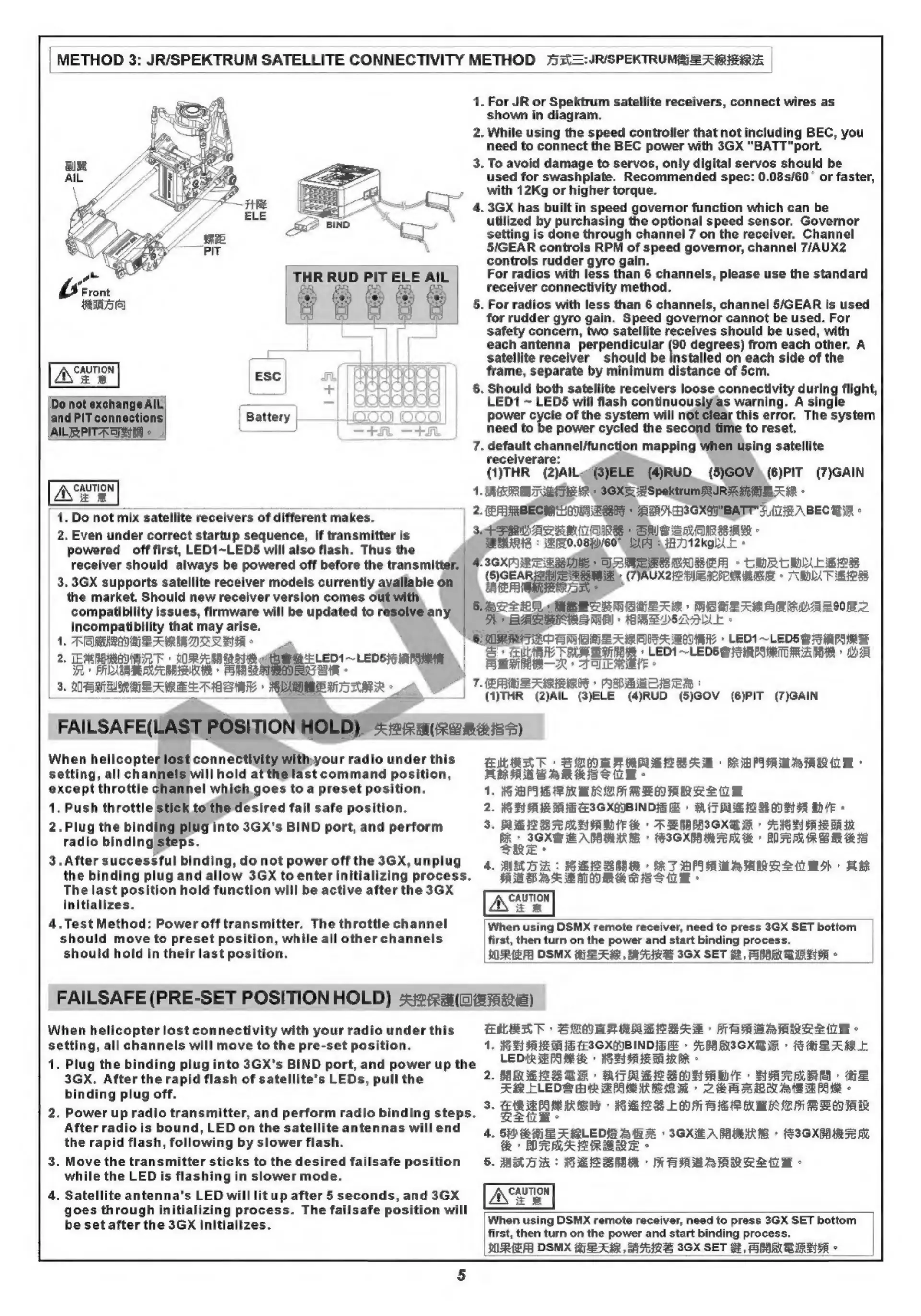
For
JR
or
Spektrum
satellite
receivers,
connect
wires
as
shown
in
diagram.
2.
While
using
the
speed
controller
that
not
including
BEC,
you
need
to
connect
the
BEC
power
with
3GX
"BATT"port.
To
avoid
damage
to
servos,
only
digital
servos
should
be
used
for
swashplate.
Recommended
spec:
0.08s/60
or
faster,
with
12Kg
or
higher
torque.
4.
3GX
has
built
in
speed
governor
function
which
can
be
utilized
by
purchasing
the
optional
speed
sensor.
Governor
setting
is
done
through
channel
7
on
the
receiver.
Channel
5/GEAR
controls
RPM
of
speed
governor,
channel
7/AUX2
controls
rudder
gyro
gain.
For
radios
with
less
than
6
channels,
please
use
the
standard
receiver
connectivity
method.
For
radios
with
less
than
6
channels,
channel
5/GEAR
is
used
for
rudder
gyro
gain.
Speed
governor
cannot
be
used.
For
safety
concern,
two
satellite
receives
should
be
used,
with
each
antenna
perpendicular
(90
degrees)
from each
other.
A
satellite
receiver
should
be
installed
on
each
side
of
the
frame,
separate
by
minimum
distance
of
5cm.
Should
both
satellite
receivers
loose
connectivity
during
flight,
LED1
~
LEDS
will
flash
continuouslyas
warning.
A
single
power
cycle
of
the
system
will
not
clear
this
error.
The
system
need
to
be
power
cycled
the
second
time
to
reset.
default
channel/function
mapping
when
using
satellite
receiverare:
(1)THR
(2)AlL@(3)ELE
(4)RUD_
(5)GOV)(6)PIT
(7)GAIN
1.
RFR
BD
TTR»
SSXSESpektrumAVIR
Amie
AAR
2.
{ERRBECH
HNE
i
AN
SSXAMBATT'
FLEA
BEC
WA
°
Sec
FRVAZRRUIRE
SUS
ERIREAR
ERIE
:
80.08/60%
LIPIA
A7)12kg
lE
°
A
3GXA
RERA
MERRTE
»
CORCA
ER
(5)GEAI
p
g
(TVAUX22
BIA
BLURS
©
EDA
TERE
QSewaees
2
i:
SALSA
MBE
LMORLAR
MARSARBLRUA
LIONS
DBAS
SINES
MAR
ARBLSADLLE
«
ay
gt
VARERNE
ENAA
LED1
~LEDS
GFP
ean
ee
BAS
»
Le
~LEDS
SSMS
TOAGA
BOM
DA
PBL
—R
»
A
OLE
AME
#
bal
ad
|
7-
PARESI
ARMU
DEEA
:
(I)THR
(2)AIL
(3)ELE
(4)RUD
(5)GOV
(6)PIT
(7)GAIN
FAILSAFE(LAST
POSITION
HOLD)
<ienuremiss)
When
helicopter
lost
connectivity
withyour
radio
under
this
ELERT,
BiG)
MF
SSeS
M+
PRB
PIA
AR
ARABS
ARIES
UE.
1.
BPE
RAE
EM
REO
RRR
iw
.
HEAR
AH
ESSXAVBIND
IGA
+
MTGE
ORA
HNL
©
.
BRE ISS
5c
LEAD
TE
TEGER
+
Fe
HG
Hs
PAE
BA
ae
+
ICX
METAL
+
BITC
RBM
eS
SRE.
4.
MED
:
HEIs
BSBA
RT
DARRAR
eS
tt
BD
REGAASMORK
HIS
-
2.
3.
[When
using
DSMX
remote
receiver,
need
to
press
3GX SET
bottom
first,
then
turn
on
the
power
and
start
binding
process.
AREA
DSMX
ABRAM,
MARS
3GX
SET
f,
SMA
BIA
-
FAILSAFE
(PRE-SET
POSITION
HOLD)
-ei@:2aa(@ae7aaie)
ELRAR
SUNRARRELSAB
HARBRRRAL
WB
1.
NAAS
EISXGIBINDIGA
»
AMASGXB
IR
SMHLARL
LEDR
RPS
RG
+
TERIAL
OA
IRER
©
2.
BRESSSR:
AIRES
SOA
ADI
HATS
AE
FRLLEVSHRAGS
KEM
CGRBRLUARRAE
-
3.
3
pelea
RERE
LON
BER
MEK
CH
BBO
A
4.
ETEN
SGX
A
BIRRE
>
FICXAE
N
E
OTRRARERE
-
ARDA
:
PETS
HAABAARRS
1H
When
using
DSMX
remote
receiver,
need
to
press
3GX SET
bottom
first,
then
turn
on
the
power
and
start
binding
process.
OREA
DSMX
SAR,
SARE
3GX
SET
H,
SHAMS
RAVA
«

Related product manuals