Need help?
Do you have a question about the All Medicus GlucoDr AGM-2100 and is the answer not in the manual?
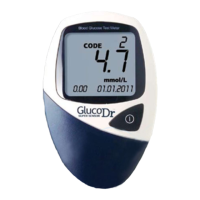
Describes the intended use of the GlucoDr Blood Glucose Monitoring System for self-testing.
Explains the scientific principle behind glucose measurement using the GlucoDr system.
Lists important safety guidelines and operational advice for using the GlucoDr meter.
Guidelines for storing and handling GlucoDr test strips to maintain their efficacy.
Details the LCD display and operation of the meter's buttons (Code, Memory, Power).
Describes the test strip port and the location of the battery cover.
Explains icons for Memory, Code, Battery, Strip, Blood Drop, and Temperature.
Identifies key parts like Grip, Yellow Side-edge, Confirmation window, and Gold electrodes.
Steps to turn on the meter and ensure code match with the test strip vial.
Instructions to enter CODE MODE and change the code number using buttons.
Information on when and how to use control solution and associated cautions.
Instructions for inserting the test strip into the meter and checking the code.
Guidance on using the lancing device to obtain a blood sample from the fingertip.
Steps for applying the blood sample to the test strip for accurate results.
Explanation of how test results are displayed and saved after 11 seconds.
Instructions on how to remove and discard the used test strip.
Explains 'Lo'/'HI' messages and when to retest or consult a professional.
Provides reference values for diagnosing diabetes and prediabetes conditions.
Steps to enter MEMORY MODE and recall stored test results.
 General
| Device Type | Blood Glucose Meter |
|---|---|
| Measurement Method | Electrochemical |
| Blood Sample | Capillary whole blood |
| Sample Volume | 0.5 μL |
| Measuring Time | 5 seconds |
| Display | LCD |
| Battery Life | Approximately 1000 tests |
| Operating Temperature | 10-40°C |
| Operating Humidity | 10-90% RH |
| Hematocrit Range | 30-55% |
| Measurement Range | 20 ~ 600 mg/dL (1.1 ~ 33.3 mmol/L) |


 To Next Page