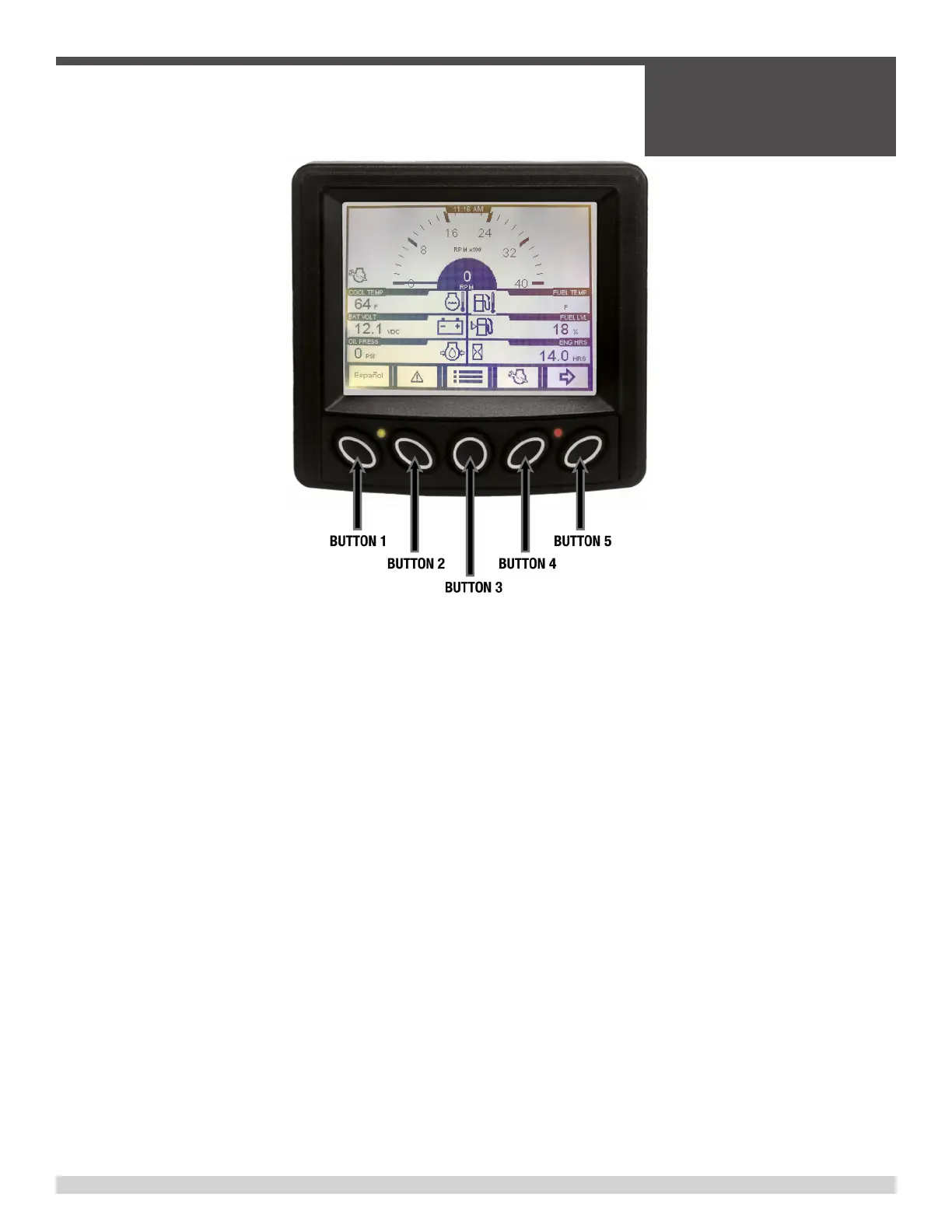
OPERATOR INTERFACE HOME SCREEN: This screen (shown above) is the instrument cluster screen and is where you
will start to navigate to all other menus.
BUTTON ONE: This button will swap the language between English and Spanish.
BUTTON TWO: This button will display the Engine Fault Codes and the I/O Status Screen. By selecting I/O status, you
will then be able to see real time status of the Machine ID points, Seat Switch status, Cold Start status, Desired Engine
Speed, and Run/Idle Status.
BUTTON THREE: This button will allow a person to change the screen brightness, screen contrast, units of measure,
and language. Use button 1 to move the selection “UP”, use button 2 to move the selection “DOWN”, button 3 will verify
the selection, use button 5 to return to the home screen.
BUTTON FOUR: Directs you to the Service Reminder screen. The first screen will give an overview of the current state
of all the service reminders that are set. To cycle through/reset the reminders, press OK (button 3), then press the down
arrow (button 1) and select “+” (button 3). This will reset the selected option back to the appropriate service interval. To
cycle through the different service options, press “+” (button 3) when the selection arrow is at the top.
BUTTON FIVE: This will alternate the top row of readouts to provide more real time engine process data. The top row
will either display an “Engine Torque / Load RPM” option or a “Cool Temp / Fuel Temp” option.
Engine Control Unit (ECU)
SECTION 2
OPERATIONS
069970 Page 35


 To Next Page