The AlliedStar AS 200E is a digital optical scanning device designed for professional use in dental practices. It acquires digital impressions of hard and soft tissues, such as teeth, gums, and mucous membranes, through oral scanning. This data is then used for oral restoration and orthodontic treatment of malocclusion. The device is suitable for both adult and pediatric clinical practice.
Function Description:
The AS 200E is an intraoral scanner that captures 3D full-color digital impressions. It operates using the 802.11a/n/ac WiFi protocol, allowing for wireless communication. The scanner is intended to be connected to a computer system that meets specific technical requirements for data processing and display.
Important Technical Specifications:
- Model: AS 200E
- Weight:
- Scanner (including battery, without tip): 245 g
- Tip Large - Sterilization (TP202): 13g
- Tip Small - Sterilization (TP203): 12g
- Color: 3D full color
- USB Ports: USB 3.0 wireless card port, Type C charge port
- Field of View:
- Tip Large - Sterilization (TP202): 16mm x 14mm
- Tip Small - Sterilization (TP203): 12mm x 12mm
- Depth of Field: 15mm
- WiFi Channels & Output Power:
- Channel 48 (802.11a): 5240 MHz, 14.57 dBm
- Channel 157 (802.11a): 5785 MHz, 14.23 dBm
- SAR Value for Handpiece: 0.798 W/Kg (10g for CE), 0.011 W/Kg (1g for FCC)
- Environmental Requirements:
- Operating Temperature: 15°C ~ 30°C
- Transport and Storage Temperature: -10°C ~ 50°C
- Operating Relative Humidity: 10% ~ 65% RH
- Transportation and Storage Relative Humidity: 10% ~ 95% RH
- Operating Atmospheric Pressure: 70 ~ 106 KPa
- Transportation and Storage Atmospheric Pressure: 60 ~ 106 KPa
- Workstation Configuration Requirements:
- Processor: Intel® Core™ i7 9th Generation, base frequency 2.6 GHz (or better)
- Memory: 32 GB (or more) DDR4, frequency 2666 MHz (or better)
- Disk: 512G (or more) SSD
- Graphics card: NVIDIA® GeForce® GTX 1650 (or better)
- Display: 15.6" FHD (1920 x 1080) (or more)
- Others: USB 3.0 port
- Operating system: Windows 10 (build 18362 or newer) / Win 11, 64 bit
- Optional: Touch screen
- Electrical Safety Classification:
- Type of protection against electric shock: Internally powered
- Degree of protection against electric shock: Type BF Applied Part
- Mode of operation: Continuous operation
- Flammable anesthetics: Not suitable for use in the presence of flammable anesthetics or a mixture of flammable anesthetics with air or oxygen or nitrous oxide.
Usage Features:
The AS 200E is designed for ease of use in a clinical setting. Users must be trained to operate the scanner and should familiarize themselves with the safety instructions. The device is restricted to sale by or on the order of a dentist in the U.S. Federal law. It is important to ensure the scanner is turned off when not in use. The device is for indoor use only and operates in specific 5GHz bands to reduce interference. Patients with certain conditions (oral mucosal disease, mental illness, severe respiratory disease, asthma, Parkinson's disease, hyperactivity disease, or moderate/severe opening limitation) should be carefully considered or are contraindicated for use.
Maintenance Features:
Regular cleaning, disinfecting, and sterilizing of the scanner and its accessories are crucial for hygienic safety and to minimize cross-contamination.
- Cleaning and Disinfecting the Scanner: After each patient, the scanner must be thoroughly disinfected. If visibly soiled, it must be cleaned first. Use a lint-free cloth dampened with lukewarm water to remove blood/body fluids. For disinfection, use a commercially prepared intermediate-level disinfectant wipe (e.g., CaviWipes), following the manufacturer's instructions for contact time. Avoid disinfectants containing phenolics or iodophors. Do not immerse the scanner in water or disinfectant solution, and do not allow liquid to enter through gaps, air outlets, or pinholes. After drying, remove residual disinfectant with a clean, water-dampened lint-free cloth.
- Cleaning and Sterilizing the Tip: The scanner tips (TP202 and TP203) are reusable and require specific cleaning and sterilization procedures.
- Manual Cleaning: Rinse excess soil from the tips (2 minutes), apply enzymatic detergent solution with a soft brush, and rinse under clean, running water (2 minutes). Inspect the tips and repeat if necessary. Use a lens tissue or lint-free cloth to remove dust from the mirror.
- Sterilization: Scanner tips are NOT sterilized upon receipt and must be sterilized before first use. Place tips in a sealed steam sterilization pouch. Sterilize in a steam autoclave at 134°C. The exposure time should exceed 3 minutes but not exceed 6 minutes. The tips can be autoclaved up to 60 cycles if the exposure time at 134°C is limited to not more than 6 minutes.
- Visual Inspection: Before each use, visually inspect the scanner for damage (lens window, buttons, contact points) and the scanner tips for deterioration (damage, detached components, smudges, scratches on the mirror). Replace damaged tips. When the tip is removed, install the front protective cover to protect the scanner lens window. If scan quality is poor, clean the tip mirror and scanner's lens window with a microfiber cleaning swab and impurity-free ethanol.
- General Warnings: Do not pull or twist cables, drop the scanner, or expose it to water spray, high vibrations, or direct UV radiation. Do not modify the equipment. Only use manufacturer-specified components, accessories, cables, and spare parts. Do not service the equipment while in use with the patient. If the equipment is faulty, turn it off and contact a qualified Alliedstar service technician.

 Need help?
 General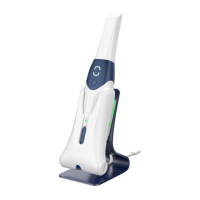

 To Next Page