Need help?
Do you have a question about the Allo RemoteControl WHY EVO and is the answer not in the manual?
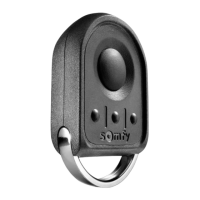
The provided manual describes the "WHY EVO" remote control, a device designed for duplicating existing remote control codes, specifically for garage doors, gates, or other automated systems. It supports both fixed code and rolling code duplication, offering versatility for various automation systems.
The WHY EVO remote control serves as a universal duplicator for existing remote controls. Its primary function is to learn and replicate the radio frequency codes from an original remote, allowing users to create a copy that can then operate their automated systems. This is particularly useful for replacing lost or broken remotes, or for providing additional access controls. The manual details two main duplication procedures: "Fixed Code Duplicating Procedures" and "Rolling Simple Duplicating Procedures," indicating its capability to handle different security protocols. It also includes a procedure for duplicating from one WHY EVO to another WHY EVO remote.
For fixed code duplication, the process involves a specific sequence of button presses on the WHY EVO, followed by placing the original remote in close proximity (approximately 5 cm) and transmitting its code. The WHY EVO provides visual feedback through an LED (initially white, then changing to blue) to indicate successful code learning. An extended "BEEP" sound further confirms the correct code learning. Once the code is learned, it can be programmed to any button on the WHY EVO.
For rolling code duplication, the initial steps are similar, involving a button press sequence and LED feedback. However, after successful code learning, an additional step is required: activating the correct procedure for the programmed model and inserting the new remote control into the receiver of the automation system. This suggests that rolling code systems often require the new remote to be "introduced" or "enrolled" directly into the receiver's memory, beyond just duplicating the code. The manual refers to a "compatibility list present in this manual" for this step, though the list itself is not provided in the excerpt.
The device is designed for user-friendly operation, with clear step-by-step instructions and visual/auditory cues to guide the user through the duplication process.
In summary, the WHY EVO remote control is a flexible and user-friendly device for duplicating existing remote control codes for automated systems. Its clear instructions, visual and auditory feedback, and support for both fixed and rolling codes make it a practical solution for managing access to various automation setups.
 General
| Brand | Allo RemoteControl |
|---|---|
| Model | WHY EVO |
| Category | Remote Control |
| Language | English |


 To Next Page