Allora 2
15
5 - The keyboard
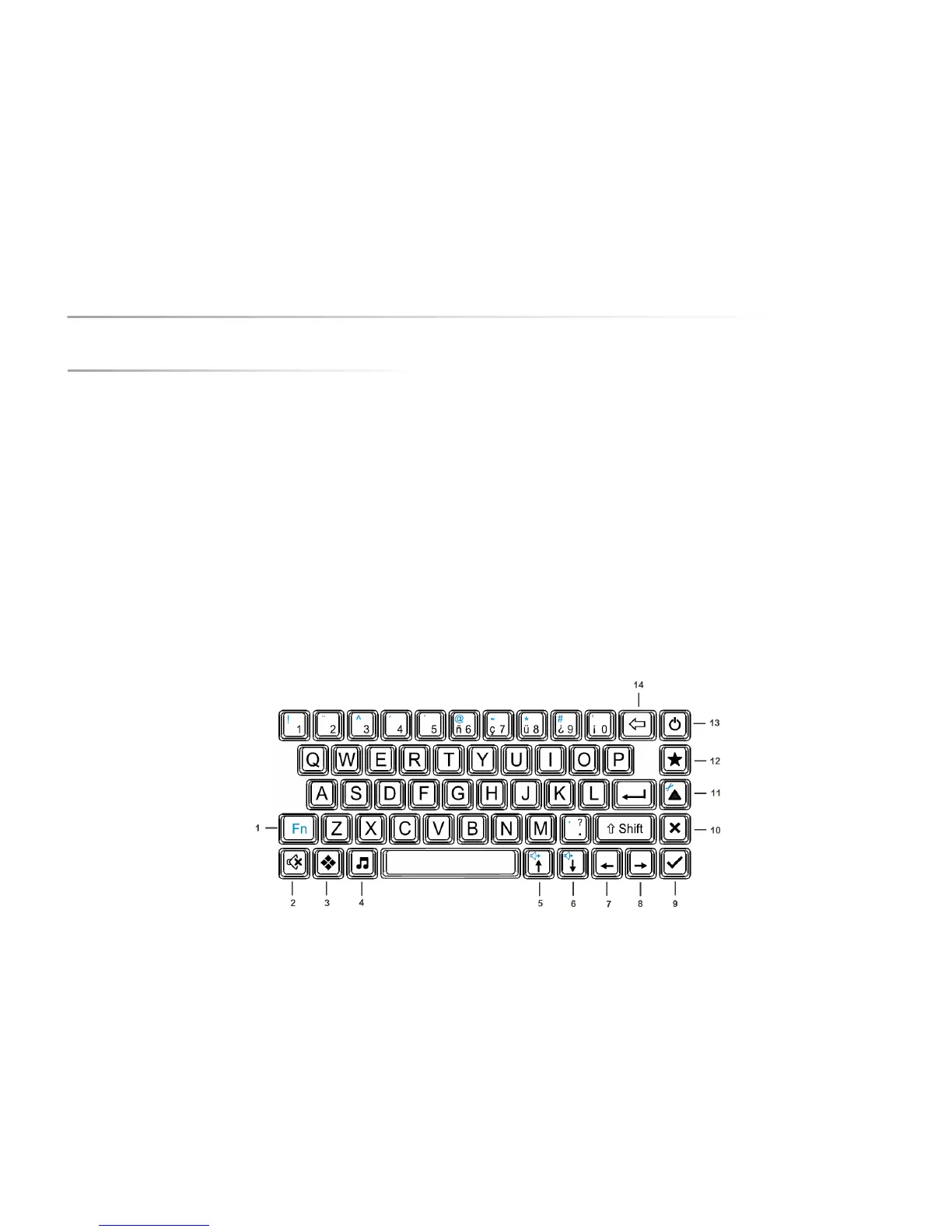
The Allora has a waterproof rubber keypad with keys which are the same size as on a normal keyboard. The keyboard contains the full alphabet, the numbers,
frequently used special characters (shown in blue), a function key Fn, one Shift key, an Enter key and a number of control keys.
To enter a character on the display just hit the corresponding key. The keystroke acceptance and delay times are adjustable to avoid unwanted repeat or accidental
keystrokes. Note that the use of acceptance and/or delay times are set with the needs of the user in mind. If the device is placed with a new user, it is important to
ensure that the settings are readjusted to meet the users’ needs otherwise it may appear that the keyboard is slower or not working properly.
To select a number you need to press the number key slightly longer until the number appears on the screen. Briefly press the number keys 1 to 5 to select the
corresponding word from the word prediction list that appears at the bottom of the screen.
The characters beside the figures 6, 7, 8, 9, 0 can be formed by briefly pressing the corresponding keys, just like all other characters on the keyboard.
The following is the description of a number of important keys on the keyboard of the Allora.


 To Next Page
 Loading...