Allora 2
16
5.1 Function key
The function key Fn is always used in combination with another key. For
example, press the function key and then press the digit key 1 to display the
exclamation mark. You do not have to hold the function key to make a
combination, you can press Fn first, release it and then press 1 to form the
exclamation mark. Similarly, you can select all special characters from those in
blue in the upper left corner of the number keys.
The blue symbols on some of the keys refer to a function which can be activated
when the key is used in combination with the function key Fn. However,
combinations with other keys that don’t have the additional blue symbol on it are
also possible.
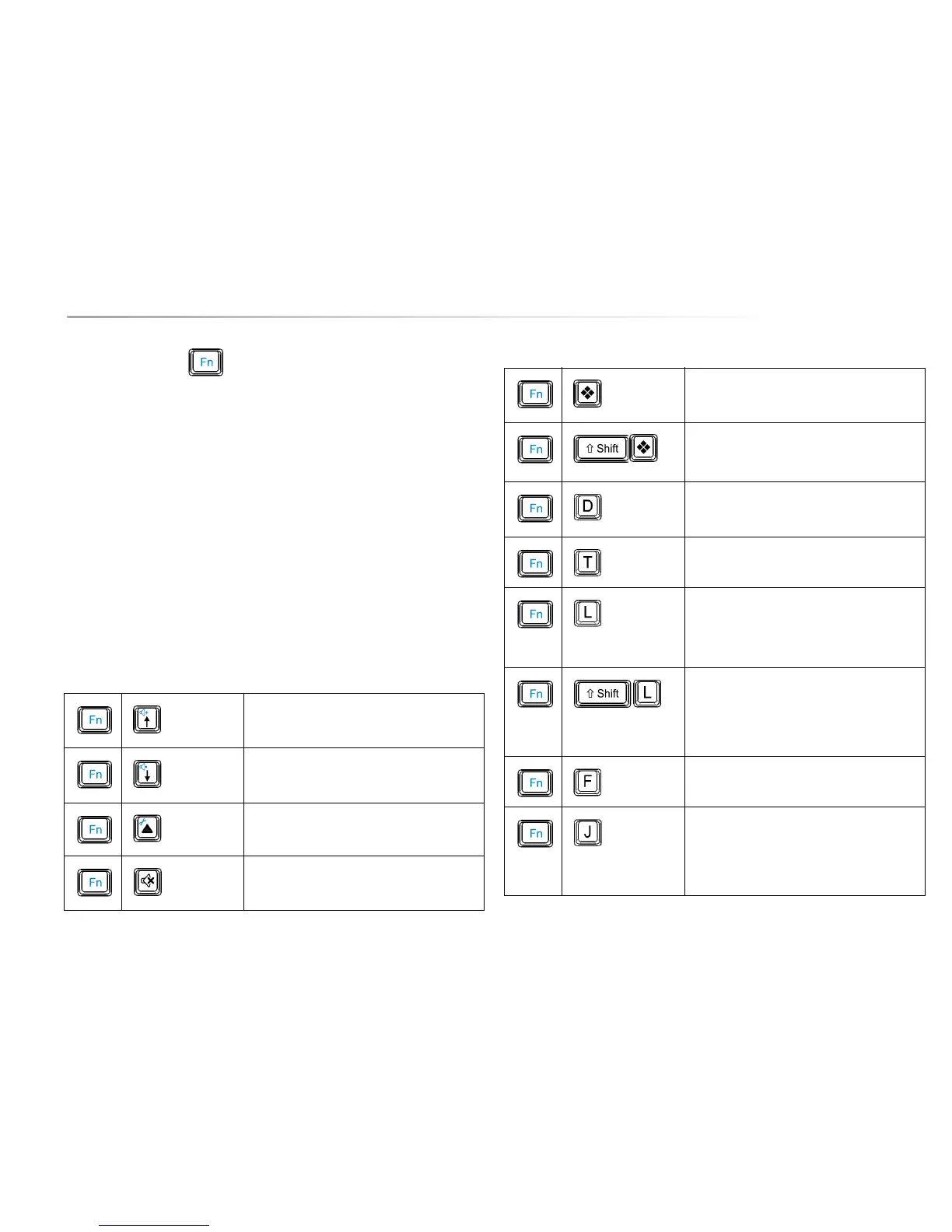
The following list gives you an overview of the other function key combinations:
Table 1: Function Key Combination
Increase the volume.
Decrease the volume.
Go to the Allora settings menu.
Mute/unmute the sound.
Add the message to the sentence prediction
list.
Delete the predicted sentence that is
displayed from the sentence prediction list
Pronounce date.
Pronounce time.
Increase the character size. Once maximum
size is reached, the next step will start from
the minimum size and then continues
increasing again.
Decrease the character size. Once
minimum size is reached, the next step will
start from the maximum size and then
continues decreasing again.
Switch the 2nd display on or off. This
setting is stored until it is changed again.
Switch between sound from the 2nd display
or from the Allora (only when 2nd display is
disconnected). This setting is stored until it
is changed again.
Table 1: Function Key Combination


 To Next Page
 Loading...