
 Need help?
Do you have a question about the AllScanner VXDIAG VCX-DoIP and is the answer not in the manual?
Disclaims company liability for product usage issues and damages.
States that all content is copyrighted by Shenzhen Allscanner Technology Co., Ltd.
Identifies ALLScanner and VXDIAG as registered trademarks.
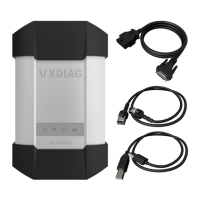
Introduces the VCX-DoIP as a vehicle network interface with Ethernet diagnostic technology.
Lists key features of the VCX-DoIP, including multi-brand diagnostics and advanced functions.
Details the hardware design of the vehicle network interface, including processors and communication capabilities.
Covers ECU software upgrades and calibration procedures.
Details ECU replacement, flushing, and programming processes.
Indicates equipment working status with a red light, flashing on error.
Shows wireless network status via a blue light, with different blinking for connection types.
Displays host communication status with a blue light for USB or LAN connections.
Indicates vehicle communication status with a red light for legacy or DoIP protocols.
Instructions to obtain the VX Manager installer via CD-ROM or download link.
Lists system requirements for VX Manager installation, including OS, processor, and memory.
Details steps 1-4: running the setup, welcome screen, and proceeding to next steps.
Describes steps 5-6: selecting diagnostic drivers for installation.
Explains how to correctly connect the diagnostic device hardware to the vehicle and PC.
Details the process of connecting the device via USB, including driver installation.
Explains how to connect the device wirelessly via Wi-Fi, including network setup.
Describes how to verify successful device connection using VX Manager software.
Lists and describes basic functions available in VX Manager, such as Reconnect and Equipment Testing.
Explains how VCX devices manage functionality via licenses and lists supported products.
Details how to view available authorization lists for the connected VCX device.
Explains the process and importance of updating device licenses online.
Guides users on how to install specific diagnostic drivers for vehicle applications.
Explains how to update diagnostic drivers when new versions are released.
Details the terms and duration of the product's one-year limited warranty.
Lists conditions and situations that are excluded from the product warranty coverage.
Provides information on obtaining technical support and accessing documentation resources.
Provides contact details for inquiries, support, and maintenance services.
 General
| Category | Vehicle Diagnostic Tool |
|---|---|
| Connectivity | USB |
| Compatibility | Compatible with various vehicle brands and models |
| Software Support | VX Manager |
| Update | Online updates available |
| Protocols | DoIP |

 To Next Page