8 EN
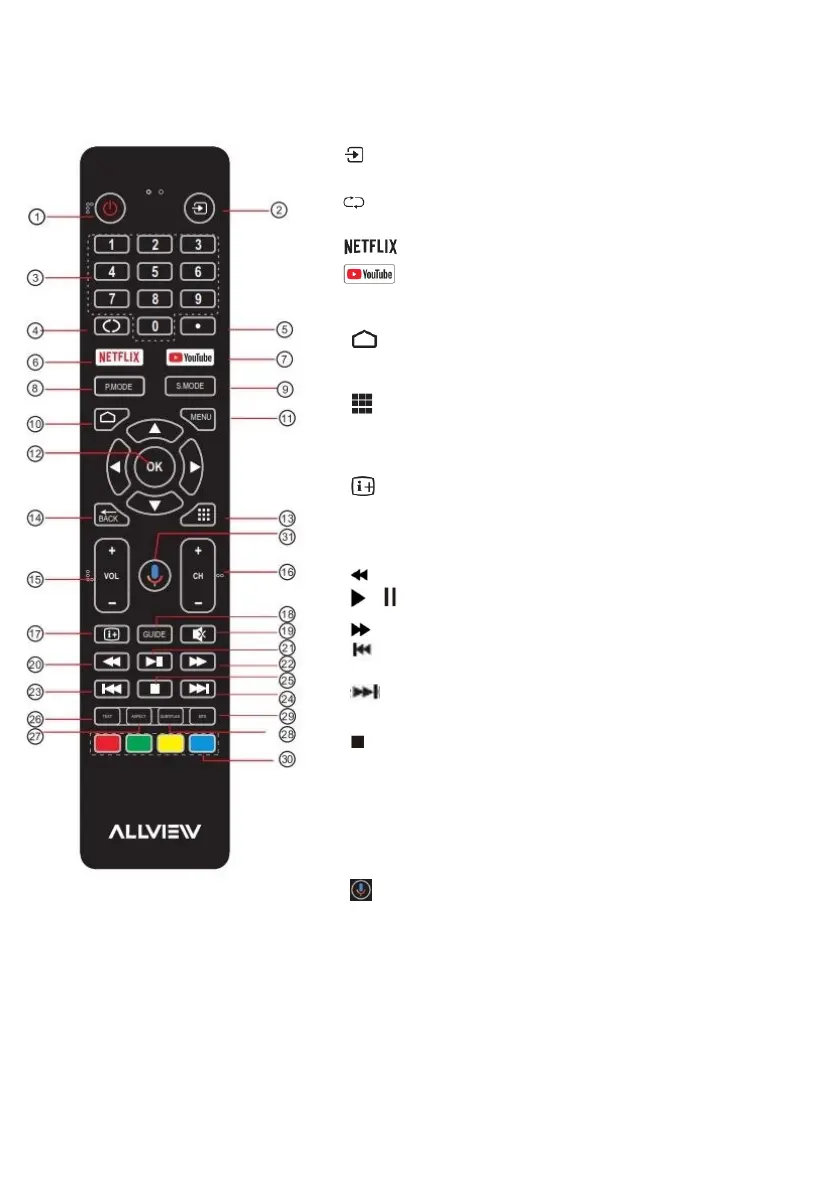
REMOTE CONTROL FUNCTIONS
1: POWER: To set the TV in Standby or Power On modes.
2: :Select among the different input signal sources.
3: NUMERIC KEY: For direct access to channels.
4: :Jumps to last channeled viewed.
5: (dot): Input the character „dot”.
6: :Press to open Netflix.
7: :Press to open Youtube
8: P.MODE: Press to switch to picture mode.
9. S.MODE: Press to switch to sound mode.
10: :Press to open the Home Page.
11: MENU: Press to open or close the on-screen menu.
12: OK: Confirms selection.
13: :Press to open the app list.
14: Back: Return to the previous menu.
15: VOL +/-: To adjust the sound level.
16: CH+/CH-: To access the next or previous channels.
17: : Press to display the channel information.
18: GUIDE: Press to display the electronic program guide in TV
mode.
19: MUTE: To disable or enable the speaker sound output.
20: (Reverse): Reverse playback rapidly.
21: / (Play/Pause): Start playback. Pause playback.
22: (Forward): Advance playback rapidly.
23: (Prev): Skip to the beginning of the previous
chapter/track/photo
24: (Next): Skip to the beginning of the next
chapter/track/photo
25: (Stop): Press to stop multimedia playback.
26: TEXT: Press to select the teletext mode.
27: ASPECT: Press to change the picture aspect ratio.
28: SUBTITLE: Turn on the subtitles in DTV mode.
29: MTS: Press to select Mono, Nicam, Stereo for ATV channel.
Audio language for DTV channel.
30: Coloured buttons: Implement the relevant operations
according to the prompt at the bottom of the menu in the text.
31: : Start a voice search.
NOTE: This remote control is used across a range of TV models with different capabilities. Some
functions listed above may not be applicable to your TV model.



 To Next Page