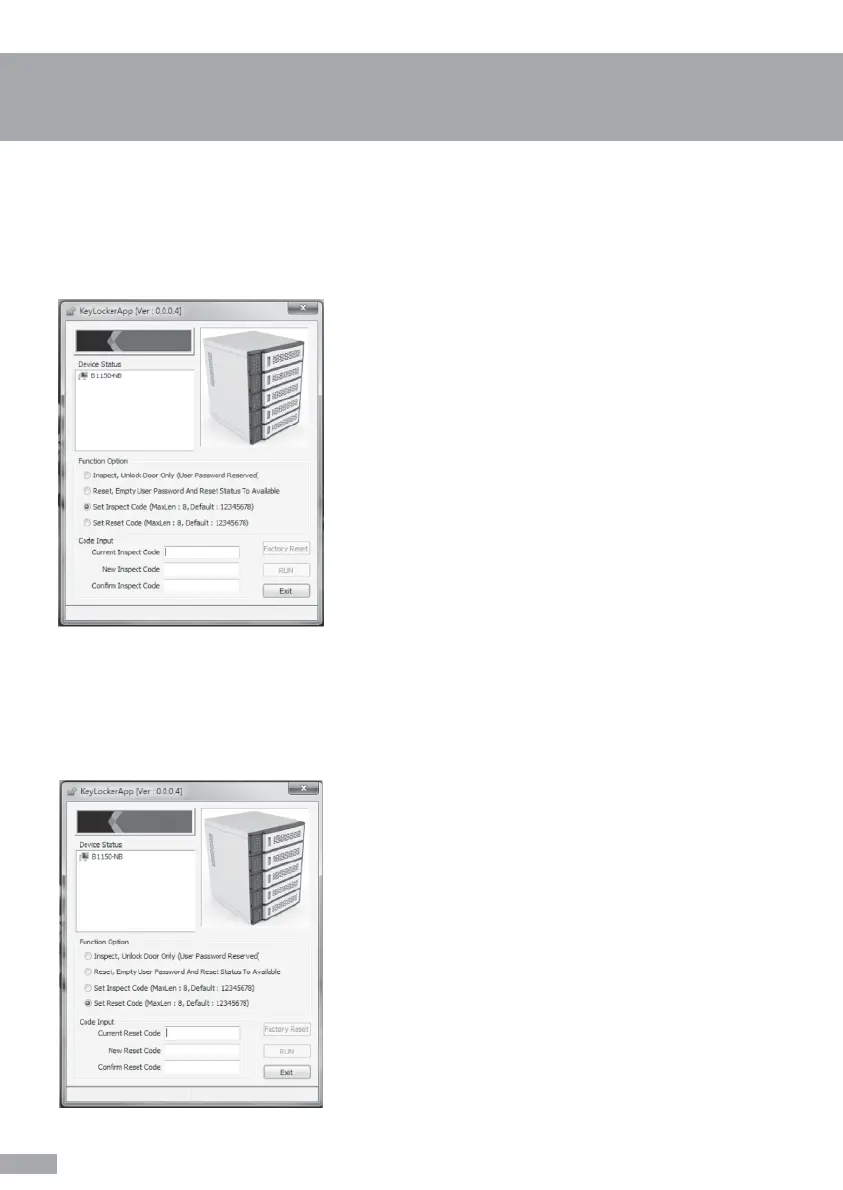
Inspect Code Set up by administrator
8
Select 3rd option (Set Inspect Code (MaxLen: 8,
Default: 12345678)) » Insert “Current Inspect
Code” » Insert “New Inspect Code” and “Confirm
Inspect Code” » Press “RUN” to proceed.
“Successful!” message will pop up after the code
has been configured successfully. Notice! You
may not set more than 8 digits for the code.
Tip: Default Inspect Code is 12345678
Select 4th option (Set Reset Code (MaxLen: 8,
Default: 12345678)) » Insert “Current Reset Code”
» Insert “New Reset Code” and “Confirm Reset
Code” » Press “RUN” to proceed.
“Successful!” message will pop up after the code
has been configured successfully. Notice! You
may not set more than 8 digits for the code.
Tip: Default Inspect Code is 12345678. It’s an
important code to reset code back to default
setting (refer to 2nd function option), suggest
administrator to take a note to avoid code missing.
Setting your own Inspect Code for confidentiality concern
Reset Code Set up by administrator
Setting your own Reset Code for confidentiality concern


 To Next Page