12
How To use the App
We suggest the App should be treated as a confidential
program and never be disclosed to any third party or
end-user. It will be more convenient for administrator to
manage lockers by using this specific App.
LockerAdmin
Please always remember to OPEN LockerAdmin before you connect your Mac to target compartment.
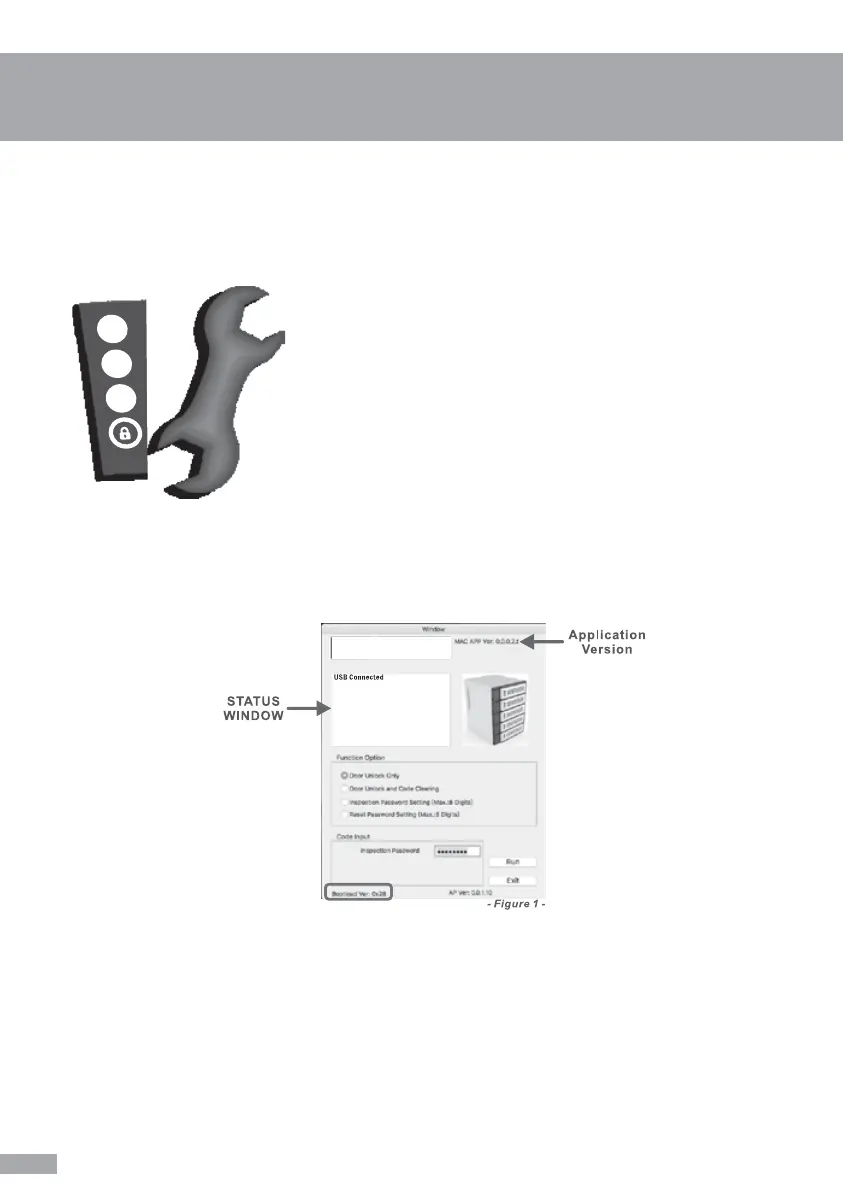
Administration Window will pop up after you OPEN LockerAdmin from Dock, then connect your Mac to
the target compartment. App will detect the connection status and indicate the USB connection status in
the status window automatically. Meanwhile, you need to check and ensure the “Bootload Ver.: XXXX”
has been detected and shown on the left bottom of the window. (See figure 1)
NOTICE! App is unable to run if “Bootload Ver.” is undetected, please confirm you are using correct USB
Cable (not only for power but also for data) and is connected properly. Or try to reconnect the USB
Cable.
IMPORTANT!


 To Next Page