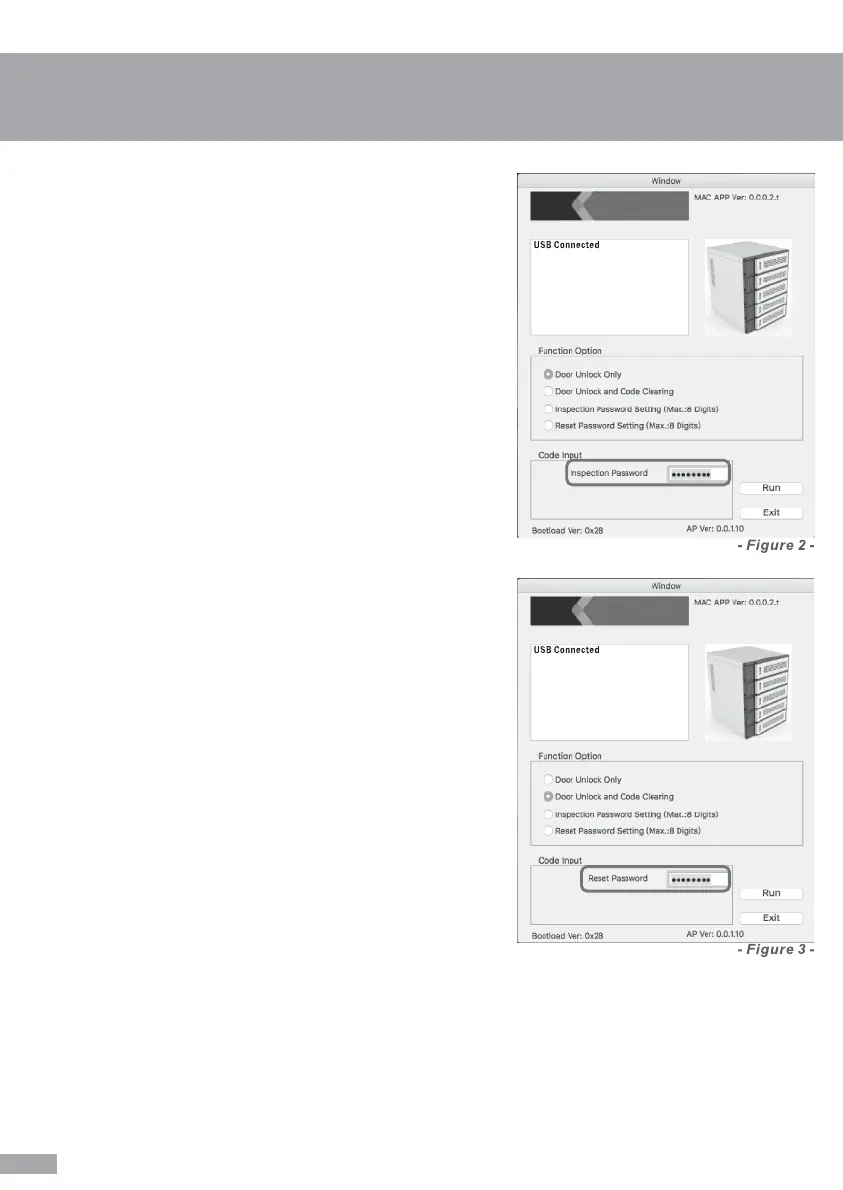
- Door Unlock Only
Select Door Unlock Only from Function
Option, insert Inspection Password then
press RUN to proceed with this function.
Tips: Default Inspection Password: 12345678
- (See figure 2)
- Door Unlock & Code Clearing
Select Door Unlock and Code Clearing
from Function Option, Insert Reset
Password then press RUN to proceed with
this function.
Tips: Default Reset Password: 12345678
- (See figure 3)
- INSPECTION Password Setting
Select Inspection Password Setting (Max.: 8 Digits) from
Function Option, Insert Current Inspection Password (start
with default), New Inspection Password and Confirm
Inspection Password then press RUN to proceed with the
change.
Tips: For strict security concerns, we recommend
administrators to set their own Inspection Password from the
beginning (before users start to use).
- (Max.: 8 Digits)(See figure 4)
- Reset Password Setting
Select Reset Password Setting (Max.: 8 Digits) from Function
Option, Insert Current Reset Password (start with default),
New Reset Password and Confirm Reset Password then
press RUN to proceed with the change.
Tips: For strict security concerns, we recommend
administrators to set their own Reset Password from the
beginning (before users start to use).
- (Max.: 8 Digits)(See figure 5)
14


 To Next Page