
 Need help?
Do you have a question about the ALP PS1000i and is the answer not in the manual?
Defines DANGER, WARNING, and CAUTION symbols and their implications.
Warns about poisonous carbon monoxide gas production and ventilation requirements.
Alerts to California-specific chemical hazards in exhaust, including cancer risks.
Warns about highly flammable and explosive vapors, and risks from hot surfaces.
Emphasizes professional electrician for building electrical system connections.
Warns that generator surfaces, especially exhaust, can exceed 150°F (65°C).
Advises against generator misuse to prevent damage or shortened lifespan.
Warns of fire risk from heat and flammable propane gas, requiring clearance.
Advises against storing spare propane cylinders near the generator.
Emphatically warns that indoor generator use is fatal due to carbon monoxide.
Alerts users to be cautious of hot surfaces on the generator.
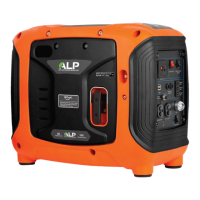
Includes control panel, primer button, choke switch, and recoil start for engine operation.
Covers, panels, carrying handle, and propane connector for maintenance and fuel.
Muffler, air filter cover, and oil filler cap for engine function and upkeep.
Switches for ECO mode, engine, and indicator lights for status monitoring.
AC/DC outlets, USB ports, parallel ports, and circuit breakers for power and safety.
Integrated LED emergency flashlight.
Explains how the ECO mode switch reduces gas consumption during operation.
Outlines initial preparation steps required before using the generator for the first time.
Details the process of adding the required engine oil before initial use.
Guides users on how to check the engine oil level before each use to prevent damage.
Lists essential checks like oil level and propane connection before starting.
Describes adjusting the choke switch for optimal starting in cold weather.
Explains the correct technique for pulling the starter handle to start the engine.
Warns about dangers of connecting generator to building electrical systems without an electrician.
Details the process of connecting appliances to the generator's AC outlets after warm-up.
Explains how to respond to an overload condition indicated by the red light.
Guides on adjusting the ECO mode switch based on appliance power requirements.
Explains the meaning and behavior of the running and overload indicator lights.
Details the procedure for using the DC output for charging 12V batteries.
Provides crucial safety instructions for connecting the DC charging cable to avoid sparks.
Explains the system that prevents engine damage by automatically shutting down the engine.
Details the steps for safely stopping the generator engine in emergencies and normal use.
Highlights the importance of routine maintenance for generator safety and performance.
Outlines essential safety precautions to take before performing any maintenance.
Presents a schedule for regular maintenance tasks to ensure optimal generator performance.
Provides a step-by-step guide for draining and refilling the engine oil.
Details the process for inspecting, cleaning, and gapping the spark plug.
Guides on inspecting and cleaning the air filter for optimal engine airflow.
Provides important considerations for storing and transporting the generator safely.
Outlines steps for preparing the generator for long-term storage to prevent rust.
Lists common reasons why the engine fails to start and provides solutions.
Addresses problems where connected devices do not operate correctly.
Provides steps to resolve issues related to the DC output not functioning.
 General
| Starting Watts | 1000W |
|---|---|
| AC Voltage | 120V |
| AC Frequency | 60Hz |
| Displacement | 63 cc |
| Starting System | Recoil |
| Engine Type | 4-stroke |
| Outlets | 120V 20A |

 To Next Page