Your Power Solutions Partner
For more information visit
www.alpha.ca
F-MKT-08 Rev 1.0 0470348-00 Rev B (07/2018)
Copyright © 2018 Alpha Technologies. All Rights Reserved. Alpha® is a registered trademark of Alpha Technologies.
Member of The Alpha Group™ is a trademark of Alpha Technologies.
Member of the Alpha Group
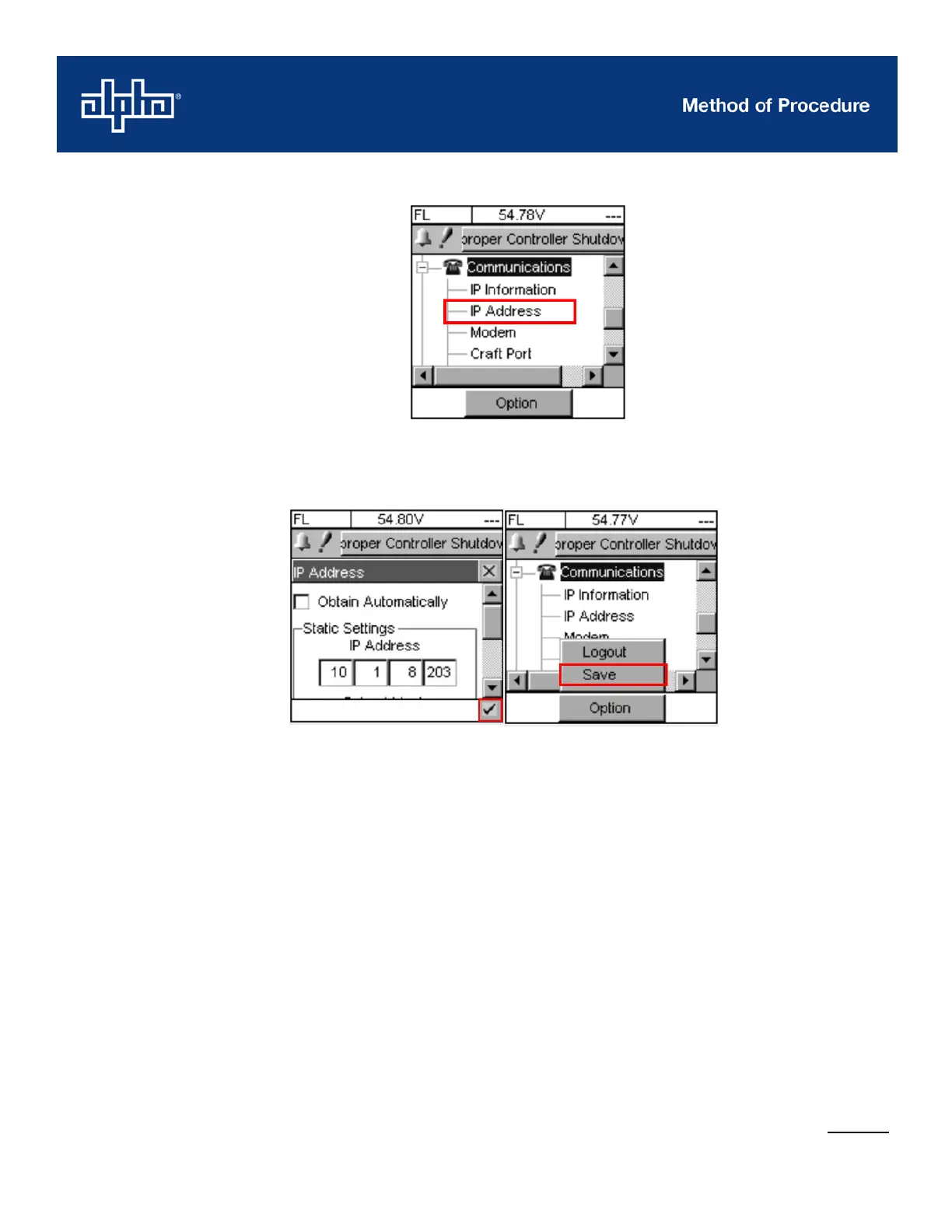
Once the IP has been configured, tap the checkbox on the bottom right corner to return to the
main menu.
In the main menu, under Options, tap on the Save.
2. Connect the Ethernet cable to the Ethernet port on your laptop and to the controller.
3. Turn off the wireless Internet, because this may interfere with the LAN connection.
4. Set up the computer and launch the Control Panel.
a. For Windows 2000, go to Network and Dialup Connections
b. For Windows XP, go to Network Connections
c. For Windows Vista/7/10, go to Network and Sharing Centre



 To Next Page