6
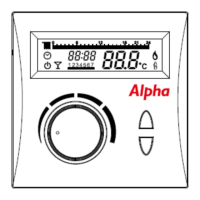
Turn the knob and 6 and 7 will be underlined (Saturday and Sunday), press the knob to
enter the heating on/off time periods. The display will show a graph at the top
representing each hour of the day and the time from midnight, turn the knob to scroll through
the hours of the day and press the transmit button to select an on period, this will be
identified by a solid block in the graph for each hour selected. To remove a selected on period
press the temperature button and the solid block will disappear. Press the knob to store the
settings.
Turn the knob and day one will flash; this gives the option to set different heating on/off
periods for individual days if required . To set each day follow the procedure above for
each day. If different individual day settings are not required turn the knob through each day
to skip to the next function.
After the heating on/off periods are set turn the knob and will be displayed, this
represents the minimum room temperature setting during a heating off period. Press the knob
to enter the menu and turn the knob to adjust the temperature to the desired setting (e.g
14⁰C), press the knob to store.
Turn the knob and will appear, press the knob to exit the programming menu.
Alternatively it will automatically exits after 1 minute.
Parameter settings
Frost Protection
Frost protection will switch the heating on should the room temperature fall below the
temperature set (e.g. 4⁰C) to help prevent pipes from freezing.
Press the temperature button for 5 seconds and FrSt 01 will appear, press the rotary knob
to enter menu and the temperature will appear. Turn the knob to set the temperature and
press the knob to store.
Heating off
This setting controls the switch off point for the heating to maintain an even temperature e.g.
if the set temperature is 20⁰C and the heating off setting is 0.6, the heating will switch off
when the room temperature reaches 20.6⁰C.
Turn the knob to HOFF 02, press the knob and the temperature will be displayed, turn the
knob to adjust the temperature and press the knob to store.


 To Next Page
 Loading...