

EasyManua.ls Logo

Alpha RC006 - User Manual

Alpha RC006
2 pages
Print Icon
To Next Page IconTo Next Page
Loading...
RC RECEIVER p1006
ALPHA SUPPORT PHONE (909) 307-2320
1. TECHNICAL SPECIFICATIONS
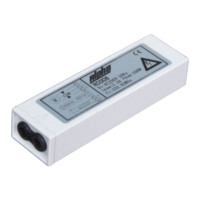
Single Motor Receiver
Power: AC1 0V(60Hz) Rated load: do not exceed 400 watts Protection Index: IP442
remotesThe receiver can be compatible with 15 at most.
The receiver will cut off electricity after working 4 minutes continuously.
2. WIRES CONNECT
3. CODE LEARNING
4. COPY
5. CODE DELETING
AC 1 0V2
Wa Ay
Way B
Power on, the motor
will vibrate.
Switch on the power, press
receiver’s learning button,
the motor vibrates once.
Press A’s UP andremote
DOWN buttons once
simultaneously.
Press remote’s UP and DOWN
buttons once simultaneously.
Press UP and DOWN
buttons simultaneously.
Press remote’s UP and DOWN
buttons simultaneously.
Press remote A’s STOP button
8 times, the motor vibrates once.
Press remote’s STOP
button 6 times.
You can control the motor
by the remote.
The motor can be controlled
by the .remote
Press remote B’s STOP button once,
the motor vibrates. Now you can
control the motor also by B.remote
Code deleting is successful, no
remote can control this motor.
Press the STOP button
once within 10s, the motor
will vibrate.
Press ’s STOP buttonremote
once, the motor vibrates.
Press remote B’s UP and DOWN
buttons once simultaneously.
Press remote’s UP button once,
the motor vibrates.
AC POWER
Note: Remote remoteB can control the tubular motor after it learns code from A.
Note: No can control this tubular motor after code deleting unless you reset.remote
Way A
black
white
black
white
black
Question and Answer IconNeed help?

Do you have a question about the Alpha RC006 and is the answer not in the manual?

Summary

Technical Specifications

Wires Connect

Code Learning Methods

Code Learning - Way A

Procedure for code learning using AC power connection and motor vibration.

Code Learning - Way B

Procedure for code learning via receiver's learning button.

Copy Remote Code

Code Deleting Methods

Code Deleting - Way A

Procedure for deleting codes using remote UP/DOWN buttons.

Direction Change

Set Step by Step Function

Delete Step by Step Function

Wall Switch Connection

Overview

The Alpha RC006 is a single motor receiver designed to control tubular motors, offering various functionalities for remote and manual operation. It is compatible with multiple remotes and includes features for code learning, copying, deleting, direction change, and step-by-step control.

Function Description

The primary function of the RC006 receiver is to provide remote control for tubular motors. It allows users to operate the motor using compatible remotes, enabling actions such as UP, DOWN, and STOP. The receiver also supports manual control via a wall switch, which can be connected to achieve an UP-STOP-DOWN-STOP-UP sequence.

Code Learning: The receiver can learn codes from new remotes, allowing them to control the motor. There are two main ways to learn codes:

  • Way A: Power on the motor, then simultaneously press the UP and DOWN buttons on the remote. The motor will vibrate, indicating successful learning.
  • Way B: Switch on the power, press the receiver's learning button once (the motor vibrates once), then simultaneously press the UP and DOWN buttons on the remote. The motor will vibrate, indicating successful learning.

Code Copying: This feature allows a new remote (Remote B) to learn the code from an already programmed remote (Remote A).

  1. Step 1 (Remote A): Simultaneously press Remote A's UP and DOWN buttons once.
  2. Step 2 (Remote A): Press Remote A's STOP button 8 times. The motor will vibrate once.
  3. Step 3 (Remote B): Simultaneously press Remote B's UP and DOWN buttons once.
  4. Step 4 (Remote B): Press Remote B's STOP button once. The motor will vibrate. Remote B can now control the motor.

Code Deleting: This function removes all learned remote codes from the receiver.

  • Way A: Simultaneously press the UP and DOWN buttons on a programmed remote. Then, press the STOP button 6 times. The motor will vibrate once after pressing the UP button once. This indicates successful code deletion, and no remote can control the motor until it is reset.
  • Way B: Press the receiver's learning button until the motor vibrates twice. This deletes all codes, and no remotes can control the motor.

Direction Change: This feature allows users to reverse the motor's running direction.

  1. Simultaneously press the UP and DOWN buttons on a programmed remote.
  2. Press the STOP button 6 times.
  3. Press the DOWN button once. The motor vibrates, and its running direction is changed.

Set Step by Step Function: This mode allows the motor to run in incremental steps.

  1. Simultaneously press the UP and DOWN buttons on a programmed remote.
  2. Press the STOP button once.
  3. Press the UP button once. The motor vibrates once, and it will now run step by step.
    • If the motor is in vibration state, pressing the UP or DOWN button for 3 seconds will make it run continuously. Pressing the STOP button will change it back to vibration state.

Delete Step by Step Function: This function reverts the motor from step-by-step mode to continuous operation.
  1. Simultaneously press the UP and DOWN buttons on a programmed remote.
  2. Press the STOP button once.
  3. Press the DOWN button once. The motor vibrates once, and it will now run continuously.

Important Technical Specifications

  • Power: AC120V(60Hz)
  • Rated Load: Do not exceed 400 watts
  • Protection Index: IP44
  • Remote Compatibility: Compatible with up to 15 remotes
  • Continuous Operation Cut-off: The receiver will cut off electricity after working 4 minutes continuously.
  • Working Temperature: -10 °C to +55 °C

Usage Features

  • Remote Control: The primary method of control, allowing for convenient operation of the tubular motor.
  • Manual Switch Terminal: Provides an option for wired control using a wall switch, typically a doorbell switch, to achieve an UP-STOP-DOWN-STOP-UP sequence.
  • Learning Button: A physical button on the receiver for initiating code learning and deletion processes.
  • Visual Feedback: Motor vibrations are used as indicators for successful operations (e.g., code learning, deletion, direction change).
  • Safety Cut-off: Automatic power cut-off after 4 minutes of continuous operation prevents overheating and potential damage.
  • Compatibility: Designed to work with various rolling code remotes, with the RE101 remote used as an example in the instructions.

Maintenance Features

  • Battery Replacement: If the remote's battery is low, it should be replaced to ensure proper functionality.
  • Resetting: In case of signal interference causing settings to fail, a reset procedure is available.
  • Environmental Considerations: The receiver is of high voltage and should not be placed in humid conditions.
  • Supervision: Children should be supervised to prevent them from playing with the appliance.
  • Product Updates: The manufacturer reserves the right to make changes in appearance, color, or functions without prior notification.

Alpha RC006 Specifications

General IconGeneral
BrandAlpha
ModelRC006
CategoryReceiver
LanguageEnglish
