WSER UNIVERSAL MOTOR GUIDE p2
1
1
1
1
1
1
1
2
1
1
1
2
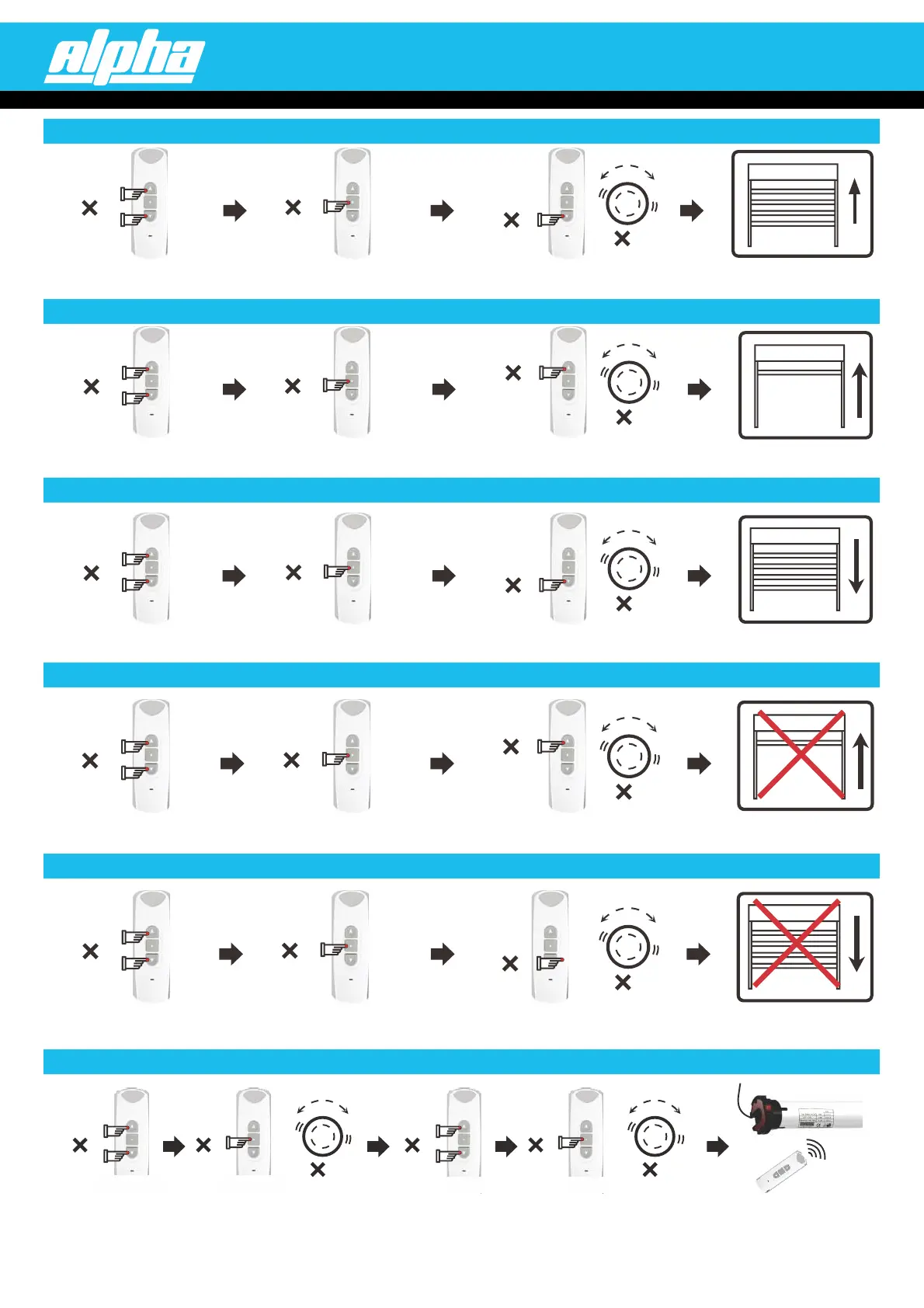
7. (firstly, move the blind to the desired position)SETTING THE TOP LIMIT
8. (firstly, move the blind to the desired position)SETTING THE BOTTOM LIMIT
6. TURN OFF “STEP BY STEP” MODE (
motor will run up and down as normal)
Press the UP and DOWN buttons
simultaneously, then release.
Pr ss the STOP button twice.e
Press th UP button once, thee
motor ill vibrate.w
Top mit is now set.li
Press he UP and DOWN buttonst
simultaneou ly, th release.sen
Press the S O bu on twiceTP tt
Press the DOWN button once,
the moto will vibrate.r
Bott limit is now set.om
Pr ss the UP and DOWN buttonse
simultaneously, then release.
P ess the STOP button once.r
Press the DOWN button once,
the motor will vibrate.
The tor will now runmo
normally.
11. ASSIGNING AN EXTRA REMOTE (OR CHANNEL) TO A MOTOR VIA THE ORIGINAL REMOTE
Press the UP and DOWN
buttons simultaneously,
then release.
Press the UP and DOWN
buttons simultaneously,
then release.
You can now use the new
remote to control the motor.
Press the STOP button
8 times, the motor will
vibrate.
Press the STOP button
once, the motor will
vibrate.
1
1
8
1
1
1
Original Original
NEW NEW
1
1
1
4
1
1
1
4
9. OPDELETING THE T LIMIT
10. OTTOMDELETING THE B LIMIT
Pr ss the UP and DOWN buttonse
Pr ss the UP and DOWN buttonse
simultaneously, then release.
simultaneously, then release.
Botto limit is deleted.m
Top limit is deleted.
Pr ss the DOWN button once, thee
Pr ss theUP button once, thee
motor will vibrate.
motor will vibrate.
Press the STOP button 4 times.
Press the STOP button 4 times.
ALPHA SUPPORT PHONE (02) 4355 4775



 To Next Page
 Loading...