DECARB INSTRUCTIONS
07
Plug the power cord into a 120V
North American power outlet. To use
in another country you will need to
purchase a step-down transformer to
step-down the local voltage to 120V
60Hz.
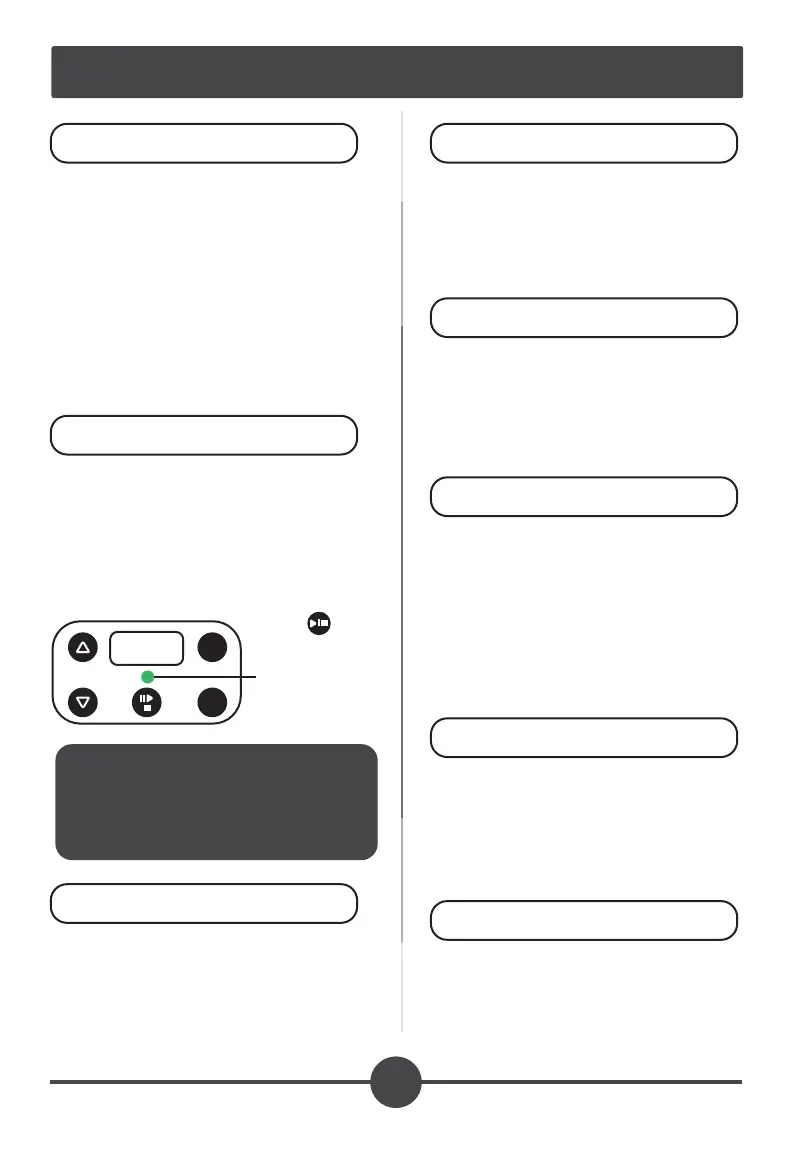
The green led indicates the EdiOven
is ready to select your time and
temperature settings.
When plugged in, the preset setting
appears: 240°F 1:10 (70 minutes)
To customize, simply press the time
or temperature button and then up or
down buttons to your liking.
NOTE: Once the cycle starts,
time or temperature adjust-
ments are not allowed.
SET TIME & TEMP
POWER
1.
2.
Add silicon lid pressing rmly
down to push out air. Add the
Outer Lid, securing with slight
twist to the right (clockwise).
Press the Start / Pause / Stop
button to start the cycle. The LED
color will change from green to red
indicating the cycle has started.
START CYCLE
ADD LIDS
4.
5.
Once the cycle is complete the LED
will change to a circular green
motion indicating the cycle is nished
and is now in cool down mode. Once
complete the LED motion will stop
and the EdiOven will emit a series of
beeps.
Once nished, the inside will still
be VERY hot. Wait 15 minutes for
the metal cup to cool to the touch
before removing or infusing!!
WAIT for COOLDOWN
CYCLE COMPLETE
6.
7.
Remove the metal cup, either
hand wash or place in the
dishwasher.
CLEANUP
8.
Load the metal cup with up to 1 oz
/ 28 grams of dry plant material.
Most of the infusion recipes use
1/4 oz (7 grams) per cycle.
LOAD
3.
TIME
TEMP
Status Light
Start / Pause / Stop


 To Next Page