072-0500 Alphasense User Manual
OPC-R1 Optical Particle Counter Issue 1
Alphasense Ltd Page 20 of 33 February 2019
Sensor Technology House, 300 Avenue West, Skyline 120, Great Notley. Essex.CM77 7AA. UK
Tel: +44 (0) 1376 556700 - Fax: +44 (0) 1376 335899
Email: sensors@alphasense.com - Web: www.alphasense.com
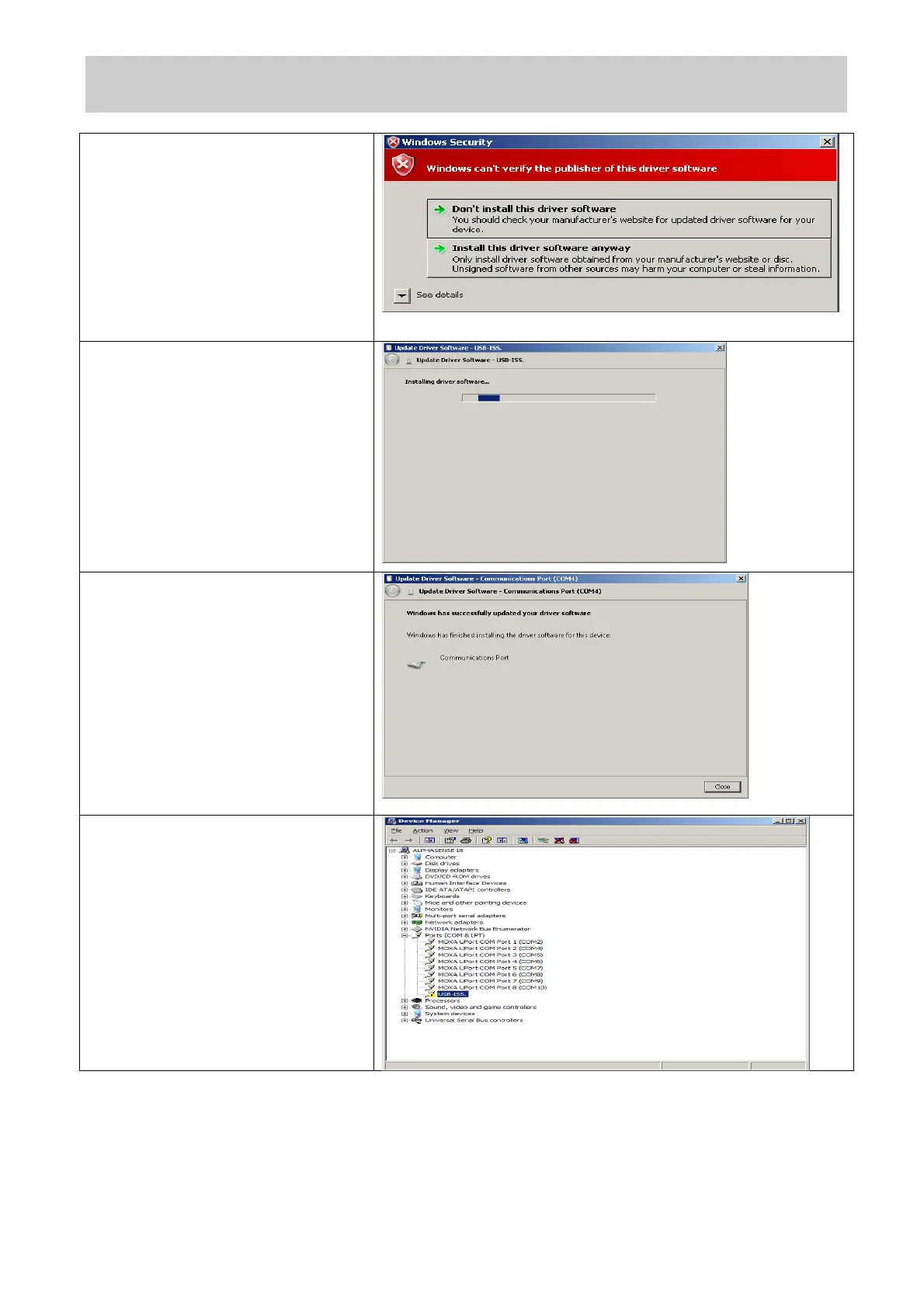
Windows 7 will then issue a security
warning. This is due to a licence
issue and not a concern to the
operating system. Select the “Install
this driver software anyway” option.
Windows will then install the driver
files for the device.
Once the device driver software has
been installed the form below will be
displayed. Make a note of the
allocated COM port number (COM4
in the example below).
If the device driver is installed
incorrectly the Device Manager will
indicate this with a yellow
exclamation mark symbol shown
below.
If this should happen, remove the
USB lead and uninstall the device
by right clicking the symbol and
selecting “Uninstall”. Return to the
beginning of the “Installing the
device driver” (Windows XP or
Windows 7) section.


 To Next Page
 Loading...