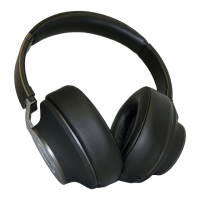
This document describes the Alphasonik V80BN Noise Canceling Headphones, providing detailed information on their function, technical specifications, usage, and maintenance.
Function Description:
The Alphasonik V80BN are noise-canceling headphones designed to provide a high-quality audio experience while minimizing ambient noise. They offer both Bluetooth wireless connectivity and a wired mode for versatile use. The active noise-canceling (ANC) feature is designed to reduce surrounding ambient noise, enhancing the listening experience in various environments. The headphones are equipped with a microphone for hands-free calling and include controls for playback, volume adjustment, call management, and ANC activation.
Important Technical Specifications:
- Battery: 520mAh
- Charging Current: 5V / 350mA
- Charging Time: 2 Hours
- Estimated Play Time:
- ANC OFF: 30 Hours
- ANC ON: 20 Hours
- Idle Power Consumption:
- ANC Off: <12mA
- ANC On: <29mA
- Bluetooth Version: 5.0
- Bluetooth Frequency: 2.402GHz - 2.48GHz
- Bluetooth Sensitivity: -85dBm
- Bluetooth Distance: 10m / 33ft.
- Noise Canceling Depth: 25dB
- Noise Canceling Bandwidth: 20Hz - 500Hz
- Noise Canceling Effective Frequency: 40Hz - 400Hz
- Impedance: 2 x 32Ω
- Frequency Response: 20 - 20kHz
- THD (Total Harmonic Distortion): >0.7%
- Audio Cable: 3.5mm (3m / 9.8ft.)
- Charging Cable: Micro USB (1.2m / 4ft.)
Usage Features:
What's Included:
- V80BN Noise Canceling Headphones
- Hard shell carrying case
- Operations Manual
- 3.5mm Audio Cable (3m / 9.8ft.)
- Micro USB Charging Cable (1.2m / 4ft.)
Headphone Requirements:
- Bluetooth source device must be Bluetooth 4.0 or higher.
- Micro USB Charging requirements: 5V / 500mA.
Product Details (Controls and Indicators):
The control buttons are located on the outer side of the earpad cushion.
- ANC LED Indicator: Illuminates blue when ANC is on.
- ANC Button: Used to switch ANC On/Off.
- Headset
- ▼ / - Button: Volume DOWN, Previous Track, Reject a Call (long press).
- On/Off / Multi Function Button: Turn On/Off, Pairing Mode, Play/Pause, Accept a Call, End Call.
- ▲ / + Button: Volume UP, Next Track.
- Status LED Indicator:
- Flashes Red & Blue: In pairing mode.
- Blinks Blue Slowly: Connected to compatible device.
- Illuminates Red: Headset Charging.
- Illuminates Green: Headset Charged.
- Micro-USB Connector: For charging.
- Microphone
- 3.5mm WIRED Input: For wired audio connection.
Charging:
- Fully charge the headset before first use.
- Connect the micro USB cable to the headset and a compatible USB power source.
- During charging, the status LED will illuminate red.
- When fully charged, the status LED will illuminate green.
- The headset can be used while charging, and the LED will continue to flash red during charge.
- An audible warning will be announced when the battery is low.
Bluetooth Connection:
- This process only needs to be programmed once. The headset will automatically connect to a paired device when in Bluetooth range and enabled.
- Activate Bluetooth on your compatible device.
- Press and hold the multi-function button for five seconds; the status LED will flash RED and BLUE alternately, indicating pairing mode.
- Search for "V80BN" in your device's Bluetooth list and select to connect.
- The status LED will flash BLUE slowly after a successful connection.
Operation (Wireless Mode):
- Turning On: Press the On/Off Multi function button for three seconds. The status LED will flash blue rapidly (searching for a paired device) or blue slowly (connected).
- Bluetooth Mode: Connect a device (as described above). Start playback on the device and use headset or source unit controls. Volume settings on the source unit also affect headset volume.
- Turning Off: Hold down the On/Off multi-function button for three seconds. The status LED will illuminate red briefly and then turn off.
Operation (Wired Mode):
- Connect one end of the 3.5mm cable to your audio source and the other end to the 3.5mm audio port on the headset.
- Control playback on the source unit.
- Volume settings on the source unit also affect headset volume.
Noise Canceling (ANC):
- When ANC is activated, ambient noise picked up by the microphone is counter-measured, significantly reducing surrounding noise.
- Switching ON: Press the ANC button for 2 seconds. The blue ANC LED will illuminate.
- Switching OFF: Press the ANC button for 2 seconds. The blue ANC LED illumination on the left side of the headphone will turn off.
- Note: If noise canceling is turned on, all ambient noise will be reduced.
Controls Table:
| Controls |
Buttons |
Action |
| Turn On |
On/Off Multi function button |
Press for 3 secs. |
| Pairing Mode |
On/Off Multi function button |
Press for 5 secs. |
| Play / Pause |
On/Off Multi function button |
Short Press |
| Volume UP |
▲ / + - Button |
Long Press |
| Volume DOWN |
▼ / + - Button |
Long Press |
| Next Track |
▲ / + - Button |
Short Press |
| Previous Track |
▼ / + - Button |
Short Press |
| Accept a Call |
On/Off Multi function button |
Short Press |
| Reject a Call |
On/Off Multi function button |
Press for 2 secs. |
| End Call |
On/Off Multi function button |
Short Press |
| Turn Off |
On/Off Multi function button |
Press for 3 secs. |
| Switch ANC On/Off |
ANC Button |
Press for 2 secs. |
Maintenance Features:
- Do not modify or alter the product; this may affect safety and cause injury.
- All modifications and repairs must be carried out by Alphasonik or authorized personnel.
- Charge the product using an easily accessible outlet for quick unplugging in emergencies.
- Do not attempt to open the product.
- Avoid strong impacts to the headphones.
- Do not store headphones in direct sunlight, near heating devices, or in hot, humid, or dusty places.
- Do not allow the headphones to get wet.
- Connect/disconnect the cord by holding the plug, not pulling on the cord, to prevent broken wires and electric shock.
- Do not wind the cord around portable audio devices, as this may damage or sever it.
- Consult the user manual of any device before connecting the headphones to ensure compatibility and correct usage.
- Store the product in the included case to prevent the cord from getting caught or severed.
- Never immerse the headset in water or other liquids.
- To prevent hearing damage, do not raise the volume too high. Extended listening at loud volumes can cause temporary or permanent hearing loss.
- This product produces strong magnetic fields that may interfere with pacemakers and implanted defibrillators (ICDs). Maintain at least 6 inches distance between the headset and such devices.
- Never use the headphones while driving, riding a motorcycle or bicycle, or operating any other vehicle.
- Do not use the headphones in places where the inability to hear ambient sound presents a serious risk (e.g., railroad crossings, train stations, construction sites, roads with vehicles/bicycles).
- Discontinue use if skin irritation results from direct contact with the product.
- Alphasonik is not liable for data loss that may occur while using this product.
- Minimize the volume on your audio device before connecting headphones to avoid hearing damage from sudden exposure to excessive volume.
- Ensure to purchase the appropriate conversion plug adapter when connecting headphones to equipment with other than a 3.5 stereo headphone jack or smartphones of compatible models.
Warranty:
- Alphasonik warrants this product against defects in material and workmanship for one (1) year from the date of original purchase from an Authorized Alphasonik Dealer.
- Dated proof of purchase is required for warranty service. Information on authorized service can be obtained at www.alphasonik.com or by emailing support@alphasonik.com.
- The warranty becomes void if service is performed by anyone other than an approved Alphasonik Warranty Service Center.
- The warranty does not apply to products subjected to misuse, neglect, accident, broken warranty seals, altered/defaced/removed serial numbers, or improper connection/installation/adjustment/repair.
- The warranty does not cover static, electrical interference, adjustments, or labor costs for removal/reinstallation for repair.
- Alphasonik's sole responsibility under this warranty is limited to repair or replacement at their discretion.
- If sending the product for service, it must be shipped in its original or equivalent carton, fully insured, with shipping charges prepaid. Alphasonik will not assume responsibility for loss or damage during shipping.
- This warranty is not transferable and protects the original purchaser residing in the United States. International consumers should contact their local retailer or distributor.
- All implied warranties, except to the extent prohibited by applicable law, shall not exceed the stated warranty period. Alphasonik is not liable for any direct or consequential loss or damage arising from the use or inability to use the product. Some states do not allow limitations on implied warranties or exclusions of incidental/consequential damages, so these limitations may not apply.
- This warranty provides specific legal rights, and you may have other rights that vary by state.
- For performance difficulties or issues with an authorized service center, contact Alphasonik by emailing support@alphasonik.com.

 Need help?
 General

 To Next Page