• Reset: switch off the fridge, long press for three seconds until E1 displays, under E1
mode, long press at the same time until the screen displays "888".
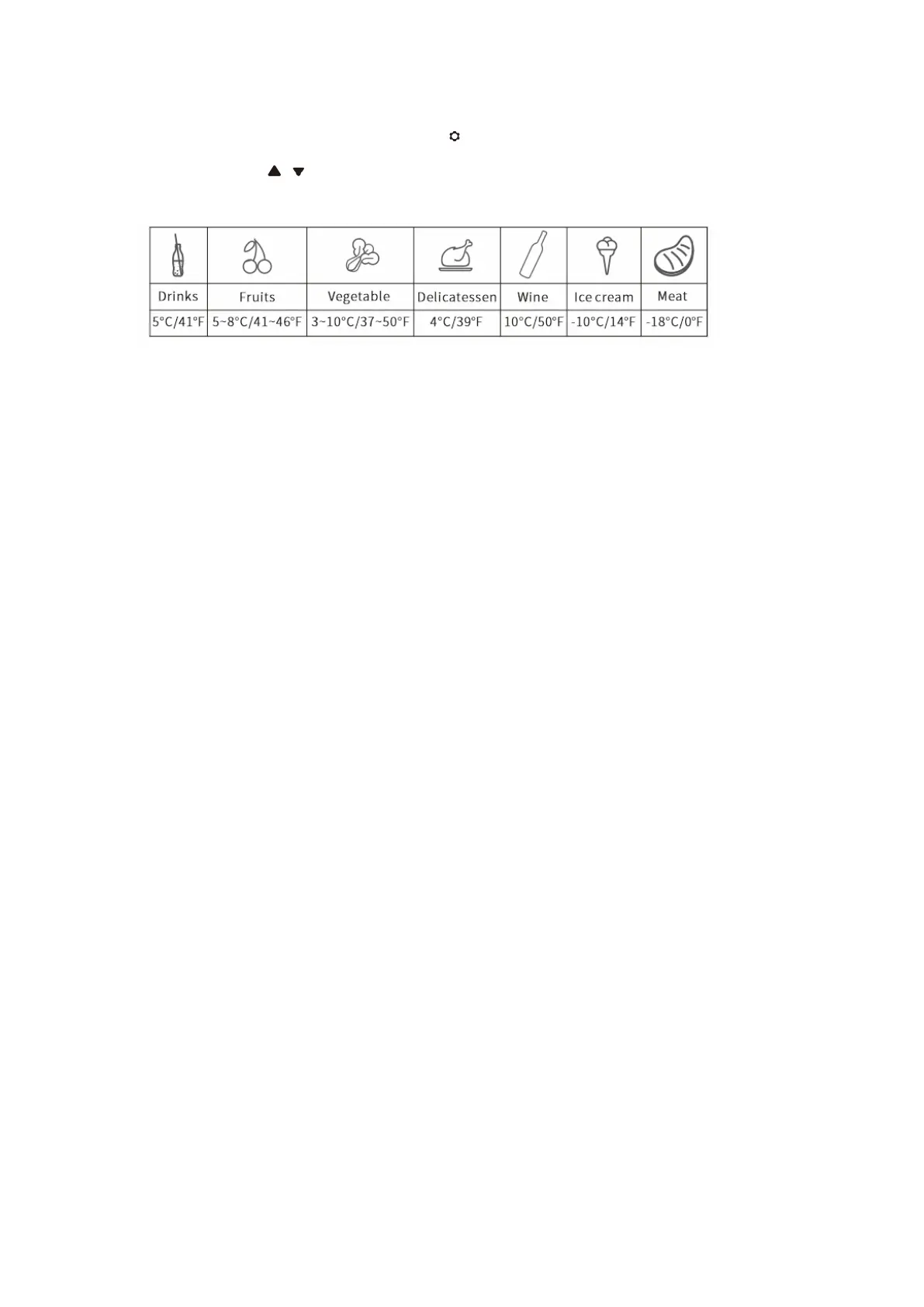
• Recommended temperature for common food:
6. CARE AND MAINTENANCE
■Cleaning:
• Switch off and unplug the device first to avoid electric shock.
• Use wet cloth to clean the device and dry it.
• Do not soak the fridge in water and do not wash it directly.
• Do not use abrasive cleaning agents during cleaning as these can damage the device.
■Storage:
If the device will not be in use for a long time, please follow the instruction:
• Switch off and unplug the device.
• Take out all the items stored in the device.
• Wipe off excess water with a soft rag.
• Put the fridge in a cool and dry place.
• Leave the lid slightly open to prevent odors from forming.
• Recommended storage environment: ambient temperature: 25°C, ambient humidity: ≤ 75%.
■Defrosting:
Humidity can form frost in the interior of the cooling device or on the evaporator.
This reduces the cooling capacity. Defrost the device in good time to avoid this.
• Switch off and unplug the device first to avoid electric shock.
• Take out all the items stored in the device.
• Keep the lid open.
• Wipe off the defrosted water.
Never use hard or pointed tools to remove ice or to loosen objects which have frozen in place.
7. TOUBLESHOOTING
Issues Cause/Suggestions
Refrigerator does not work
• Check if the switch is on.
• Check if the plug and socket are connected well.
• Check if the fuse has been burnt.
• Check if the power supply is malfunctioned.
• Switch on/off the fridge frequently may cause start delay of the compressor.


 To Next Page