EasyManua.ls Logo

Alpine 1310R - Page 19

Alpine 1310R
29 pages
Print Icon
To Next Page IconTo Next Page
To Previous Page IconTo Previous Page
Loading...
OPERATION
@
RADIO
OPERATION
Tuning
Band
Selection
Press
the
BAND
button
@
to
select
the
desired
tuning
band.
The
Band
indicator
shows
your
selection.
DYNAS
System
Mode
The
DYNAS
system
has
two
modes;
DYNAS
1
and
DYNAS
2.
Set
either
one
of
the
mode
which
provides
good
reception
according
to
procedures
shown
below.
Then,
the
DYNAS
system
allows
you
to
receive
clearer
reception
of
FM
broadcasting.
In
a
noisy
and
sound
distorted
area,
set
to
DYNAS
2.
1.
Press
the
DYNAS
button
@.
"DYNAS
1"
will
appear
on
the
display.
2.
Press
the
DYNAS
button
@
for
more
than
2
sec.,
and
"DYNAS
2"
will
appear
on
the
display
(and
DYNAS
1
mode
is
switched
to
DYNAS
2
mode).
3.
To
release
the
DYNAS
system
mode,
press
the
DYNAS
button
@.
NOTE:
lf
distortion
and
noises
higher
than
those
obtained
in
normal
reception
are
heard,
set
the
DYNAS
mode
to
OFF.
The
increased
distortion
and
noises
will
be
caused
in
many
cases
by
reasons
shown
below.
1.
When
reception
frequency
is
deviated
In
the
1310R,
a
reception
frequency
is
received
in
the
step
of
0.05
MHz,
so
+0.025
MHz
deviation
may
be
caused
depending
upon
broadcasting
stations.
2.
When
transmission
signals
are
overmodulated
in
broadcasting
stations
Some
broadcasting
stations
may
be
transmitting
signals
with
increased
modulation
depth
to
increase
sound
level.
Local/Distance
(DX)
Seek
Sensitivity
for
FM,
MW
and
LW
You
can
select
the
radio
seek
sensitivity
(local
or
distance
(DX)),
by
pressing
the
DX
(distance)
button
©
for
more
than
2
seconds.
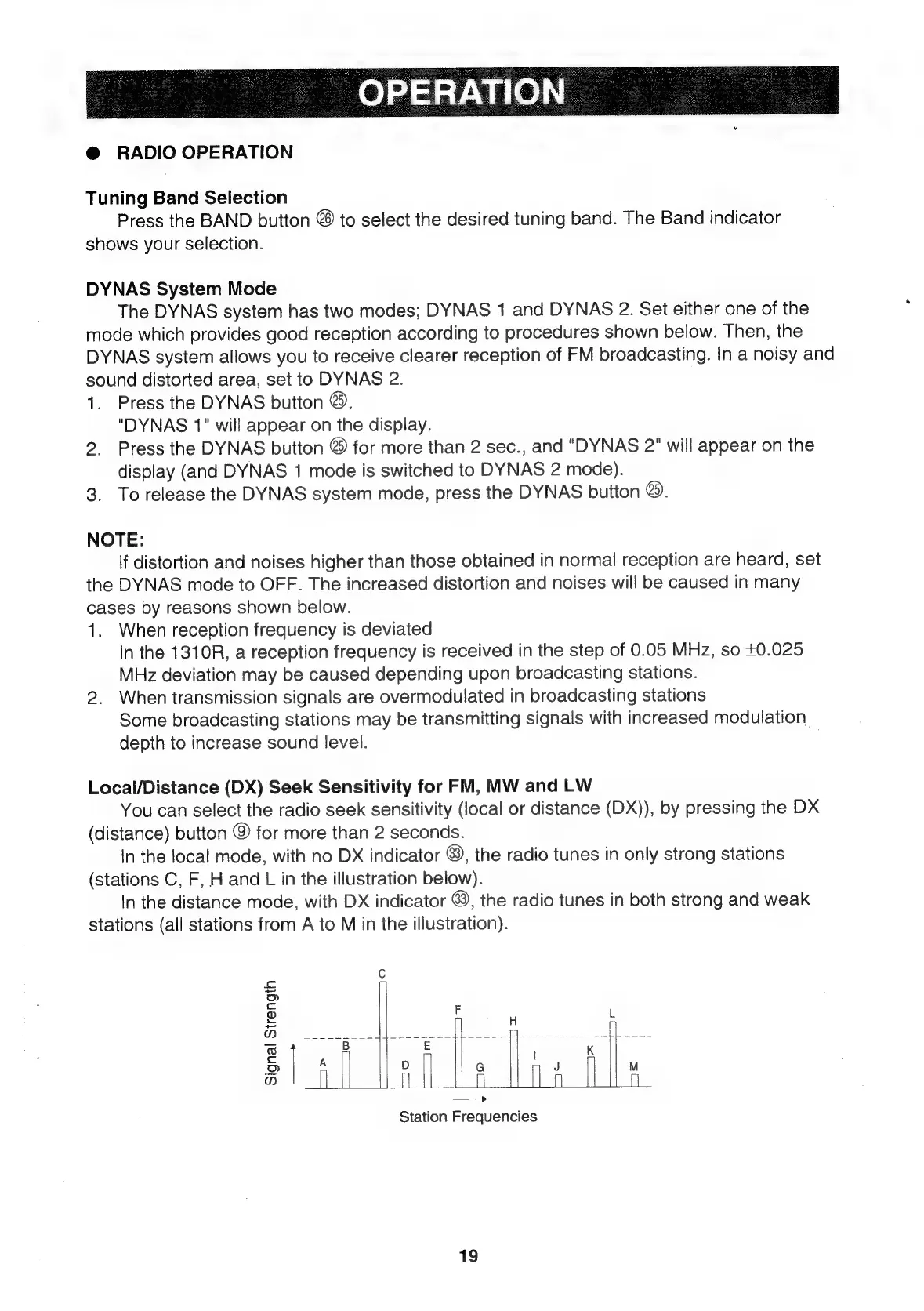
In
the
local
mode,
with
no
DX
indicator
@&),
the
radio
tunes
in
only
strong
stations
(stations
C,
F,
H
and
L
in
the
illustration
below).
In
the
distance
mode,
with
DX
indicator
@&),
the
radio
tunes
in
both
strong
and
weak
stations
(all
stations
from
A
to
M
in
the
illustration).
(o)
Signal
Strength
—_——>
>
1
1
ey
{ |
i
a
Eso.
3
{
Im;
1 |
i}
fai
|
x
7
|
|
a
a
a
j=
Station
Frequencies
19

Related product manuals