EasyManua.ls Logo

Alpine 7980M - Page 10

Alpine 7980M
94 pages
Print Icon
To Next Page IconTo Next Page
To Previous Page IconTo Previous Page
Loading...
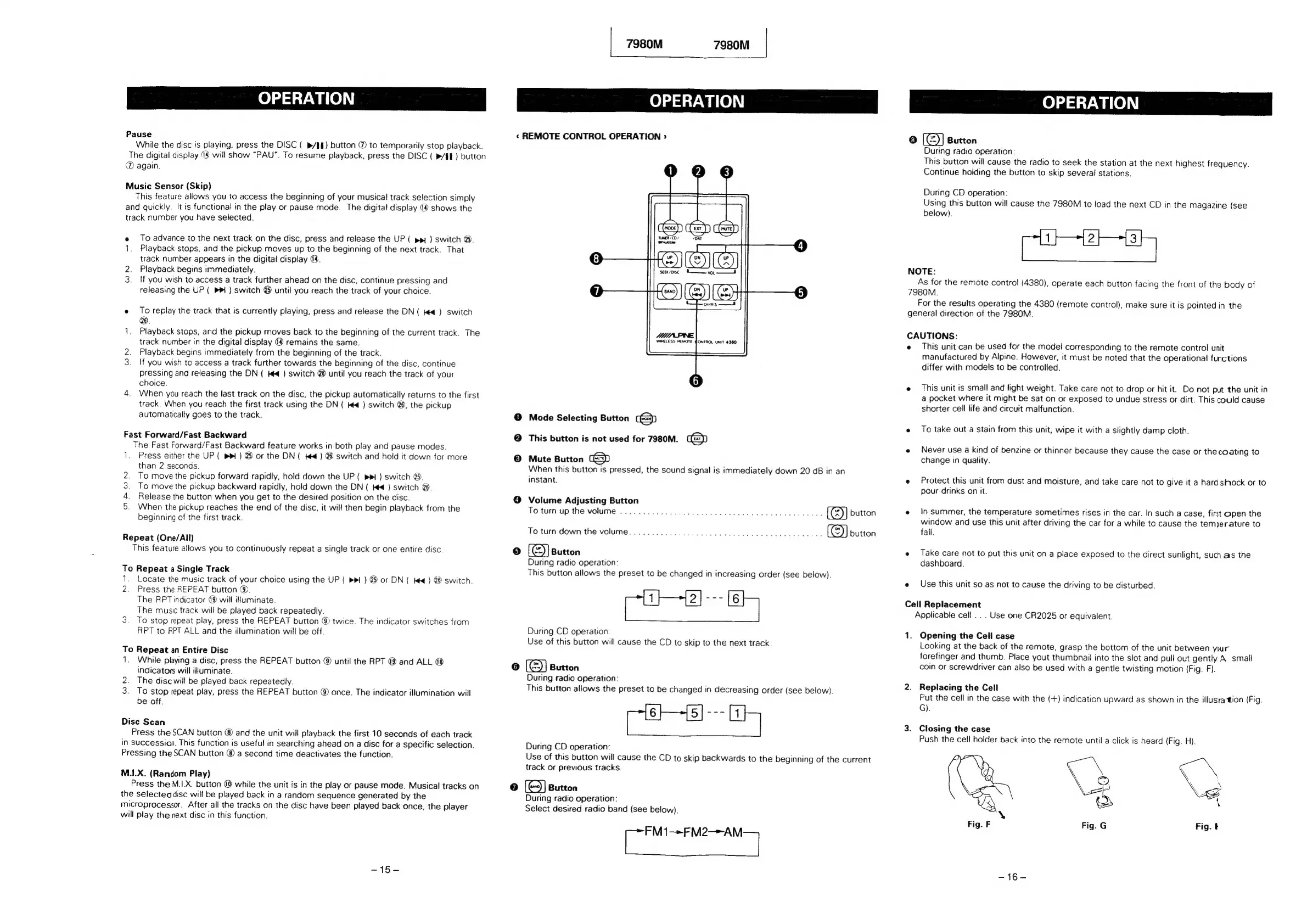
OPERATION
Pause
While
the
disc
is
playing,
press
the
DISC
(
p/&§)
button
®
to
temporarily
stop
playback.
The
digital
display
19
will
show
“PAU”.
To
resume
playback,
press
the
DISC
(
»/EE}
button
again.
Music
Sensor
(Skip)
This
feature
allows
you
to
access
the
beginning
of
your
musical
track
selection
simply
and
quickly.
It
is
functional
in
the
play
or
pause
mode.
The
digital
display
(@
shows
the
track
number
you
have
selected.
e
To
advance
to
the
next
track
on
the
disc,
press
and
release
the
UP
(
pp
)
switch
@.
1.
Playback
stops,
and
the
pickup
moves
up
to
the
beginning
of
the
next
track.
That
track
number
appears
in
the
digital
display
@.
2.
Playback
begins
immediately.
3.
If
you
wish
to
access
a
track
further
ahead
on
the
disc,
continue
pressing
and
releasing
the
UP
(
Pm)
switch
@
until
you
reach
the
track
of
your
choice.
e
To
replay
the
track
that
is
currently
playing,
press
and
release
the
DN
(
e€_)
switch
1.
Playback
stops,
and
the
pickup
moves
back
to
the
beginning
of
the
current
track.
The
track
number
in
the
digital
display
@
remains
the
same.
2.
Playback
begins
immediately
from
the
beginning
of
the
track.
3.
If
you
wish
to
access
a
track
further
towards
the
beginning
of
the
disc,
continue
pressing
and
releasing
the
DN
(
#4
)
switch
@
until
you
reach
the
track
of
your
choice.
4.
When
you
reach
the
last
track
on
the
disc,
the
pickup
automatically
returns
to
the
first
track.
When
you
reach
the
first
track
using
the
DN
(
Ked
)
switch
@,
the
pickup
automatically
goes
to
the
track.
Fast
Forward/Fast
Backward
The
Fast
Forward/Fast
Backward
feature
works
in
both
play
and
pause
modes.
1.
Press
either
the
UP
(
pp
)
@
or
the
DN
(
K€)
@
switch
and
hold
it
down
for
more
than
2
seconds.
To
move
the
pickup
forward
rapidly,
hold
down
the
UP
(
pm
)
switch
@.
To
move
the
pickup
backward
rapidly,
hold
down
the
DN
(
Ke
})
switch
2.
Release
the
button
when
you
get
to
the
desired
position
on
the
disc.
When
the
pickup
reaches
the
end
of
the
disc,
it
will
then
begin
playback
from
the
beginning
of
the
first
track.
aRwWN
Repeat
(One/All)
This
feature
allows
you
to
continuously
repeat
a
single
track
or
one
entire
disc.
To
Repeat
a
Single
Track
1.
Locate
the
music
track
of
your
choice
using
the
UP
(
>
)
@
or
DN
(
Kee
)
8
switch.
2.
Press
the
REPEAT
button
©.
The
RPT
indicator
49
will
ituminate.
The
music
track
will
be
played
back
repeatedly.
3.
To
stop
repeat
play,
press
the
REPEAT
button
@
twice.
The
indicator
switches
from
RPT
to
RPT
ALL
and
the
illumination
will
be
off.
To
Repeat
an
Entire
Disc
1.
While
playing
a
disc,
press
the
REPEAT
button
®
until
the
RPT
@
and
ALL
@
indicators
will
illuminate.
2.
The
disc
will
be
played
back
repeatedly.
3.
To
stop
repeat
play,
press
the
REPEAT
button
@
once.
The
indicator
illumination
will
be
off.
Disc
Scan
Press
the
SCAN
button
®
and
the
unit
will
playback
the
first
10
seconds
of
each
track
in
Succession.
This
function
is
useful
in
searching
ahead
on
a
disc
for
a
specific
selection.
Pressing
the
SCAN
button
®
a
second
time
deactivates
the
function.
M.1.X.
(Random
Play)
Press
the
M.I.X.
button
@
while
the
unit
is in
the
play
or
pause
mode.
Musical
tracks
on
the
selected
disc
will
be
played
back
in
a
random
sequence
generated
by
the
microprocessor.
After
all
the
tracks
on
the
disc
have
been
played
back
once,
the
player
will
play
the
next
disc
in
this
function.
~15-
7980M
7980M
OPERATION
«
REMOTE
CONTROL
OPERATION
>
WIRELESS
REMOTE
€ONTROL
UNIT
4380
@
Mode
Selecting
Button
(=)
©
This
button
is
not
used
for
7980M.
C&D
©
Mute
Button
When
this
button
is
pressed,
the
sound
signal
is
immediately
down
20
dB
in
an
instant.
@
Volume
Adjusting
Button
To
turn
up
the
volume
.
20.6
e
ee
ceee
button
To
turn
down
the
volume...
2.2.00
cece
eee
ee
button
15)
Button
During
radio
operation:
This
button
allows
the
preset
to
be
changed
in
increasing
order
(see
below).
During
CD
operation
Use
of
this
button
will
cause
the
CD
to
skip
to
the
next
track.
©
[@)]
Button
During
radio
operation:
This
button
allows
the
preset
to
be
changed
in
decreasing
order
(see
below).
During
CD
operation:
Use
of
this
button
will
cause
the
CD
to
skip
backwards
to
the
beginning
of
the
current
track
or
previous
tracks.
7)
(e)]
Button
During
radio
operation:
Select
desired
radio
band
(see
below).
ae
ef
ml
OPERATION
C8
(®]
Button
During
radio
operation:
This
button
will
cause
the
radio
to
seek
the
station
at
the
next
highest
frequency.
Continue
holding
the
button
to
skip
several
stations.
During
CD
operation:
Using
this
button
will
cause
the
7980M
to
load
the
next
CD
in
the
magazine
(see
below).
NOTE:
As
for
the
remote
contro!
(4380),
operate
each
button
facing
the
front
of
the
body
of
7980M.
For the
results
operating
the
4380
(remote
control),
make
sure
it
is
pointed
in
the
general
direction
of
the
7980M.
CAUTIONS:
e
This
unit
can
be
used
for
the
model
corresponding
to
the
remote
control
unit
manufactured
by
Alpine.
However,
it
must
be
noted
that
the
operational
functions
differ
with
models
to
be
controlled.
e
This
unit
is
small
and
light
weight.
Take
care
not
to
drop
or
hit
it.
Do
not
put
the
unit
in
a
pocket
where
it
might
be
sat
on
or
exposed
to
undue
stress
or
dirt.
This
could
cause
shorter
cell
life
and
circuit
malfunction.
e
To
take
out
a
Stain
from
this
unit,
wipe
it
with
a
slightly
damp
cloth.
e
Never
use
a
kind
of
benzine
or
thinner
because
they
cause
the
case
or
thecoating
to
change
in
quality.
e
Protect
this
unit
from
dust
and
moisture,
and
take
care
not
to
give
it
a
hard
shock
or
to
pour
drinks
on
it.
e
In
summer,
the
temperature
sometimes
rises
in
the
car.
In
such
a
case,
first
open
the
window
and
use
this
unit
after
driving
the
car
for
a
while
to
cause
the
temperature
to
fall.
e
Take
care
not
to
put
this
unit
on
a
place
exposed
to
the
direct
sunlight,
such
as
the
dashboard.
e
Use
this
unit
so
as
not
to
cause
the
driving
to
be
disturbed.
Cell
Replacement
Applicable
cell...
Use
one
CR2025
or
equivalent.
1.
Opening
the
Cell
case
Looking
at
the
back
of
the
remote,
grasp
the
bottom
of
the
unit
between
your
forefinger
and
thumb.
Place
yout
thumbnail
into
the
slot
and
pull
out
gently.
A
small
coin
or
screwdriver
can
also
be
used
with
a
gentle
twisting
motion
(Fig.
F).
2.
Replacing
the
Cell
Put
the
cell
in
the
case
with
the
(+)
indication
upward
as
shown
in
the
illusra
tion
(Fig.
G).
3.
Closing
the
case
Push
the
ceil
holder
back
into
the
remote
until
a
click
is
heard
(Fig.
H).
Fig.
F
Fig.
G
Fig.
SiGe

Related product manuals