EasyManua.ls Logo

Alpine CDA-7939R - Page 28

Alpine CDA-7939R
47 pages
Print Icon
To Next Page IconTo Next Page
To Previous Page IconTo Previous Page
Loading...
D3
om
T05
PAU
CD
Shuttle
Operation
English
Controiling
CD
Shuttle
(Optional)
If
an
optional
Alpine
6-disc
CD
Shuttle
is
connected
to
the
Ai-NET
connector
of
the
CDA-7939R,
you
can
control
the
CD
Shuttle
using
the
CDA-7939R.
You
can
connect
and
operate
multiple
Alpine
CD
Shuttles
when
these
are
connected
through
the
Multi-Changer
Switching
device(s)
(KCA-400C)
to
the
CDA-7939R.
See
the
Multi-Changer
Selection
section
on
page
64
for
selecting
the
CD
Shuttles.
Note:
The
controls
on
the
CDA-7939R
for
the
CD
operation
are
operative
only
when
the
CD
Shuttle
is
intercon-
nected
with
the
CDA-7939R.
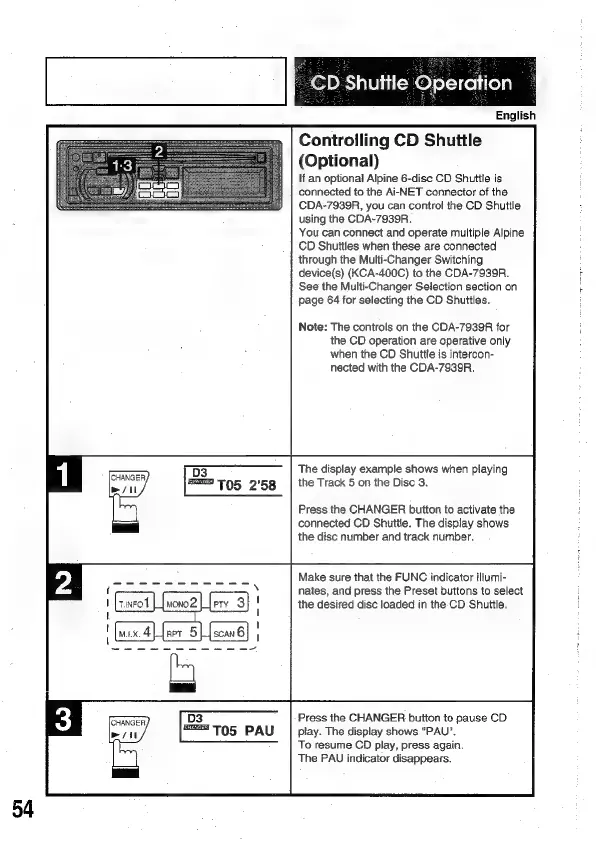
The
display
example
shows
when
playing
the
Track
5
on
the
Disc
3.
Press
the
CHANGER
button
to
activate
the
connected
CD
Shuttle.
The
display
shows
the
disc
number
and
track
number.
Make
sure
that
the
FUNC
indicator
iltumi-
nates,
and
press
the
Preset
buttons
to
select
the
desired
disc
loaded
in
the-CD
Shuttle.
Press
the
CHANGER
button
to
pause
CD
play.
The
display
shows
"PAU".
To
resume
CD
play,
press
again.
The
PAU
indicator
disappears.

Related product manuals